
Animate a glTF demo with Three.js
Learn how to model a pointer/character in Blender, export as glTF/GLB, and use three.js to set up scene, camera, depth-of-field and beat-synced animations inside one HTML demo. Covers model export, three.js loading and animation control, audio-aligned timing, and delivery of a browser-playable demo.
Image Analysis
Image 1 — Evidence summary
Observed facts (only directly observable content, no speculation):
- There is no readable text in the image.
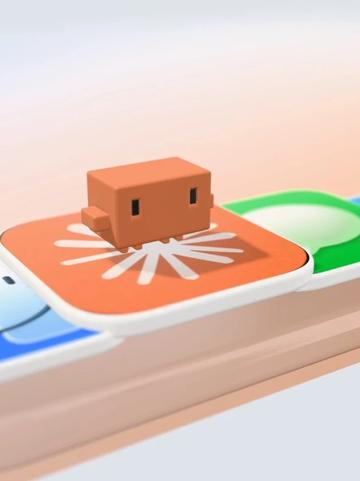
- Near the center-top of the image is an orange cube-like small object with two vertical black square shapes on its front resembling “eyes”.
- The orange object sits on an orange rounded-rectangle platform; the platform surface has a white radial/petal-like pattern (multiple white lines/petals radiating from the center).
- To the left and right of the orange platform are partially visible rounded-rectangle platforms of other colors: blue on the left and green on the right.
- The platforms rest on a light-colored (beige/light-wood) base with layered edges; the base has a horizontal stacked structure.
- The background is a light to slightly pink-orange gradient; there is shallow depth-of-field blur toward the frame edges.
- The overall image is a 3D-rendered (CGI) style with soft lighting and specular highlights.
- There are soft shadows (the small object casts a shadow on the platform) and highlights/shine on the platform edges.
Unclear or not shown (items to note):
- No readable text appears, so no UI text or labels can be listed.
- The meaning of the white radial pattern on the platform cannot be determined (decoration, icon, or state indicator unclear).
- The image does not show explicit UI steps, button labels, progress bars, or charts.
- The exact material of the small object (plastic, wood, rubber, etc.) cannot be determined solely from the image, though it appears smooth.
Speculation (marked as speculation, not fact):
- The image might belong to a mobile app or game UI element (e.g., card or option carousel) because of the multi-colored rounded platforms and character-like model, but this is only a visual-style speculation.
- The white radial pattern on the orange platform might indicate the platform is "selected" or highlighted, or it could be a decorative graphic.
- The orange cube-like object might be a game character, icon, or decorative item.
Additional notes:
- No human faces, names, or other personally identifiable information appear in the image.
SkillPI Creation Analysis
Intended use of the work:
- The source describes a workflow to convert code-driven desktop interactions into a visual video/demo. The deliverable appears to be a browser-playable HTML/three.js demo that visualizes clicks, typing, and drag events with a character/pointer model, including camera work, depth-of-field, motion effects and beat-synced animations. Such a result can be used for product demos, motion-design reels, or short-form video content.
Key points from the image evidence (from image_text):
- The evidence image is a CGI 3D render: an orange cube-like character on an orange rounded tile with blue/green neighbor tiles, shallow depth of field, soft lighting and soft shadows. No readable UI text or step labels are present.
Associated skills and actionable steps (based on the source description and common implementation patterns):
1) Model and animate in Blender
- Create the pointer/character model in Blender, set up materials and lighting.
- Optionally rig the model and create short animations (click press, bounce, drag poses) for export as part of the model.
2) Export and prepare assets
- Export model/animations as glTF/GLB, and prepare textures and audio (if using beat-synced animation). Ensure transforms, normals and animation frames export correctly.
3) Build the scene in three.js
- In a single HTML file, initialize three.js scene, camera and renderer, and load the GLB via GLTFLoader.
- Use EffectComposer and a depth-of-field/postprocessing pass to reproduce DOF and soft-blur effects.
- Use AnimationMixer or direct transform/keyframe control to play or trigger model animations.
4) Map interactions to visual events
- Map desktop interaction steps (click, type, drag) to a timeline of events. This timeline can be a scripted JSON, programmatically generated sequence, or driven by an external service.
- For beat-synced effects, either run beat detection on audio or manually align animation keyframes to the audio timeline.
5) Package and optimize
- Combine resources into the demo HTML, optimize textures and GLB size, and tune renderer settings for target performance.
Prerequisites for reproduction:
- Required knowledge: Blender modeling/export (glTF/GLB), three.js fundamentals (scene setup, loaders, AnimationMixer, EffectComposer), JavaScript frontend development, and a way to host/serve the HTML demo.
- Optional skills: audio beat detection and scripting to generate interaction sequences automatically.
Items to verify (mentioned in the source but not independently confirmed):
- The open-source skill named “onetake”: availability, repository, API and whether it generates interaction sequences directly. Confirm by checking the project's repository or documentation.
- The role and technical details of “Claude Code” and the named “Clawd bot”—whether they are an LLM-based generator of interaction scripts, a visual asset, or a naming convention; confirm any APIs or export formats used.
- The quoted API cost (about 20 RMB): what is included in that estimate (LLM/API calls, hosting, rendering), and the assumptions behind the cost calculation.
Risks and limitations:
- This interpretation outlines a practical implementation approach but does not verify third-party skills or APIs referenced in the source. Before attempting full reproduction, obtain the actual repositories and API documentation for any external tools mentioned.
- The steps provide a high-level, commonly used implementation path; exact code, data formats, and animation timing require project-specific development and testing.