
Build a React 3D product viewer with color switching
Step-by-step guidance to implement an interactive 3D product preview in React using React Three Fiber: load glTF models, set up Canvas and lighting, implement thumbnails/camera switching, add color/material controls, integrate an add-to-cart UI, and apply performance optimizations for web delivery.
Image Analysis
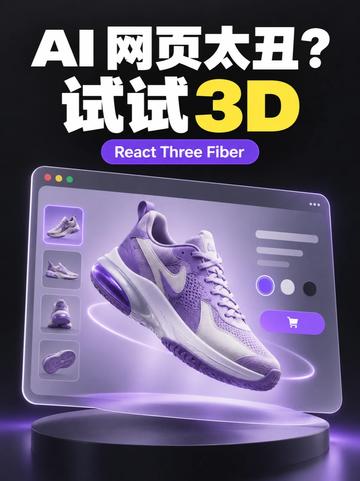
Image 1 — transcribed readable text, UI elements, chart data and visible phenomena (organized as “Facts”, “Inferred”, “Unclear”):
Facts (directly visible or readable elements)
- Readable text (verbatim):
- “AI 网页太丑?” (AI webpages too ugly?)
- “试试 3D” (Try 3D)
- “React Three Fiber” (shown inside a purple rounded label)
- Main visual elements:
- A floating sneaker (purple-white color) above a pedestal/display; glowing rings or trails around the shoe.
- Background with a dark-to-purple gradient or dark tone, overall purple ambient lighting.
- A simulated browser/app window: three round buttons in the top-left (mac-style close/minimize/maximize), with a large image and a side-column of thumbnails inside the window.
- 3–4 small thumbnails in a vertical column on the left, showing different views or images of the shoe.
- Several horizontal placeholder bars on the right of the window (indicating product information/description positions).
- Three circular color swatches in a row near the center-right of the window (appearing as light, medium, dark/black tones; exact hues unclear).
- A purple rounded button at the window bottom-right with a shopping cart icon (implying add-to-cart/purchase).
- Top page text layout: large white Chinese text above, beneath it “试试 3D” where “3D” is highlighted in yellow with a 3D look.
- The image uses glow/highlight/shadow treatment consistent with a 3D rendered product poster.
- Visual style and elements:
- Strong purple tones and purple glow, high-contrast three-dimensional lighting.
- UI elements (thumbnails, swatches, button, placeholder text) resemble a typical e‑commerce 3D product preview layout.
Inferred (reasonable assumptions based on visible elements; not direct evidence)
- The image is promotional in nature, intended to advertise using React Three Fiber for 3D web or product displays (inferred from the React Three Fiber label and the headline).
- The left thumbnails likely switch shoe viewpoints or show multiple model images.
- The three circular swatches are probably color/material selectors to change the shoe’s appearance.
- The shopping cart button likely represents add-to-cart or purchase functionality.
- The placeholder bars on the right likely represent product title, price, and short description (common layout), but they are shown as placeholders here.
Unclear / Not identifiable (elements present but text or details are unreadable or uncertain)
- The exact text of the horizontal placeholder bars on the right cannot be read.
- Details inside the left thumbnails (view names, small annotations) are not legible.
- Exact color/texture values of the three swatches (e.g., whether they are white/gray/black or specific purple tones) cannot be precisely determined.
- The three round buttons at the top-left of the window are not clear enough to confirm exact colors/icons (red/yellow/green).
- Any very small text (brand name, tiny labels, price figures) cannot be identified.
SkillPI Creation Analysis
Purpose: The content demonstrates how adding 3D visualization to a React site can improve product pages or portfolios, focusing on a sneaker viewer with color switching, multi-view thumbnails, and a shopping CTA.
Image evidence summary: The image clearly shows a rendered 3D sneaker, left-column thumbnails (implying multi-view switching), three color swatches for palette/material selection, and a cart button; the design uses purple lighting and high-contrast 3D shading typical of product showcase mockups.
Associated skill and practical steps (based on React Three Fiber mentioned in the source):
1) Setup: in a React project, install core packages (example): npm install three @react-three/fiber @react-three/drei.
2) Scene basics: add a <Canvas> from @react-three/fiber, configure ambient/directional/spot lights, and an environment map for reflections.
3) Load models: use useGLTF (from @react-three/drei) or GLTFLoader to load glTF/glb sneaker models and add them to the scene as mesh/scene nodes.
4) Thumbnails & camera control: implement thumbnails that set camera position or swap model variants; control the camera via OrbitControls or programmatic camera lerp for smooth transitions.
5) Color/material switching: change mesh material properties (material.color, maps, metalness, roughness) or swap textures to represent different colorways; wire swatch UI (React components) to update scene state.
6) UI integration: place product metadata and Add-to-Cart as regular React elements or overlays (Html from drei) and connect cart actions to your e‑commerce logic or API.
7) Performance: use Suspense + lazy loading for models, Draco or mesh compression, LODs and texture mipmaps, and useMemo/useCallback to minimize re-renders.
Reproduction prerequisites: a working React environment, 3D assets (glTF/glb), Node.js build tools, hosting for model and texture assets, and a WebGL-capable browser. For full e‑commerce flows, backend APIs or platform integration are required. Also verify asset licenses before use.
Items to verify before/after implementation:
- Exact 3D model formats, texture maps, and any compression used in the original assets;
- Mobile/touch performance and controls for lower-end devices;
- Accessibility fallback (static images, ARIA labels) and SEO/preview strategy for crawlers;
- Whether the source references a public example repository or ready-made demo code (the image names React Three Fiber but no repo or code link is provided).
Note: The steps above are implementation suggestions based on the source mention of React Three Fiber and common 3D web practices. They do not claim to reproduce the exact original asset or its visual fidelity; actual results depend on model quality, asset sizes, and device performance.