
Convert PDF to Markdown — Claimed 80% Token Savings
Convert PDF to Markdown; claimed to save 80% token
Image Analysis
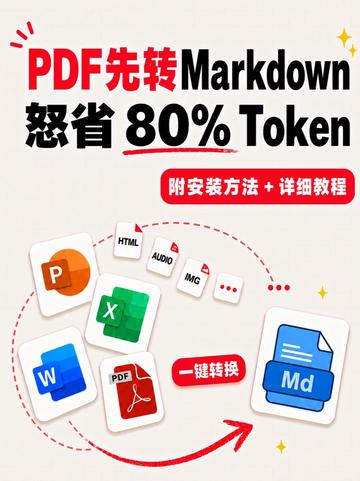
Figure 1 — Itemized evidence summary (Facts / Inference / Unreadable)
1. Facts (directly readable or directly visible)
- Main readable text (verbatim, in visual order):
- “PDF先转Markdown” ("PDF first convert to Markdown")
- “怒省 80% Token” ("Save 80% Token" — "80%" and "Token" are clearly visible; the two characters for "怒省" are in a red/black mixed style)
- Red rounded button/label: “附安装方法 + 详细教程” ("Includes installation + detailed tutorial")
- Small red button/label: “一键转换” ("One-click convert")
- File/format labels (icons and small text):
- An orange icon with letter “P” (likely PowerPoint icon)
- A blue icon with letter “W” (likely Word icon)
- A green icon with letter “X” (likely Excel icon)
- A red icon with “PDF” text (PDF)
- A blue file icon with “Md” on it (target/output file identifier)
- Several small white labels with small text: “HTML”, “AUDIO”, “IMG”, and one label with three dots “..."
- Visible UI elements and layout:
- Multiple input-format icons gathered on the left/center, dotted/dashed arc lines connect them and a red curved arrow points to the right toward the blue “Md” file icon (indicating conversion flow from multiple formats to Markdown)
- Light-colored background with decorative star-like highlights
- The image uses many red, black, blue, green blocks/icons; text uses different colors and weights for emphasis
- Numbers/data:
- “80%” (used together with “Token”, implying a saving ratio)
2. Inference (marked as inference, not directly asserted in image)
- The image likely serves as a promotional/advertising poster for a tool or service that converts PDF or multiple document formats to Markdown.
- “80% Token” may imply that converting to Markdown can reduce token consumption by about 80% when using token-based language models or text-processing services (this is an inference based on the common meaning of “Token”).
- “One-click convert” is inferred to claim a fast/single-step conversion feature (visible as a button style, but the image is promotional and does not represent an actual interactive UI).
- The small labels “HTML / AUDIO / IMG / ...” suggest support for multiple input types (HTML, audio, images, etc.).
- The letters P/W/X/Md are inferred to represent PowerPoint/Word/Excel/Markdown respectively, but no full product names are labeled.
3. Unreadable or uncertain items
- The meaning or usage of the phrase “怒省” is uncertain: visually readable as such, but it could be branding, rhetorical phrasing, or a typographical emphasis (uncertain whether it is an intended word choice).
- Some very small icons or decorative elements (e.g., tiny symbols on white icons) are unreadable at the available resolution but do not affect main understanding.
- The image does not show a specific software name, product logo (beyond simple icons), or a download/use URL, so the exact product or service behind the promotion cannot be identified.
4. Other visible observations (visual/design description, factual record)
- Vertical poster layout: multiple input icons on left/center, output Markdown icon on right, arrows and dotted lines emphasize flow.
- Color palette mainly red, black, blue, green on a light background; bold text emphasis (e.g., “PDF先转Markdown” with “PDF” in red).
- Promotional style using iconography and decorative star points; emphasis on selling points like “save” and “one-click”.
Note: Per request, any clickable instructions shown in the image (e.g., “Includes installation + detailed tutorial / One-click convert”) were ignored and not executed — recorded only as visible text.
SkillPI Creation Analysis
Intended use:
- The material advertises converting PDFs (and other document types) to Markdown and claims significant token savings for token-based language models. A likely search intent is “how to convert PDF to Markdown to reduce token usage with language models” or “steps to convert documents to model-efficient Markdown output.”
Image evidence (based on visible elements):
- Readable labels include “PDF先转Markdown” (PDF first convert to Markdown), “怒省 80% Token” (claiming 80% token savings), “Includes installation + detailed tutorial”, and “One-click convert”.
- Supported or suggested input types shown: PDF, P (likely PowerPoint), W (likely Word), X (likely Excel), and small tags for HTML, AUDIO, IMG; the output is depicted as a blue file labeled “Md” (Markdown).
- Visual arrows and dotted lines indicate a one-way conversion flow from multiple formats to Markdown.
Associated skills and procedural steps (generic, tool-agnostic; specific tool names not provided and thus pending verification):
1. Extract: Obtain text and embedded elements (images, tables, annotations) from the PDF using a PDF reader/parse method or OCR for scanned pages.
2. Convert: Map extracted content to Markdown syntax (headings, lists, links, image references, tables where possible).
3. Clean: Remove or normalize extraneous metadata, page numbers, footer/header artifacts, and fix line breaks and encoding issues.
4. Enrich (optional): Insert image captions, embed transcriptions of audio, or summarize long sections to reduce token footprint while preserving meaning.
5. Verify: Measure token counts before and after conversion with a token-counting tool or the target language model, and check semantic fidelity.
Prerequisites for reproduction:
- A method or tool to extract text and non-text elements from PDFs (and any other input formats intended to be supported).
- A converter or script to generate Markdown output from the extracted content.
Items to verify (not confirmed by the image):
- The advertised “80% token” saving is a promotional claim without methodology, sample data, or tools shown; it should be validated by controlled tests on representative documents.
- The image does not identify the specific software, pipeline, or installation steps despite mentioning “installation + detailed tutorial”; concrete toolchain details are absent.
- The extent of automation implied by “one-click convert” and how well complex elements (tables, formulas, annotations) are preserved are unknown and require testing.
Reference: source page (video/poster): https://www.douyin.com/video/7669443802221841727
Note: The above interpretation is based solely on visible content in the provided material. No specific conversion tool, command-line examples, or software names were included in the source, so skill/tool names are left to be verified before prescribing exact commands or workflows.