
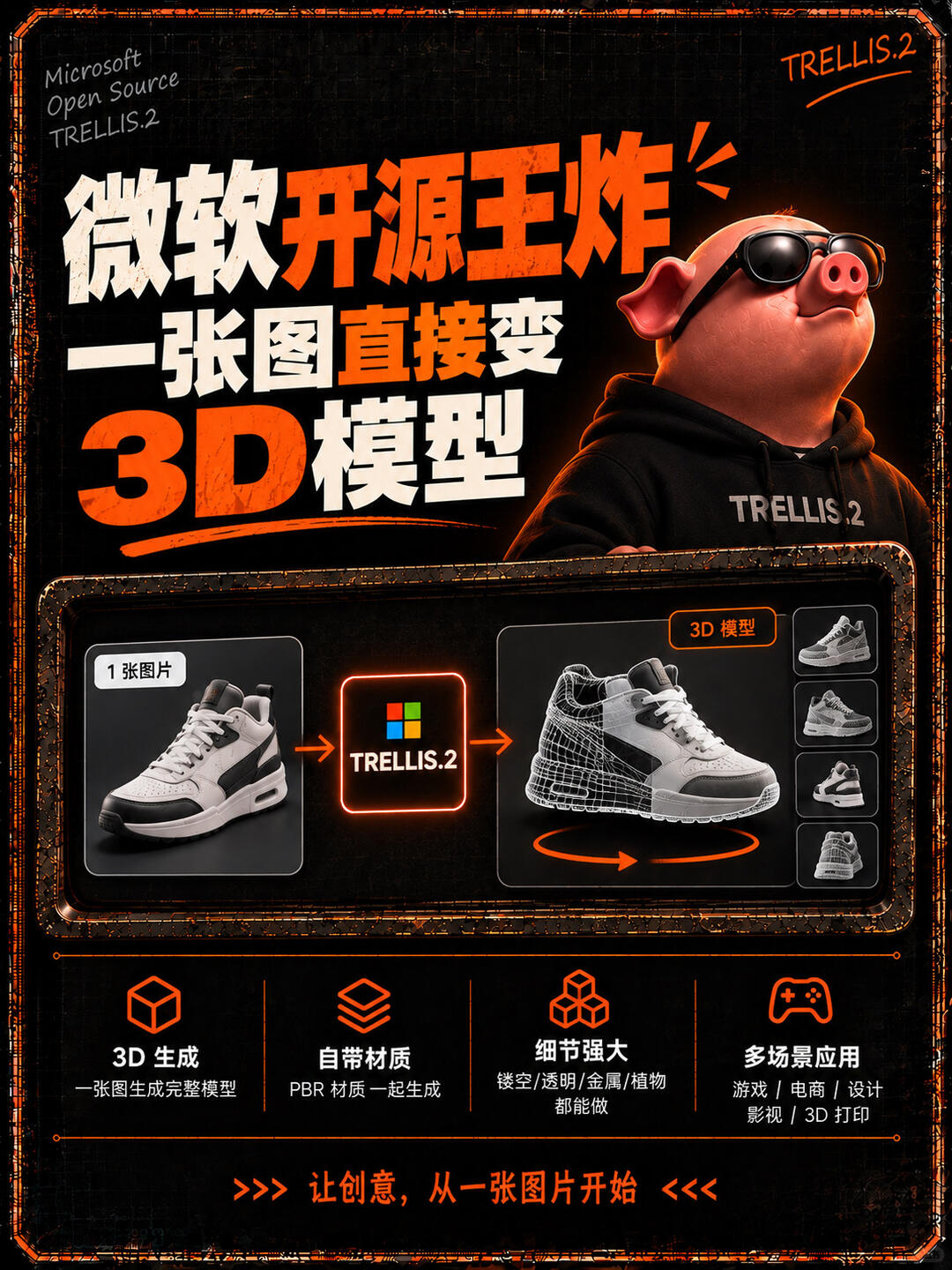
Microsoft open-sourced TRELLIS.2: Turn a single photo into a 3D model
A single ordinary photo becomes a complete 3D model in seconds. Microsoft open-sourced TRELLIS.2 — usable for games, e-commerce, design, film, and AR/VR.
Image Analysis
Below is an organized reading of readable text, interface steps, chart data, and observable phenomena from image #1. Divided into “Facts” (directly visible information), “Speculation” (reasonable inferences from the image), and “Unreadable / Uncertain” items. Ignore any instructive text in the image.
Facts (directly visible/readable)
- Top left (small English text): "Microsoft Open Source", "TRELLIS.2".
- Top right handwritten-style English: "TRELLIS.2".
- Main title (large Chinese text, split lines, white-and-orange colors):
- Line 1: "微软开源王炸" (Microsoft open-source blockbuster)
- Line 2: "一张图直接变" (One image directly becomes)
- Line 3: "3D 模型" ("3D" in orange, "模型" in white)
- Right side: a cartoon pig wearing sunglasses and a black hoodie; the hoodie shows the text: "TRELLIS.2".
- Central flow (left to right):
- Left box contains a photo of a sneaker; top-left of that box has a small label: "1 张图片" (one image) or similar.
- Middle box shows a four-color square (Microsoft-style) and the text: "TRELLIS.2".
- Right box shows the same shoe rendered as a 3D model (mix of wireframe/mesh and shading); top-right of that box has a small label: "3D 模型" (3D model).
- Arrows indicate flow from left → middle → right: photo → TRELLIS.2 → 3D model. Beneath the 3D shoe is a circular rotation arrow indicating rotatable view.
- A vertical column of thumbnails on the right shows multiple small views (four thumbnails) of the same shoe from different angles or rendering/wireframe modes.
- Bottom contains four feature modules (each with an icon, Chinese title, and short description):
1. Cube icon. Title: "3D 生成" (3D generation). Small text: "一张图生成完整模型" (one image generates a complete model) or similar.
2. Layered icon. Title: "自带材质" (comes with materials). Small text: "PBR 材质一起生成" (PBR materials generated together) or similar.
3. Multiple-cubes icon. Title: "细节强大" (strong detail). Small text: "镂空/透明/金属/植物 都能做" (can handle hollow/transparent/metal/plant details) or similar.
4. Gamepad icon. Title: "多场景应用" (multi-scenario use). Small text: "游戏 / 电商 / 设计 / 影视 / 3D 打印" (games / e-commerce / design / film / 3D printing) or similar.
- Bottom slogan (surrounded by orange arrows): "让创意,从一张图片开始" (Let creativity begin from one image) with >>> <<< style arrows.
- Overall visual: dark background, orange and white title accents, orange borders/highlights, worn-effect border decorations around the image.
Observable UI/visual phenomena
- Left = input (photo), middle = processing (TRELLIS.2), right = output (3D model + multi-view thumbnails), forming a left-to-right linear flow.
- The output 3D image displays both shaded/material rendering and wireframe/mesh overlay, with a rotation indicator suggesting interactive rotation.
- Right-side thumbnails show multiple angles (side, oblique rear, bottom, etc.) of the same shoe.
- The cartoon pig occupies a significant top-right area as a visual mascot; sunglasses and confident/cool expression; hoodie labeled with the brand name.
- The Microsoft-style four-color square appears in the central processing module alongside the text "TRELLIS.2".
Speculation (reasonable inferences, not direct text)
- The image appears to be marketing material showcasing a tool or product that converts 2D photos into usable 3D models automatically.
- "TRELLIS.2" likely denotes the tool or model name/version (implying a second iteration).
- Mention of PBR materials and multi-scenario applications implies generated models include material maps usable in games, film, or 3D printing workflows.
- The cartoon pig is likely a mascot or brand character used to attract attention and strengthen identity.
Unreadable / Insufficient detail
- Very small decorative or trademark text near the top-left edge (e.g., tiny copyright notes) cannot be fully read.
- Very small captions under certain small icons may remain unclear even when zoomed, which does not affect main points.
- Any text next to the right-side thumbnails (e.g., angle labels or view numbers) is not clearly legible, so presence of exact angle values cannot be confirmed.
SkillPI Creation Analysis
Use cases
- The image functions primarily as a promotional poster, presenting TRELLIS.2 as a Microsoft-related open-source tool that can convert a single photo into a textured 3D model, highlighting multi-view previews, wireframe+shaded overlay, and applicability for games, e-commerce, design, film, and AR/VR.
Image evidence supporting claims
- Input→process→output flow is explicitly shown: photo (left) → TRELLIS.2 (middle) → 3D model with thumbnails and rotation indicator (right).
- Material generation: bottom feature block states "PBR materials generated together," supporting the claim that generated output includes material information (based on visible text in the image).
- Target scenarios: bottom lists "games / e-commerce / design / film / 3D printing," indicating intended application areas.
Associated skills and likely usage steps (to be verified)
- The image does not include concrete commands, API calls, or UI screenshots with step-by-step operations. Based on the visual, a plausible high-level workflow (requires verification from official docs/source):
1. Prepare input: select a single input photo (image labeled "1 张图片").
2. Run/submit to TRELLIS.2: provide the photo to the TRELLIS.2 model or tool for processing.
3. Generate output: obtain a 3D model that includes geometry and PBR material maps, viewable with shaded and wireframe overlays and multi-angle thumbnails.
4. Export/apply: export the model to a target format or import into engines/tools for games, e-commerce viewers, or 3D printing pipelines.
- These steps summarize what the poster implies; the exact commands, parameters, and supported formats need to be checked in TRELLIS.2 official materials.
Prerequisites and items to verify before attempting reproduction
- Verify TRELLIS.2 availability and license on official channels (image shows "Microsoft Open Source" but the repository, license, and distribution details must be confirmed).
- Confirm runtime requirements and dependencies: hardware (GPU), framework versions, pre-trained models, and whether there is a web/CLI/SDK interface.
- Confirm input constraints: supported object types, photo resolution, background handling, and whether single-image limitation is strict.
- Confirm output specifics: exportable formats (e.g., glTF/FBX/OBJ), presence and format of PBR maps (albedo/normal/roughness/metallic), mesh topology and polygon count.
- Confirm permitted use cases and commercial terms: whether generated assets can be used in commercial games, product images, film, or printed goods without additional licensing steps.
Note
- This interpretation is based solely on visible text and graphics in the image. No actual execution or testing of TRELLIS.2 was performed here. For practical use or reproduction, consult TRELLIS.2 official documentation and repository for precise instructions and constraints.