
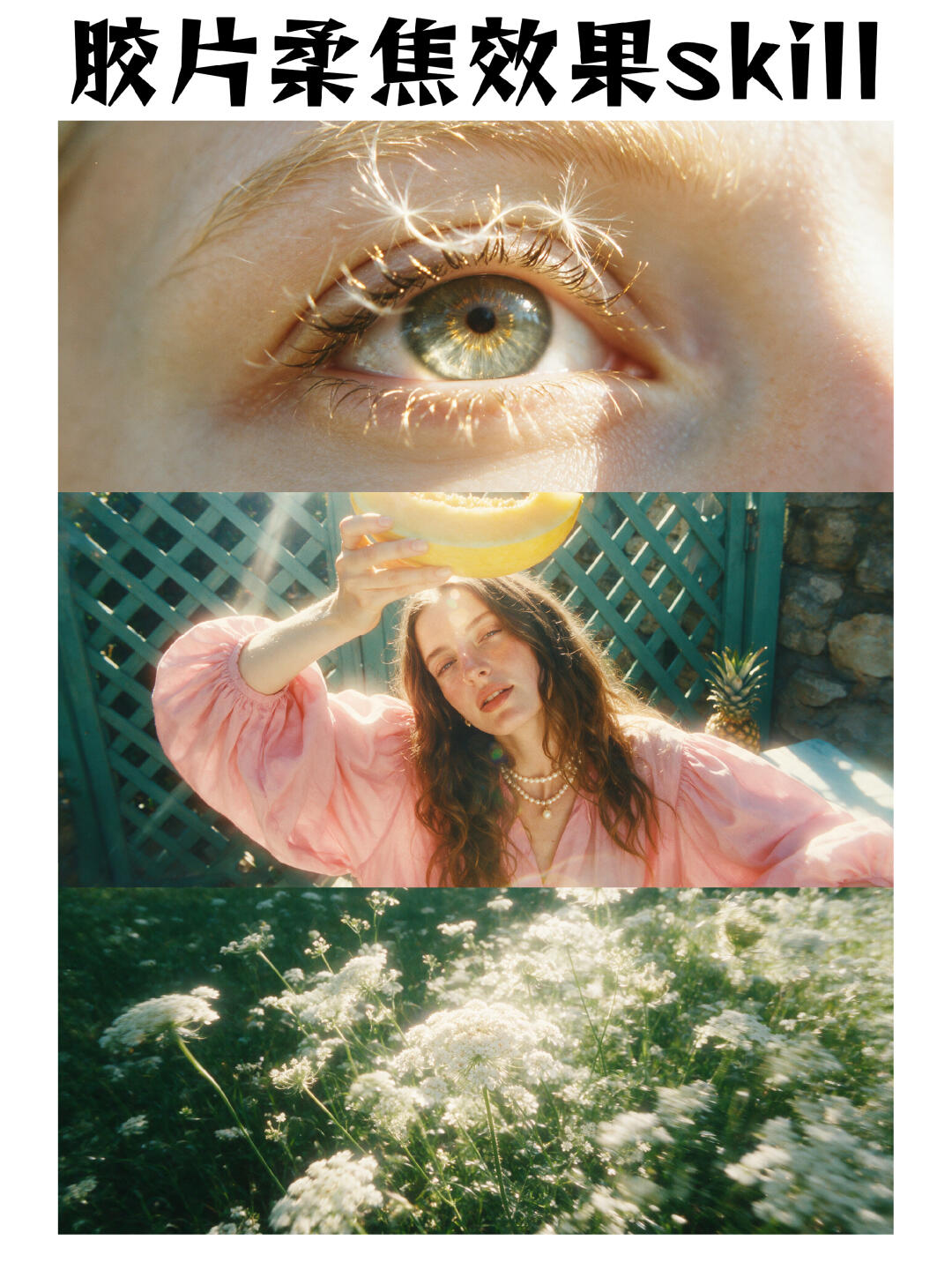
Shoot film-inspired soft-focus portraits
Learn how to obtain a stable film-style soft-focus straight-out look from a single prompt, a reference image, or by restyling an existing photo. Covers practical shooting suggestions (backlight, large aperture, composition), post-processing focal points (warm tones, lowered contrast, grain, soft highlights) and the prerequisites and verifications needed to reproduce the style.
Image Analysis
Image 1 — Evidence summary
1. Readable text (verbatim, legible)
- Top large text (black, prominent, horizontal): “胶片柔焦效果” (film soft-focus effect)
- Right/end of same line (lowercase English letters, also black): “skill”
- Note: No other legible UI text, steps, or table/chart numeric data.
2. Interface steps and chart data
- Fact: The image contains no visible interface steps, operation prompts, or table/chart numeric data (ignore any in-image instruction text).
3. Visible image facts (directly observable)
- Overall layout: vertical three-column layout with one horizontal photo per row (top, middle, bottom), white borders, and a title at the top.
- Top photo (first):
- Content: Close-up of one eye (eyelid, eyelashes, iris, cornea visible).
- Details: Iris is blue-green with yellow-brown radial patterns near the pupil; several white fibrous particles/tufts adhere to the eyelashes (resembling lint or seeds).
- Lighting: Strong highlights and specular reflections; skin texture visible.
- Middle photo (second):
- Content: Upper-body portrait of a long-haired person (face and upper torso clearly visible); the person holds half of a yellow melon (or slice) above their head.
- Clothing and accessories: Wearing a pink puff-sleeve top; wearing layered pearl necklaces (at least two strands).
- Background and props: Background is a grid-like fence/trellis (turquoise/teal); a stone wall structure and a pineapple-like fruit are visible to the right-rear.
- Light effects: Strong backlight/side light causing lens flares (halos/flare) and a soft yellowish cast.
- Bottom photo (third):
- Content: A patch of outdoor white umbel-like flowers (clusters of small white flowers across a grassy area).
- Light and focus: Strong backlighting causing brightened flower edges, depth-of-field compression, partial blur/motion blur; overall warm tone.
- Image style: Overall 'soft-focus/film look' style (visible grain, warm color cast, soft highlights).
4. Uncertain or unidentifiable items (specifics)
- Fruit species uncertain: The yellow fruit in the middle image is identified as a melon-type (e.g., cantaloupe/hami melon) but exact species cannot be confirmed.
- Flower species uncertain: The white umbel flowers resemble Apiaceae family members (e.g., wild carrot/Queen Anne's lace) but exact identification is not possible.
- Person identity: Cannot identify the person's identity, name, or personal information (no readable name tags; identity not discernible).
- Possible small copyright/annotation text below the top font or at edges is illegible due to resolution limits.
5. Inferences (marked as inference, not direct observation)
- Imaging technique/processing: The pictures may be shot on film or digitally processed with film-emulation filters to produce the 'film soft-focus' look (soft highlights, warm tones, grain, lens flare support this inference).
- White fibers on eyelashes may be dandelion seeds, fibers, or external fluff rather than part of the eyelashes.
- Middle image light source inferred to be sun or strong artificial light positioned upper-left/back, causing backlight and lens flare.
- Visual intent: Likely a photographic work or style showcase aimed at highlighting the 'film soft-focus effect.'
6. Other notes
- Per user instruction, any in-image instruction text is ignored; only visible evidence and phenomena are recorded.
- Privacy and safety: No identification or claims about the pictured person being a public figure.
SkillPI Creation Analysis
Purpose of the piece: The image set serves as a visual demonstration of a film-like soft-focus aesthetic, suitable for photography showcases, style examples, or filter demonstrations that emphasize warm tonality, grain, and soft highlights. Key image evidence: vertical three-panel layout (eye close-up, backlit portrait with melon prop, patch of backlit white umbel flowers); observable features include backlight-induced lens flare, warm color shift, visible grain, and soft-focus edges. Associated Skill usage steps (no specific Skill named in the source; steps below are general, actionable procedures rather than claims about the original method):
- Shooting suggestions (preconditions for reproduction): choose backlit or strong side-light situations to create natural lens flares; use a large aperture and short focus distance to compress depth of field and produce soft backgrounds; capture near-subject texture detail for the close-up (eye). Record shooting parameters (aperture, shutter, focal length, light position) if possible.
- Color and light adjustments (typical post-processing steps): reduce global contrast to smooth highlights; add a warm color cast (raise color temperature or introduce warm tones into highlights); preserve or introduce slight bloom in highlights to simulate soft flares; add subtle film grain and avoid heavy sharpening to maintain soft-focus character.
- Style transfer / straight-out strategy: when using a single prompt or reference image to restyle an existing photo, prioritize tone mapping (warm highlights), grain overlay, selective softening, and flare/bloom layers. If automated style-transfer or model-based methods are used, verify the tool’s fidelity on highlight handling and fine-detail preservation.
Reproduction prerequisites: achieving a close approximation requires knowledge of the original capture settings (EXIF), light placement, and whether the example was captured on film or digitally emulated. Items that need verification: whether the example originates from actual film or is entirely post-processed; which specific software, filters, plugins, or presets (if any) were used; original capture parameters and whether compositing or additional overlays were applied. Note: the source is a summary, not an operational guide; no concrete tool names, parameters, or step-by-step commands are provided. The steps above are general, evidence-based recommendations and do not assert they replicate the original method exactly.