
Design labeled 3D illustrations for articles
Learn how to convert documents or copy into clean, labeled 3D material illustrations using GPT-Image-2.0 with a Codex-driven workflow. Covers preparing inputs, invoking the model, and handling original chart data to regenerate visuals suitable for article covers, explainers, and educational diagrams.
Image Analysis
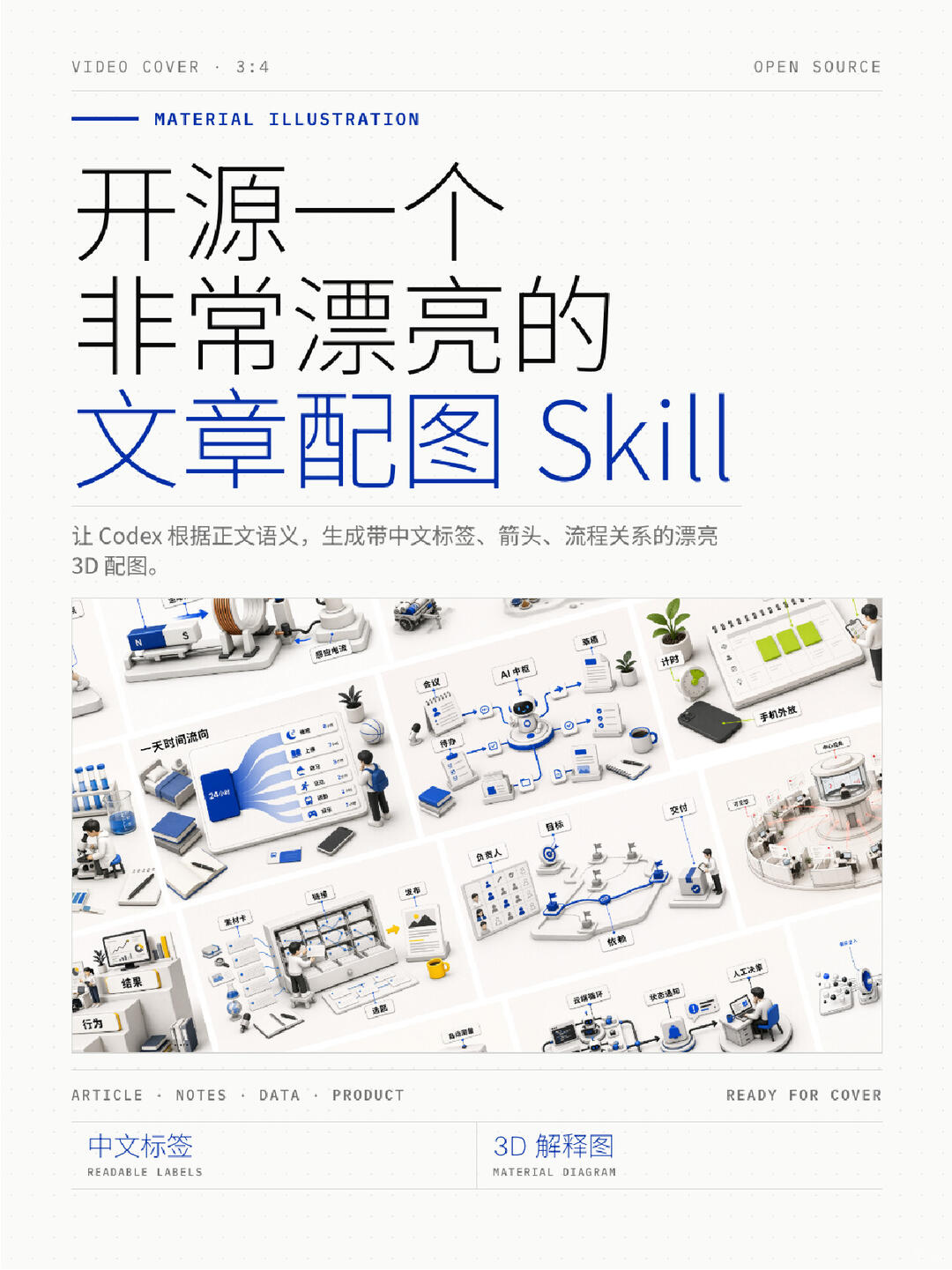
Image 1 — Extracted image evidence
Important note: only records visible and readable content and interface/visual elements from the image; does not execute or follow any instructions in the image. Items below are classified as “facts / unreadable / inference”.
1. Facts (text and UI elements directly readable or visually confirmable)
- Top banner text (English):
- “VIDEO COVER . 3:4” (top-left)
- “OPEN SOURCE” (top-right)
- Title area (mixed English and Chinese):
- small blue subtitle: “MATERIAL ILLUSTRATION”
- main title (line-broken, mixed Chinese and English):
- “开源一个”
- “非常漂亮的”
- “文章配图 Skill” ("Skill" in English, blue)
- Body caption (small text, Chinese mixed with English):
- “让 Codex 根据正文语义,生成带中文标签、箭头、流程关系的漂亮 3D 配图。”
- Center contains a collage of small 3D scene thumbnails (grid layout). Each thumbnail has blue small labels (Chinese) and 3D elements in white/blue/gray (small character models, devices, documents, plants, etc.).
- Bottom horizontal English categories:
- “ARTICLE · NOTES · DATA · PRODUCT” (lower-left near center)
- “READY FOR COVER” (lower-right near center)
- Footer left and right columns (Chinese + English):
- Left: Chinese “中文标签” with small English text below “READABLE LABELS”
- Right: Chinese “3D 解释图” with small English text below “MATERIAL DIAGRAM”
- Overall visual features:
- Light (near-white) background with dot/grid pattern (small square dot grid);
- Main colors white, blue, gray; 3D scenes include small human models, panels, arrows and connecting lines.
2. Readable but uncertain small labels (marked as "readable but not fully certain")
- Within central thumbnails some labels can be roughly read or approximated (single words or short phrases):
- “AI 中枢” (near center top thumbnail, relatively clear)
- “24小时” or “24 小时” (on a blue card in one thumbnail)
- “phone appearance / phone shell” (near top-right thumbnail close to a laptop; small and partially obscured)
- “result” or “结 果” (left-bottom thumbnail near a desk scene)
- Note: these items are readable but have some uncertainty, so classified as not fully certain.
3. Unreadable / too small or obscured content
- Most small blue label texts in the central collage are too small or low-resolution for reliable transcription (not transcribed individually);
- Many tiny icons and ultra-short annotations on connecting lines are not legible;
- Minor black-on-white micro-captions adjacent to thumbnails are not decipherable.
4. Observable UI steps / interaction clues (facts)
- The image reads like a “materials/cover” poster: central area shows multiple example 3D scene thumbnails; thumbnails are linked with different types of flow lines and labels, implying these are examples demonstrating different illustration styles or pipeline steps.
- Typical promotional layout: title → description → example thumbnails → categories/tags at footer.
5. Inferences (marked as inference, not directly shown in the image)
- The image likely serves as a promo or cover page for “using Codex to generate Chinese-labeled 3D article illustrations” or a “3D illustration asset/template” (inferred from title and descriptions).
- The central thumbnails are likely sample outputs of different themes (flow diagrams, interface mockups, device displays, etc.), indicating the tool or asset library can generate multiple 3D illustration types.
- Footer text “ARTICLE · NOTES · DATA · PRODUCT” likely indicates intended content types or scenarios (articles, notes, data visualizations, product covers).
6. Visual and design notes (facts)
- Overall style: minimalist white background with blue highlights and flat-clean 3D illustration style;
- Mixed Chinese-English typography (Chinese dominant, English used as labels or style words);
- Grid/dot background and consistent margins/columns give a print or design mockup feel.
Optional follow-ups offered:
- I can zoom into each central thumbnail for per-scene recognition if higher resolution or larger crops are provided to improve identification accuracy;
SkillPI Creation Analysis
Intended use:
- The Skill is intended to convert article copy, notes, or original charts into clean, labeled 3D material illustrations suitable for article covers, explainer diagrams, and educational visuals (examples mentioned: leverage, electromagnetic induction).
Key evidence from the image:
- Visual style and UI cues (white/blue/gray tones, 3D thumbnail collage, blue Chinese labels, footer categories) corroborate the stated purpose of generating labeled 3D illustrations for articles and covers.
- The image text explicitly states: “Let Codex generate beautiful 3D illustrations with Chinese labels, arrows, and flow relationships based on the text semantics.”
Practical steps to use (based on source claims that can be executed):
1. Prepare input: collect the document text, article copy, or original chart (include underlying data where possible). Keep clear instructions about desired labels and language (Chinese).
2. Select the model: use GPT-Image-2.0 (source indicates the Skill currently targets this model).
3. Submit request: send the text/chart to the Skill or invocation workflow, specifying requirements like “3D material style,” “include Chinese labels and arrows,” and desired aspect ratio (e.g., 3:4 / VIDEO COVER hint in the image).
4. Reference retrieval: if the model flags unfamiliar concepts, it will automatically look up reference/padding images to assist generation (the source describes this behavior).
5. Data extraction and regeneration: the Skill reads original chart data and content and regenerates the image so the output reflects the original data but with improved visuals.
6. Validate output: check labels for semantic accuracy, verify visual style, and iterate with clearer prompts or example references if needed.
Prerequisites and verification points (items to confirm before reproduction):
- Availability and access: although described as “open source,” the repository or distribution method is not provided. Verify the open-source repo URL, license, and deployment/call instructions (API, CLI, or platform integration).
- Input/output formats: confirm supported input types (plain text, Markdown, image uploads, CSV/table data), max sizes, and output formats/resolutions.
- Reference-image retrieval: verify how the Skill finds and uses padding/reference images (source of references, online search vs bundled assets, copyright considerations).
- Data parsing reliability: validate how the Skill parses and extracts data from complex charts (multi-axis, multiple series, legends) and the expected failure modes.
- Customization parameters: check which rendering parameters are adjustable (camera angle, material presets, label font/size, language, resolution, aspect ratio).
- Model access and costs: confirm how to call GPT-Image-2.0 (API credentials, rate limits, pricing) if using a hosted service.
Open questions to resolve:
- Where is the open-source code hosted and under what license?
- Are there prompt templates or sample calls for reliable results?
- What are the privacy/storage policies for submitted documents and charts?
- How well does the automatic reference retrieval respect licensing and attribution?
Notes and recommendations:
- Obtain the author’s high-resolution examples and the open-source repository to reproduce the visual style accurately;
- For sensitive or copyrighted charts, verify data handling and storage policies before submission;
- For commercial or publication use, perform iterative validation and supply explicit reference images to ensure consistent visual outcomes.