
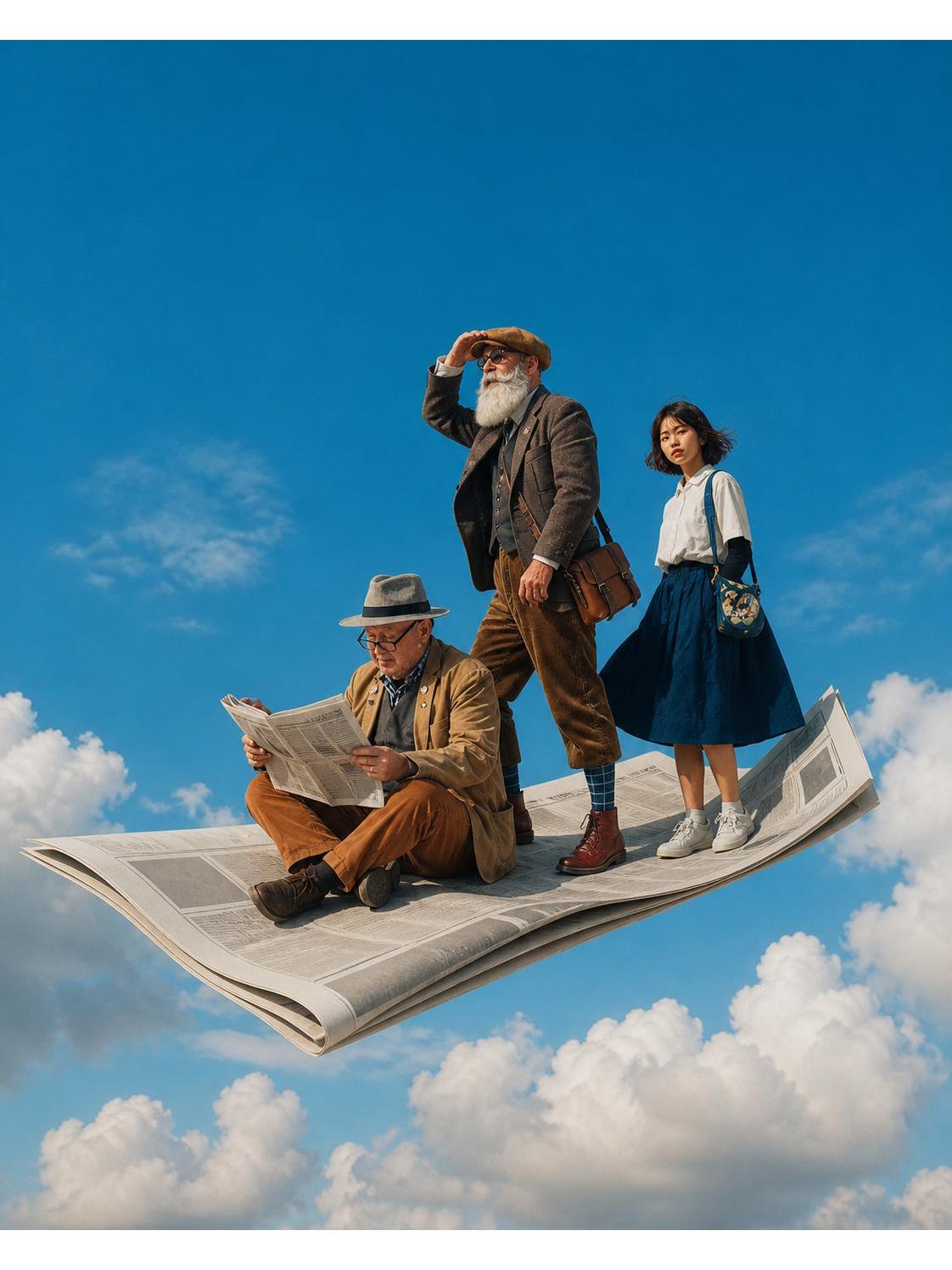
Design a surreal portrait on a floating newspaper
Learn how to generate a surreal scene of people standing on an oversized floating newspaper using a prompt template (template noted as being in the source's last image). Covers obtaining the template, preparing a text-to-image model/skill, composing prompts, choosing generation parameters, and postprocessing tips to produce a clear surreal portrait.
Image Analysis
Image 1 — Evidence summary
Readable text / UI / Charts
- Readable text: No clearly legible text. There is a large newspaper in the image with black-and-white column layout and small text, but the font is too small and obscured by distance and folds to read specific words or headings.
- UI steps: None (this is not a UI screenshot; no buttons or step text).
- Chart data: None.
Observed facts (only direct visual observations)
- Overall scene: Three people stand/sit on an enlarged folded newspaper that floats like a magic carpet above cloud layers; the background is a clear blue sky with scattered white clouds.
- People (left to right):
- Left: A middle-aged/older man wearing a top hat and glasses, in a light-colored coat and brown pants, sitting on the newspaper and holding/reading a newspaper (possibly the same giant sheet or another smaller paper; details not legible). He wears glasses and looks down at the paper.
- Middle: An older man with a long white beard, wearing a flat cap (or beret-like), sunglasses, dark jacket and corduroy pants, carrying a brown leather satchel; his right hand is raised to his brow as if shielding his eyes or gazing into the distance.
- Right: A young woman with short hair, wearing a white top and blue knee-length skirt, carrying/shouldering a round-patterned crossbody bag, wearing white/light sneakers, facing forward with a neutral or slightly intent expression.
- Clothing and accessory details:
- The middle man wears patterned socks (blue check pattern visible) and brown leather boots.
- The left man has a small pin or button on his coat chest (small round object visible) and a hat brim. Right hand holds a paper; lower hem and socks visible.
- The young woman's bag has a distinct pattern/print (pattern details not fully identifiable).
- Newspaper details: Folded into a thick single large sheet or stacked pages with curled edges, visible printing grid/layout (columns, image blocks or text blocks shown as gray boxes); overall in black/gray tones.
- Lighting and imagery: Light comes from upper-right or top-right direction; figures and newspaper cast clear shadows; overall daylight color temperature. People, newspaper and clouds are in focus and colors are saturated.
- Motion/environment cues: Hair and the woman's skirt show slight lift indicative of wind. The newspaper appears suspended with no contact from other objects.
Not legible / blurred items (explicitly noted)
- Text on the newspaper (headlines, paragraphs, newspaper name) is not legible due to small font and folds/angles.
- Specific content or text on the bag pattern cannot be identified (only color blocks and shapes visible).
- Any potential text or logos on pins/accessories are not readable.
- Small labels, trademarks, or brand names cannot be identified.
Inferences (marked as inferences / not direct observation)
- The image may be a composite or post-processed (photographic composite, digital editing or effects) because the newspaper floats above clouds and the composition has a surreal quality — this is an inference about production method, not a direct observable fact.
- The scene likely aims for an artistic/conceptual photograph (e.g., the 'flying newspaper' motif), but that interprets the creator's intent.
- Age categories (e.g., 'older man', 'young woman') are visual inferences, not identity confirmations.
- The wind effect (hair, skirt lift) could be caused by ambient wind or post-production adjustments; this is a reasonable inference.
Other notes
- The image contains no identifiable UI elements, tables, or numerical chart data.
- As required, no instructions appearing in the image (if any) were executed or followed.
SkillPI Creation Analysis
Use of the piece:
- The post demonstrates a style for producing surreal portraits where people appear on a floating oversized newspaper. It is suitable as a visual reference for composing prompts, scene layout, and postprocessing approaches for surreal character generation. Source video: https://www.douyin.com/video/7675291186235493678.
Image evidence summary:
- The image clearly documents three characters placed on a large folded newspaper that floats above clouds, with distinct lighting and costume details (hats, glasses, beard, satchel, patterned socks), while printed text on the newspaper and bag patterns are not legible.
Steps to use the associated skill (inferred from common text-to-image workflows; specific skill documentation must be checked):
1. Verify and obtain the skill/model: confirm whether the referenced skill name "mahua-surreal-sky" is publicly available and which platform or model versions it supports.
2. Retrieve the prompt template: the post states the prompt template is in the last image; open the original post to copy the full template and any placeholder instructions.
3. Load or paste the prompt into a text-to-image generator: replace placeholders with desired character descriptions, clothing, props, composition notes (e.g., "three people on folded newspaper, floating above clouds, daylight lighting, cinematic framing").
4. Configure generation parameters (dependent on the model/frontend): set resolution, sampler, steps, guidance/CFG scale, random seed, negative prompts, and any style or weight parameters.
5. Render multiple variants to evaluate composition, subject clarity and background integration; iterate on prompt wording and parameter choices.
6. Optional postprocessing: apply upscaling, face/detail correction, local compositing, or color grading to enhance the surreal aesthetic.
Reproduction prerequisites:
- Access to the original post to obtain the exact prompt template (it is located in the last image per the source).
- Confirmation of the skill/model availability and compatibility with your chosen generation tool.
- An appropriate text-to-image generator or service (this guidance is tool-agnostic).
Items to verify:
- Whether "mahua-surreal-sky" is a publicly available skill/configuration or a private author setup, and the exact usage instructions.
- The complete prompt template text (from the post's last image), including placeholders and any recommended tokenization or special syntax.
- Recommended generation parameters (resolution, steps, sampler, guidance scale, negative prompts, seeds).
- Need for specific model weights, additional assets, or postprocessing tools (e.g., face-restoration, upscalers, or masked inpainting workflows).
- Licensing and usage rights for reusing the template or derived images.
Note: The above steps and checks are inferred from typical prompt-driven image generation practices and do not assert that the template or parameters in the source will produce identical results without verification. To reproduce, first retrieve and verify the original prompt template and any author notes in the final image of the source post.