
Create image-and-text content with eight skills
Break image-and-text production into cover design, layout, assets, and delivery, with an artifact to check at each step.
Image Analysis
Image 1 — Evidence summary
Facts (readable text, UI elements, chart data, visible phenomena)
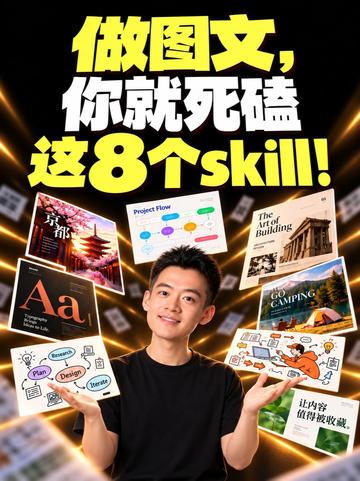
- Large top text (centered, yellow/white large font):
- “做图文,你就死磕这8个skill!” (Make image-and-text content — focus on these 8 skills!)
- Central subject:
- A young man facing the camera and smiling (wearing a black top, hands open, face clearly visible). Note: no identification or judgment of identity.
- Several floating “thumbnails” or covers around the center; readable text includes:
- Top-left: “京都” (Kyoto) — travel/architecture photo cover
- Upper-left-ish: “Project Flow” — a flow/mind-map style image with colored dots and connecting lines
- Top-right: “The Art of Building” — book/cover style with architectural photo
- Mid-right: “GO CAMPING” — tent/camping scene image
- Bottom-left: “Aa” — capital letters “Aa” indicating typography/layout element
- Lower-center-left: a simple diagram with three circles connected by arrows, circle text readable as “Plan”, “Design”, “Iterate” (or similar)
- Bottom-right: a white card with Chinese text readable as “让内容值得被收藏。” (Make content worth saving/collecting.)
- Background and visual style:
- Black background with radial light beams (yellow/gold tones) from center, creating a floating thumbnails 3D effect.
- Several thumbnails show motion blur or depth-of-field; some edge thumbnails are partially blurred.
- Typography and color:
- Main text uses large yellow and white fonts; thumbnail texts mix Chinese and English.
- Charts/flow elements:
- “Project Flow” thumbnail shows colored nodes and connecting lines, suggesting a flowchart/mind-map (node text besides “Project Flow” not fully legible).
- “Plan / Design / Iterate” appears connected by arrows/lines, indicating a cycle or sequential flow.
Inferences (marked as inferences, not verified facts)
- The image looks like a video/course/tutorial thumbnail or promotional graphic intended to present eight skills for making image-and-text content (inferred from the title and surrounding sample thumbnails).
- Floating covers/thumbnail images may represent sample works or tutorial chapters showing diverse styles (travel, architecture, camping, typography, flow design).
- The central person may be the content creator or presenter (reasonable inference, not identification).
Unclear or unreadable items (explicitly noted)
- Many small-text elements on thumbnails are unreadable due to blur or depth-of-field, for example:
- Subtitle under the “Aa” thumbnail is unreadable (too small/blurred).
- Specific node text inside “Project Flow” is not fully legible (only colored nodes and lines visible).
- Several small Chinese captions on orange/white illustration thumbnails are unreadable.
- Source information, author, publish time, or copyright marks are not visible or legible in the image (if present they are not readable due to resolution/cropping).
- Some right-edge thumbnails are heavily blurred and cannot be identified.
Source
- Image number: Image 1
- Image source: not provided (incomplete source — no URL or origin visible)
SkillPI Creation Analysis
Intended use
- The visual reads as a promotional thumbnail or cover for a short video or micro-course that highlights “8 skills” for creating image-and-text content. It is suited for short-video covers, course intros, or skill-promotion assets.
Image evidence highlights (verifiable items)
- Prominent headline text claims “Make image-and-text content — focus on these 8 skills!”; legible thumbnail labels include “Project Flow,” “Aa,” “Plan/Design/Iterate,” “GO CAMPING,” and “京都.”
- Presence of a flow-diagram style thumbnail (colored nodes and connectors) and a three-stage cycle (Plan → Design → Iterate) plus typography hint (“Aa”) and multiple style thumbnails indicating varied content categories.
Associated skills and practical steps (derived from visible elements; presented as a reproducible workflow)
1) Topic selection and asset collection: define the content theme (e.g., travel, architecture, camping) and gather photos and text elements.
2) Project flow mapping: create a Project Flow outlining stages, tasks, and handoffs.
3) Thumbnail/cover composition: design a main image (portrait or scene), headline placement, and supporting thumbnail elements to ensure clear focal hierarchy.
4) Typography and hierarchy (“Aa”): choose readable typefaces, sizes, and color contrasts so titles remain legible at thumbnail size.
5) Iterative delivery (Plan → Design → Iterate): produce versions, gather feedback, and refine layout, copy, and color.
6) Visual finishing: apply depth, motion blur, or light-beam effects to create depth while preserving legibility of key text.
Reproduction prerequisites
- Access to original high-resolution source images or video frames and the fonts used (verify licensing).
- Design tools capable of composing thumbnails, editing images, and exporting at thumbnail resolution (specific tool names are not visible in the image and must be chosen/verified separately).
Items requiring verification
- The definitive list of the “8 skills” claimed by the source (the image shows indicators but not a full enumerated list).
- Author/creator identity and copyright/usage permissions for the image and thumbnails.
- Full text on blurred thumbnails and specific typography/color values used (need original assets or source file to confirm).
End with verifiable checkpoints. Confirm the original video/page for the full 8-item list and obtain source files before attempting exact visual reproduction.