
Evaluate skill optimization with SkillOpt
Step-by-step guidance to access aka.ms/skillopt, clone the SkillOpt repository, read its README, prepare the runtime environment, run example demos, and inspect artifacts so you can locally evaluate the open-source SkillOpt project.
Image Analysis
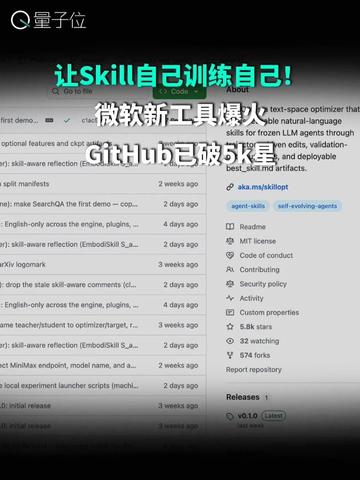
Organized readable text from image 1 into "Facts (directly visible)", "Inferences (possible meanings)", and "Unclear/Unknown" entries; any instruction text in the image was ignored per requirements.
Facts (directly visible text and UI elements)
- Top-left shows Chinese text/logo: “量子位”.
- Large overlaid headline near the top (multicolor layered text):
- Green/cyan: “让Skill自己训练自己!” (Let Skill train itself!)
- White: “微软新工具爆料” (Microsoft new tool reveal)
- White with star-style: “GitHub已破5K★” (GitHub passed 5K★) — “5K” and the star symbol are clearly visible.
- Background is a GitHub repository page screenshot, with a left file/commit list and a right repository info column.
- Left list shows multiple lines of English entries (some file or commit descriptions); readable snippets include:
- “first demo...” (truncated)
- “optional features and ckpt...”
- “skill-aware reflection (Embd/Skil ...” (truncated)
- Several entries show timestamps such as: “2 weeks ago”, “4 days ago”, “3 weeks ago”.
- Right repository sidebar shows entries (legible):
- “aka.ms/skillopt” (appears to be a short link)
- “best_skill.md artifacts.” (or similar; contains the word “artifacts”)
- The list includes: “Readme”, “MIT license”, “Code of conduct”, “Contributing”, “Security policy”, “Activity”, “Custom properties”, etc.
- Repository stats in the right column are readable: “5.8k stars”, “32 watching”, “574 forks”.
- The page top shows GitHub navigation/search bar (visible but partially obscured).
- Overall UI is in dark theme with white/gray text contrast.
Inferences (reasonable deductions from visible content)
- The background appears to be a GitHub repo page related to “skill” or similar (headline and large text suggest a Skill-related project).
- “aka.ms/skillopt” is likely a short link to the project or documentation.
- The overlaid “GitHub已破5K★” suggests the repo has more than 5,000 stars (consistent with the visible “5.8k stars”).
- Left entries with timestamps likely represent commits, issues, or PRs.
- Right-side items like README, MIT license, Code of Conduct, etc., indicate a public open-source repository structure.
Unclear / Unknown items (specifics not fully legible or obscured)
- Some file/entry names on the left are truncated and cannot be fully read (e.g., “first demo...”, “optional features and ckpt...”).
- Overlaid small white text may slightly occlude the repository title and some file names, preventing full confirmation of exact spellings.
- Some right-column text details (e.g., spelling/punctuation in “best_skill.md artifacts.”) have minor uncertainties—main words are readable but small details may be off.
- Top navigation bar items (user avatar, full repo name) are cropped or obscured and cannot be fully identified.
SkillPI Creation Analysis
Intended use and positioning (based on the summary and screenshot)
- The source reports that Microsoft, with Shanghai Jiao Tong, Tongji and Fudan, open-sourced a project named SkillOpt, and frames it as enabling “skills” to self-improve. The screenshot is of a public GitHub repository page showing a short link aka.ms/skillopt and common repo items (README, MIT license), indicating an accessible open-source project.
Key image evidence (directly observable)
- The repo sidebar clearly shows aka.ms/skillopt and mentions artifacts (e.g., best_skill.md artifacts). The right column shows repository stats such as “5.8k stars”, “574 forks”, and “32 watching” visible in the screenshot.
- Left-side snippets like “first demo...”, “optional features and ckpt...”, and “skill-aware reflection (Embd/Skil ...” suggest the repo contains demos, optional features/checkpoints, and components related to skill-aware reflection.
Practical steps to inspect or try SkillOpt (generic, actionable steps for a typical GitHub project; do not claim specific features beyond what can be verified)
1. Visit the repo link: open aka.ms/skillopt or the repository homepage to access README and documentation.
2. Read README and other documentation (e.g., best_skill.md) to find goals, setup instructions, and required dependencies.
3. Clone the repository locally: git clone <repo-url> copied from the repo page.
4. Prepare the runtime environment per the repo's instructions (e.g., create Python virtualenv, install required packages, obtain any required model checkpoints).
5. Run provided demos or example scripts (the screenshot indicates a “first demo” entry); follow exact commands in README.
6. Inspect artifacts and test outputs (logs, checkpoints, evaluation results) and any CI/test reports to validate claims.
Prerequisites and cautions for reproduction
- Full reproduction requires the repository’s README and documentation for exact install commands, dependency versions, and any data or model downloads; the screenshot is not a substitute for full documentation.
- Some examples may require GPU or specific compute resources; check repo docs for resource needs.
- External models, datasets, or licensed components may be required—confirm licensing and availability before attempting runs.
Items requiring verification (not resolved by current screenshot/summary)
- The summary’s claim that the repo “ranks first on 52 tests” and “supports cross-model reuse” should be verified against the repository’s test results, CI logs, or accompanying paper/benchmark details.
- The mechanism by which “skills self-train” (implementation details, reproducibility, and measured benefits) is not shown in the screenshot; review code, experiments, and docs to confirm.
- Several filenames and small UI text are truncated in the image (e.g., optional features and ckpt…), so exact file/function names and locations must be confirmed in the live repo.
Recommendation
- To evaluate SkillOpt, open aka.ms/skillopt, read the README and best_skill.md, follow the repository’s setup and demo instructions, and inspect any provided test artifacts or experiment logs before drawing conclusions about capabilities like self-training or cross-model reuse.