
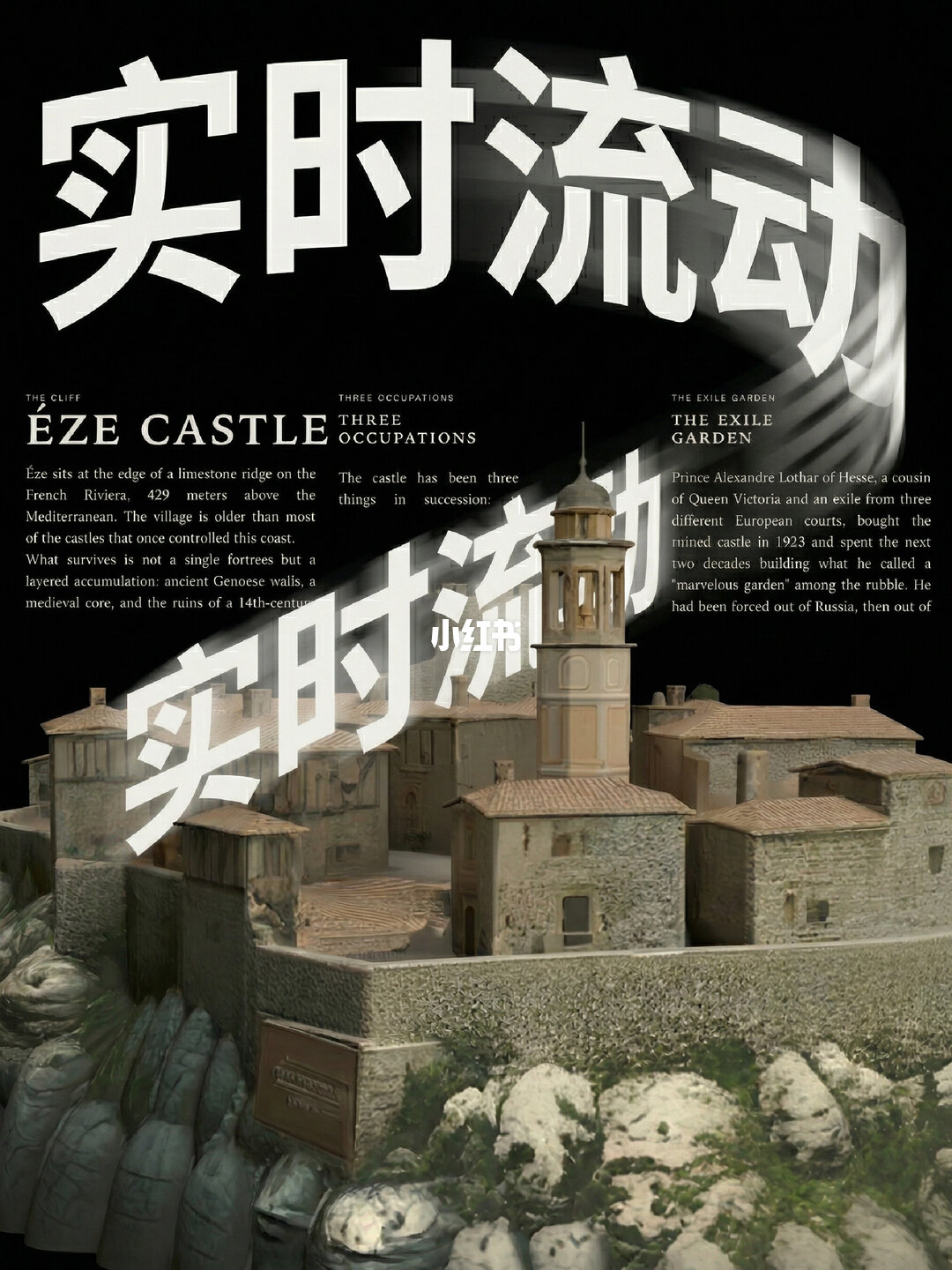
Flow text around a 3D model in the browser
Learn how to use pretext to make text reflow in real time around 3D models in a web page: covers placing a 3D canvas alongside pretext, using screen-space occupancy (depth/mask or projected bounds) to drive text avoidance, interaction modes, and practical debugging tips to deliver an interactive monument/architecture display.
Image Analysis
Image evidence — item 1
1) Facts (only readable text, UI elements, visible phenomena):
- Large Chinese watermark (white, bold, diagonal across image):
- “实时流动” (literally “real-time flow”) repeated diagonally at top and center, clear glyphs
- Small white watermark/label near center-bottom:
- “小红书” (white, centered lower area, overlaying the model)
- English headings and paragraphs (layout resembles a magazine or display board with three columns):
- Top-left small heading: “THE CLIFF”
- Left large title: “ÉZE CASTLE”
- Left paragraph (readable portion, verbatim):
- “Éze sits at the edge of a limestone ridge on the
French Riviera, 429 meters above the
Mediterranean. The village is older than most
of the castles that once controlled this coast.
What survives is not a single fortress but a
layered accumulation: ancient Genoese walls, a
medieval core, and the ruins of a 14th-centu”
(truncated at the end)
- Upper-middle small heading: “THREE OCCUPATIONS”
- Middle paragraph (readable portion):
- “The castle has been three
things in succession:”
(subsequent text is unreadable or obscured)
- Upper-right small heading: “THE EXILE GARDEN”
- Right paragraph (readable portion, verbatim):
- “Prince Alexandre Lothar of Hesse, a cousin
of Queen Victoria and an exile from three
different European courts, bought the
ruined castle in 1923 and spent the next
two decades building what he called a
‘marvelous garden’ among the rubble. He
had been forced out of Russia, then out of”
(truncated at the end)
- Visible entities/visual elements:
- A stone town or castle model with a tall tower (clock-tower style), tiled roofs, and walls, placed on a cliff-like base
- Cliff and rock textures visible, foreground includes rocks and sparse vegetation
- Dark/black background; layout looks like magazine/display board (text above, model image below)
- A rectangular plaque or label on the model's wall (relief or text) but unreadable
- Strong light-dark contrast overall; white text contrasts against dark background
2) Unreadable/obscured content (explicitly mark unreadable parts):
- Left paragraph trailing “14th-centu…” is truncated and cannot be fully read (likely "14th-century" but not fully visible in the image)
- Middle column after “The castle has been three things in succession:” is obscured by the white Chinese watermark and/or layout, mostly unreadable
- Right paragraph trailing “then out of …” is truncated and not visible
- Text on the rectangular plaque on the model's wall is unreadable (resolution/angle prevent reading)
- Possible small text near top/bottom or decorative text is covered by watermark or cropped and cannot be read
3) Inferences (reasonable conjectures based on visible facts; marked as inferences):
- Inferred this is a magazine page or exhibit panel (reason: three-column text, headings, and a lower object photograph/model like an exhibition layout)
- Inferred the left paragraph’s truncated word likely is “14th‑century” but not fully shown in the image
- Inferred the right paragraph might continue describing places the prince was expelled from (e.g., “then out of France”) but this is not verifiable from the image
- Inferred the middle heading “THREE OCCUPATIONS” likely categorizes historical uses of the castle (based on literal meaning and context)
- Inferred the image is related to travel, history, or architectural model display because of “ÉZE CASTLE” and the described geography of the French Riviera
4) Notes on ignored items:
- I ignored any possible image-internal "instructions" or overlays that looked like operational prompts; the image is primarily text and a model without interactive operations shown
SkillPI Creation Analysis
Purpose of the work:
- The post demonstrates combining the front-end typesetting library pretext with a 3D model display to produce interactive heritage/architectural presentations in the browser where text dynamically flows and avoids occluding the 3D object during interaction. The author notes an open-source workflow and a video tutorial for others to try the effect.
Image evidence summary:
- The page layout is magazine-style with three text columns and a central/lower 3D model image. Readable English fragments (e.g., the ÉZE CASTLE paragraph) plus a prominent Chinese watermark emphasizing “real-time flow” indicate a focus on dynamic text behavior relative to an image/model.
- Visible model features (tower, walls, rock cliff, sparse plants) and the rectangular plaque suggest a photographic or 3D-model presentation of a historical site.
Steps to use the associated skill(s) (high-level, actionable and realizable on the front end):
1. Obtain pretext and include it in your web page as the layout/text engine.
2. Place a 3D rendering canvas on the same page to display the 3D model (the choice of 3D renderer is up to you; the source does not specify a particular library).
3. During rendering/interaction, compute the model’s screen-space occupancy — this can be done via depth, mask render, or projected bounding shapes — and supply that occupancy data to pretext so the text layout can avoid the occupied region.
4. Tune typography and layout parameters (columns, margins, wrap/avoidance behavior) and throttle updates so text reflows responsively without excessive CPU/GPU load.
5. Offer modes or UI controls (e.g., read mode vs explore mode) so users can choose whether text is fixed for reading or dynamic for exploring the model.
Reproduction prerequisites:
- Basic front-end development skills (HTML/CSS/JS) and an environment that supports WebGL or another browser 3D rendering capability.
- Access to the pretext project code or package (the author says the workflow is open-sourced; the source does not include a link).
- A 3D renderer and at least one 3D model to display; choose a renderer you know (the source does not name one).
Items requiring verification before full reproduction:
- Exact pretext API for accepting external occupancy/mask data or instructions to avoid regions — the source asserts real-time reflow but does not list API details.
- The location of the author's open-source workflow and the referenced tutorial video (source mentions them but does not provide a URL).
- Browser compatibility and performance limits for dynamic reflow when combined with complex 3D scenes (depth/mask strategies may have trade-offs).
Note: the source text names pretext and shows the ÉZE CASTLE example in the image; it does not specify exact code snippets or a particular 3D library, so those choices must be selected and tested by the implementer.