
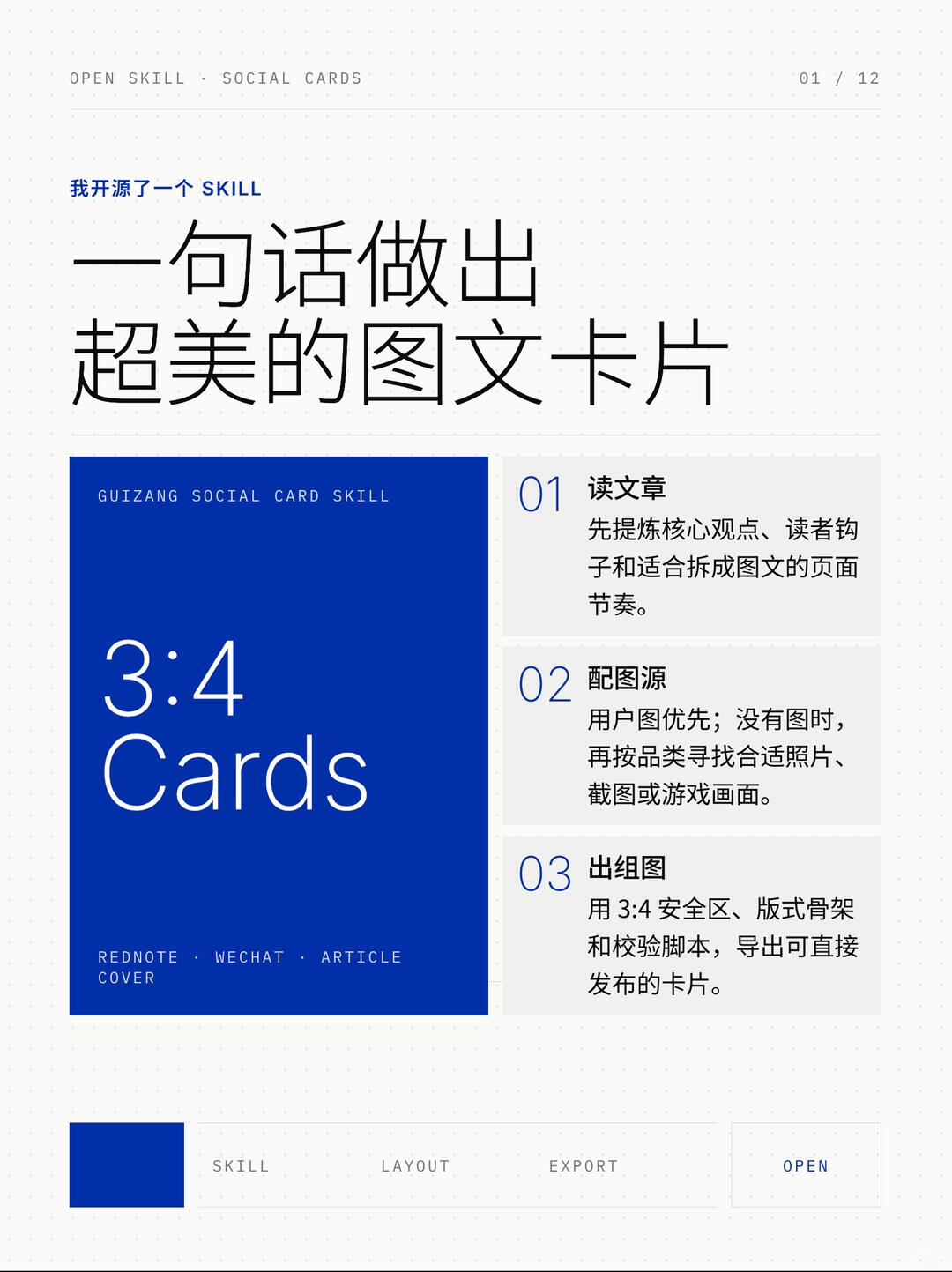
Make image-and-text cards for social platforms
Follow a three‑step workflow to turn articles into publishable 3:4 image‑text cards: extract core ideas and reader hooks, prefer user images or select category photos, then use a 3:4 safe area, layout skeleton and validation scripts to export images ready for social publishing.
Image Analysis
Slide 1 — Facts / Readable content (recorded by visual position and order)
Header / Top
- Top centered slightly left, lowercase English: "OPEN SKILL · SOCIAL CARDS"
- Small text at top right: "01 / 12"
Main title area (upper‑left, slightly centered)
- Small blue text: "我开源了一个 SKILL" (I open‑sourced a SKILL)
- Large black title: "一句话做出 超美的图文卡片"
- Note: visually the main title is split into two lines: "一句话做出" on the first line and "超美的图文卡片" on the second line.
- A thin horizontal divider under the main title.
Left large blue card (visual focus)
- Small lowercase English at top: "GUIZANG SOCIAL CARD SKILL"
- Large white text: "3:4"
- White text below: "Cards"
- Bottom small lowercase English: "REDNOTE · WECHAT · ARTICLE COVER"
Right column with three steps (vertical, gray boxes, blue step numbers on the left)
- 01 (large blue number) Read the article
- Body: "Extract the core idea, reader hooks, and the page rhythm suitable for splitting into cards."
- 02 (large blue number) Image sources
- Body: "User images preferred; if absent, find suitable photos, screenshots, or game images by category."
- 03 (large blue number) Generate card set
- Body: "Use 3:4 safe area, layout skeleton, and validation scripts to export cards ready for publishing."
Footer / Bottom navigation
- Left has a small solid blue square (no text)
- A horizontal row of labels across the bottom (gray text): "SKILL LAYOUT EXPORT"
- Far right a bordered area with blue text inside: "OPEN"
Visible UI / layout and visual observations (facts)
- Background is a light gray dotted/grid pattern (small dots forming a grid).
- Overall page uses clean whitespace; main colors are dark blue, black, and light gray.
- Left large blue rectangle and right gray step boxes form a clear two‑column layout.
- Step numbers “01/02/03” are large blue numerals within the right gray boxes adjacent to step text.
- The page uses a sans‑serif font; the main title is large; text inside the left blue card is white.
Numeric / size / ratio information (facts)
- Displayed ratio text: "3:4"
- Page number: "01 / 12"
Unclear / indeterminate details (marked as unclear)
- Whether the small blue square in the footer contains micro text is unclear (visually appears as a solid square).
- Whether there are other tiny icons or text between the footer labels and the "OPEN" button is unclear due to image resolution.
- Font details of the small text "GUIZANG SOCIAL CARD SKILL" in the left blue card are hard to discern (spelling "GUIZANG" visible but fine typographic details unclear).
Speculation (marked as speculation, not fact)
- The page is likely a tutorial or product intro (e.g., cover or landing page for a social card generation tool/skill).
- The footer labels "SKILL / LAYOUT / EXPORT / OPEN" likely serve as page/function navigation (speculated steps/sections).
- "3:4 Cards" on the blue card likely denotes the output aspect ratio or a template ratio.
- "REDNOTE · WECHAT · ARTICLE COVER" likely indicates target platforms or example use cases (notes, WeChat, article covers).
(Ignore any implied interactive behavior; only record visible text and interface elements.)
SkillPI Creation Analysis
Intended use:
- The page presents a workflow/feature set for converting articles or content into publishable image‑text social cards (social cards, article covers, WeChat/notes). The visible text frames a three‑step process to produce ready‑to‑post 3:4 cards.
Image evidence summary (verifiable from the image):
- Explicitly shows output ratio "3:4", page index "01 / 12", and three steps labeled "01 Read the article / 02 Image sources / 03 Generate card set".
- Mentions use of "3:4 safe area, layout skeleton, and validation scripts" to export cards, indicating a template + validation/export workflow.
Apparent workflow steps (as presented visually; not implementation details):
1) Read article: extract core points, reader hooks, and page rhythm suitable for splitting into cards;
2) Image sourcing: prefer user‑provided images, otherwise select category‑appropriate photos, screenshots, or game images;
3) Generate/export: apply a 3:4 safe area, a layout skeleton, and validation scripts to export images ready for publication.
Prerequisites and deliverables:
- Prerequisites: source article/text to extract content from; image assets (user images or alternative category images); templates for 3:4 layout and a validation/export mechanism or script.
- Deliverables: exported image cards in 3:4 ratio intended to be directly publishable on social platforms (the image lists REDNOTE, WECHAT, ARTICLE COVER as example targets).
Items to verify (required before claiming reproducibility):
- Implementation details of the Skill (is it open source, where is the code hosted, which languages/frameworks/tools are used?).
- Exact function and runtime environment of the "validation scripts" (local, cloud, integrated toolchain?).
- Export output formats, resolutions, and whether batch processing is supported.
- Whether layout skeletons are editable/configurable or fixed templates; how text/image replacement is automated.
- How user images are ingested and how rights/attribution are handled.
Note: the source material does not include source code or a technical implementation guide. Descriptions above are derived from visible UI text and should be treated as a design/process description rather than a verified implementation. Further technical details are needed to reproduce or operate the Skill.