
Organize AI animation styles into reusable presets
Compare animation styles on one short scene and record materials, color, camera motion, and export conditions.
Image Analysis
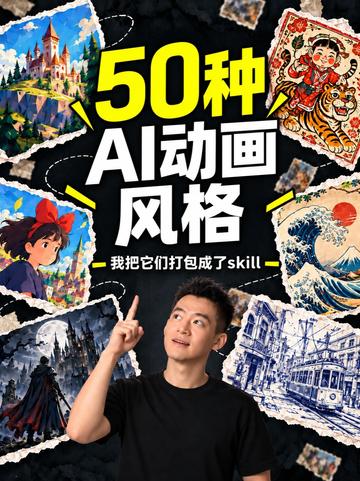
Image 1 — extracted and organized
Readable text (by prominence/position)
- 50 styles
- AI animation
- styles
- — I packaged them into a skill —
(Top large text “50 styles”, white text below “AI animation styles”, small bottom line “— I packaged them into a skill —”)
Interface steps / chart data
- No recognizable interface steps or chart/table data. The image is a poster/promo style with no interactive UI elements or numeric charts.
Visible facts (only directly observable content)
- Vertical poster layout; near the lower-center is an adult male facing the upper-right and pointing upward with his right index finger (face oriented upper-right); he wears a black short-sleeve shirt.
- Central large text combines yellow and white (the “50” in yellow, other main title text in white); a smaller horizontal phrase appears at the bottom with decorative dash lines on each side.
- Background is dark (near black) with shredded-paper or torn-paper texture/pattern; several torn-paper-style illustration patches are distributed around the edges and title area.
- Visible illustration patches (observable image elements from different poster areas include but are not limited to):
- Top-left: a castle or large building built on a cliff or high ground (bright colors, fairy-tale/fantasy style).
- Top-right: a traditional-style illustration featuring a child and a tiger (bright colors, decorative patterns).
- Upper-right-mid: a large-wave ocean image with a red circular background (sun/moon), style close to ukiyo-e.
- Bottom-right: a city street scene, including a tram/tracks and buildings, line-drawing or woodcut style.
- Lower-left-mid: an illustration of a dark character wearing a cloak/cape standing on a height or rock, overall dark tone and shadowed.
- Lower-left or mid-left: a short-haired girl with a red bow, facing left or in profile, cartoon/animation style.
- Patch edges are "torn" with irregular borders; some patches are visually connected or decorated with white dashed/stitch lines.
- Strong color contrast: black background, yellow large text, white text, and various saturated illustration color blocks.
- The image is a single poster with no identifiable buttons, progress bars, or UI controls.
Inferred (labeled as "inferred", not directly observable)
- Inferred this poster is promotional or a cover for “50 AI animation styles”, possibly used for a video, tutorial, or course (based on title text and visual layout).
- Inferred the bottom word “skill” may be a brand, platform tag, or keyword (lowercase may be design or brand choice).
- Inferred the central person could be the creator or presenter (common design semantics when a person points to the title).
- Inferred the various illustration patches likely represent different “animation styles” (given the title and the juxtaposition of multiple style samples).
Missing or unreadable information (explicitly state what is not readable/missing)
- Small copyright or watermark text in corners or on patches may exist but is unreadable at the provided image resolution; cannot transcribe.
- Presence of an author signature, logo, or platform mark in bottom corners is indeterminate (not clearly identifiable).
- The image source URL or metadata was not embedded in the provided image extract; source metadata is missing.
SkillPI Creation Analysis
Intended uses:
- The poster presents a packaged set of visual style examples and claims to combine “50 AI animation styles” into a single “skill.” Likely uses include serving as a video thumbnail, course/tutorial cover, or promotional art to showcase a collection of animation styles available for creators.
Image evidence (based on image_text observable facts):
- The prominent textual claim “50 styles” + “AI animation styles” and the line “I packaged them into a skill” directly support the assertion that the content advertises a 50-style pack labeled as a skill.
- Multiple disparate-style illustration patches (castle, child-and-tiger illustration, ukiyo-e-like large wave, tram city scene, dark cloaked figure, cartoon girl with red bow) act as visual samples implying a variety of styles are included.
- The poster format does not show download, installation, or platform-specific UI elements; no direct method for obtaining or using the skill appears in the image.
Steps to use a packaged skill (generic, to be verified for the specific skill and platform):
1) Identify distribution channel and package format (plugin, preset pack, model weights, project files) and confirm which animation tools or workflows are supported. This is not provided in the poster and must be verified.
2) Obtain the asset: download or import the skill package from the author’s page or distribution platform per the author’s instructions.
3) Install/load the skill in the supported AI animation tool (import via plugin/preset manager if applicable, or place model files per the tool’s model-loading procedure).
4) Prepare input assets: import source images, frame sequences, or rigged animations that will receive the chosen style.
5) Select and apply a style from the pack (choose one of the 50 styles) and execute the style application or transfer process within the tool.
6) Tweak parameters (strength, fidelity, frame rate, resolution) as available, then render/export the final animation or frame sequence.
Prerequisites for reproduction (must be present and verified):
- The exact location and method to obtain the skill package (author page, video description, or download link). The poster does not include this; verify via the original video or author materials. Original video URL: https://www.douyin.com/video/7692685899863215369
- Confirmation of the package format and supported tools (which animation app or pipeline the skill targets). Compatibility must be confirmed before attempting installation.
- Licensing and usage terms (commercial vs. non-commercial, attribution requirements, third-party asset restrictions) must be checked on the distribution page.
Items to verify (before attempting to use or redistribute):
- Exact download/distribution link and package version (not present in the poster).
- File format and supported host tools or runtimes (plugin, preset, model weights, etc.).
- Licensing, permitted uses, and any attribution requirements.
- Any dependencies or auxiliary resources (e.g., specific model runtimes, companion assets, or installation instructions).
Closing facts / verification note:
- The poster confirms the creator’s claim of packaging “50 AI animation styles” into a skill, but it does not contain instructions, platform information, or download details. To apply or reproduce the package, obtain the full distribution and documentation from the original source and verify compatibility and license. Original source URL: https://www.douyin.com/video/7692685899863215369