
Prototype a modern agent inspired by Knowledge Navigator
Learn how to map Apple’s 1987 Knowledge Navigator concept to a modern AI Agent prototype: extract UX patterns, define agent capabilities (NLU, retrieval, tool invocation, memory), design a touch/dialog interface, integrate back-end services, and set evaluation and privacy checks. A practical guide for designers and researchers preparing a proof-of-concept.
Image Analysis
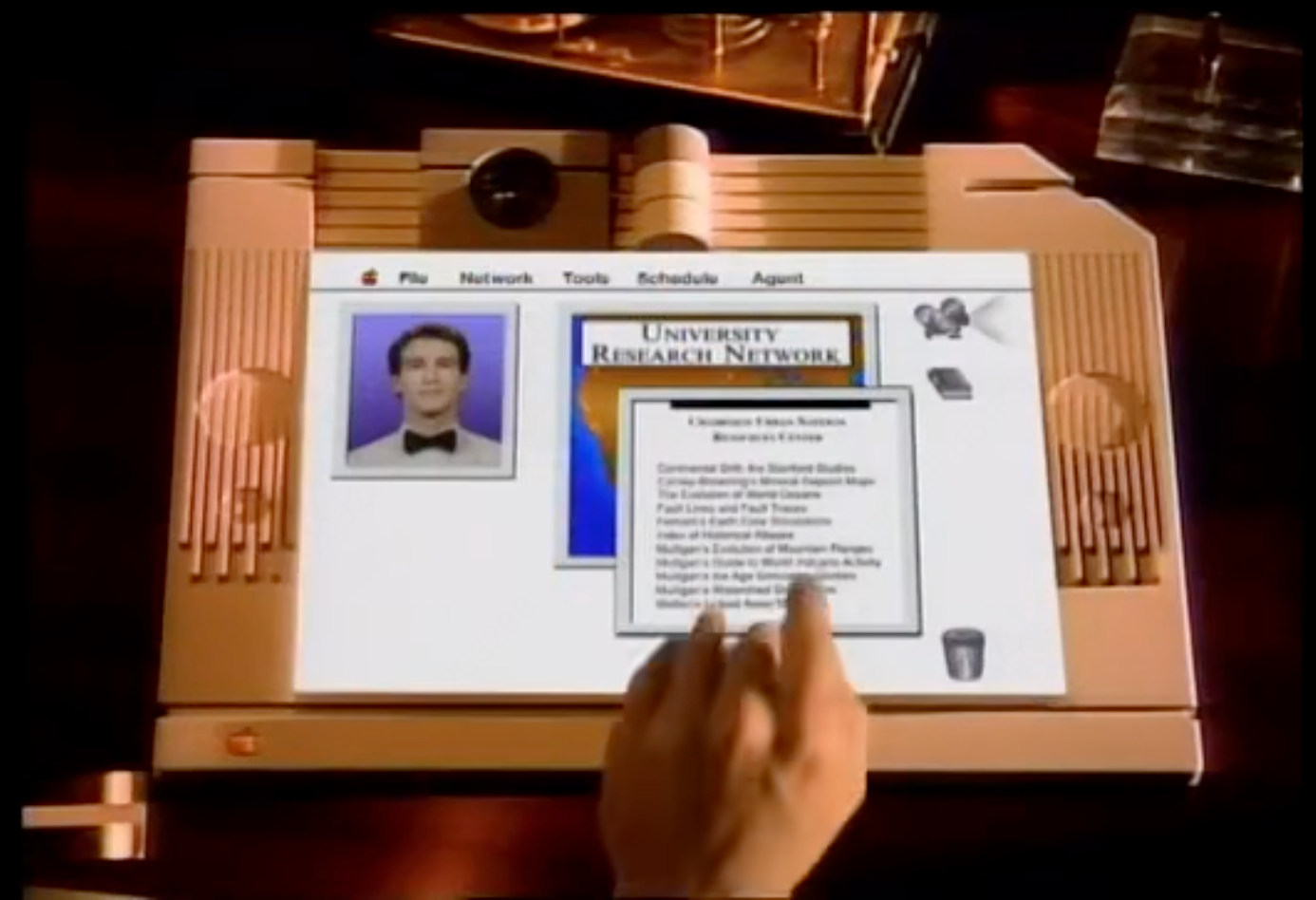
Image 1 — Observable facts (only items that can be reasonably read or directly observed)
- Device and scene
- A beige/light-brown tablet-style electronic device is visible (resembling an early touch/tablet computer or terminal), placed on a dark wooden desk.
- The device front has vertical grille strips on both left and right sides (likely vents or speakers), and each side has a circular recessed feature (above the grille area).
- The top-center of the device has a round black protrusion resembling a camera or lens; the top also shows a scroll/hinge-like structure.
- The lower-left corner of the device shows a button or indicator with an Apple logo (a small apple icon is discernible).
- The screen’s lower-right corner shows a trash/recycle bin icon (similar to a desktop trash).
- Near the lower-center of the image the tip of a hand/index finger is touching or close to the screen, with the finger moving upward (fingertip and part of the back of the hand are visible).
- On the desk outside the screen, the upper-right corner shows part of a transparent/glass object (stacked glass or a transparent container).
- Screen interface (top menu)
- The top of the screen has a horizontal menu bar; leftmost is an Apple icon, followed by words (left to right, roughly readable):
- File
- Network
- Tools
- Schedule
- Agent
- The menu bar style is a light background with gray separators.
- Main screen content
- The left side of the screen contains a portrait-style photo of a person (male, light-colored suit or formal wear, black bow tie), placed within a light gray frame.
- The center-right of the screen shows a rectangular image with a colored background (orange-blue gradient or map-like), above which larger text reads: “UNIVERSITY RESEARCH NETWORK” (uppercase and relatively clear).
- Over or in front of that colored rectangle there is a smaller pop-up window (modal or floating), with a title area at its top and a body composed of multiple short text lines (like a directory or list). A vertical scrollbar or border indicator on the right suggests the list can scroll.
- Near the top-right edge of the screen there are two icons: one resembling a film reel, the other like a book or document/box (not fully clear).
- Larger readable title in the pop-up
- The large heading above/associated with the colored rectangle reads “UNIVERSITY RESEARCH NETWORK” (consistent with the other observation).
- The pop-up’s many short lines are list entries (one per line), but most body text is small and not fully legible (see “not legible” items).
Image 1 — Unreadable or uncertain text/content (itemized by position)
- Whether the first menu word to the right of the Apple icon is exactly “File” (very likely but not 100% clear due to letter spacing and resolution).
- The full title text at the top of the pop-up window (under the bold top line) shows some words or numbers but cannot be fully read (it appears related to “UNIVERSITY RESEARCH NETWORK” but cannot be confirmed).
- The exact text of each line inside the pop-up: lines are discernible but words per line cannot be read clearly (font too small, image resolution/compression causes blur).
- Small text within the colored rectangle or secondary subtitles inside it are not legible.
- The second icon at the top right (book/box) is unclear in meaning.
Image 1 — Inferences (clearly labeled as inference, not fact)
- The interface is likely an information browsing or resource directory view for a “University Research Network” (based on the large heading and list layout).
- The pop-up is likely a detailed view of resource/list items; the finger gesture may be interacting via touch (selection or scrolling), but this is an interaction inference rather than a confirmed fact.
- The device is likely an Apple-era concept or product (based on the Apple logo and interface styling), but exact model and date cannot be determined from the image alone.
Additional observable phenomena (facts)
- The screen uses white backgrounds and light window borders with shadows or beveled edges to indicate layer hierarchy.
- The left portrait and center colored rectangle are laid out side by side, creating an information dashboard or contact/resource card layout.
- The on-screen graphics and typography exhibit a GUI style reminiscent of the 1990s era (based on icon style and widget shapes — this is an observed visual style and not a definitive date assertion).
If needed, I can zoom into each blurred line of the pop-up and indicate which characters or words are possible, or list uncertain glyphs by position (e.g., “pop-up line 1, line 2”) for further verification.
SkillPI Creation Analysis
Usefulness of the creation:
- The provided material (summary + detailed image observations) serves as a historical and design reference to study how a 1987 concept prefigured modern, goal-driven AI agents. It is useful for product designers, UX researchers, and historians interested in interface metaphors where an assistant proactively fulfills user goals.
Image evidence that supports the claim:
- Visible interface items—an Apple icon, a top menu including an “Agent” label, a large on-screen heading “UNIVERSITY RESEARCH NETWORK”, a pop-up list of resources, and a finger interacting with the screen—collectively support that the short film depicted a tablet-like interactive device with an assistant-oriented UI for browsing/locating research resources.
Associated capabilities and implementation steps (the source does not list engineering details; the following are practical steps to build a comparable prototype and require verification of specific tools and services):
1) Extract scenarios and success criteria: identify the short film’s core scenarios (e.g., knowledge search, expert contact, document organization, schedule assistance) and define measurable success criteria for each.
2) Design an interactive prototype: recreate the information layout (contact/portrait panel, central resource card, floating detail list, top function menu, touch affordances) as clickable/touchable UI screens (use any prototyping tool of choice; tool names are implementation choices to be verified).
3) Specify agent capabilities: list required agent abilities—natural language understanding (NLU), dialog/state management, retrieval/search interfaces, tool invocation APIs (calendar, mail, external knowledge), short- and long-term memory, and authentication/authorization flows.
4) Build backend integrations: connect retrieval indices or knowledge bases, wrap external services via secured APIs for tool calls, and implement a memory store for user and context state.
5) Implement interaction paths: wire touch and voice entry points to the agent flow, implement goal decomposition and tool orchestration, and create fallback behaviors for ambiguous requests.
6) Test and evaluate: run user scenarios to validate that a goal-driven agent reduces manual steps, and check accuracy, latency, security, and privacy compliance.
Prerequisites and items to verify:
- Prerequisites: access to suitable data sources and APIs (documents, calendar, email, knowledge bases), a selectable language/understanding model or modules, front-end prototyping capacity, and representative users or scenarios for testing.
- Items to verify before implementation: original short film source and copyright if republishing or reusing footage; any blurred/missing on-screen text in the image that affects precise UI interpretation; and the legal/privacy implications of connecting to real user data services.
Limitations and disclaimers:
- The above interpretation is derived from the provided summary and image description. The source does not contain runnable code or step-by-step engineering specs; specific technologies, model names, or third-party services are not asserted here and must be chosen and validated during implementation. This text does not claim that the concept has been actually reproduced in working form.