
Turn photos into cartoon stickers
Learn two ways to make photos look like sticker-style cartoons: (1) use an AI tool that supports third-party extensions and follow repo/extension instructions to process images; (2) apply a raw-image (template) in an image/AI editor and export stickerized results. Includes needed prerequisites, typical steps and items to verify before reproducing.
Image Analysis
Figure 1 — Itemized record (English translation)
1) Readable text (facts)
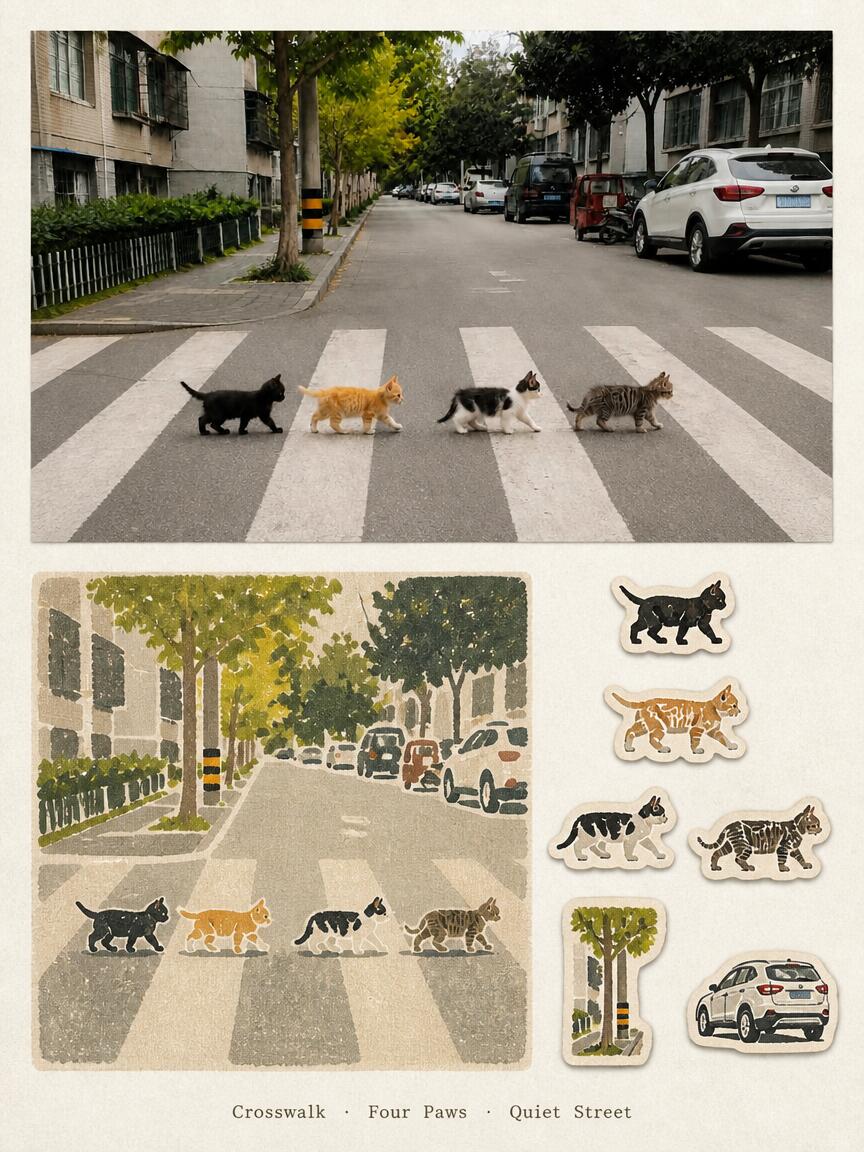
- Bottom center English short phrase: Crosswalk · Four Paws · Quiet Street
2) Composition / UI steps (visual elements listed top-to-bottom, left-to-right)
- Top large photo: street view (bird’s-eye / eye-level), foreground crosswalk (zebra crossing), parked cars and street trees visible in the distance, buildings and sidewalks on both sides.
- Middle-left: a stylized illustration corresponding to the photo scene, showing the same crosswalk and four cats, in a textured/stamp-like style.
- Right vertical column: several sticker-style small icons (from top to bottom: four cat icons of different colors/patterns, a tree sticker, a white SUV sticker).
- Bottom center: the English short phrase mentioned above (Crosswalk · Four Paws · Quiet Street).
3) Charts / numeric data
- No tables, charts, or numeric data readable.
4) Visible facts (only explicitly visible items, no inference)
- Four cats walking side-by-side across the crosswalk in the top photo (left to right: black short-haired, orange/ginger, white with black patches / calico or mottled, gray-brown tabby).
- The crosswalk shows at least five white horizontal stripes (partially visible).
- Trees and parked vehicles on both sides of the street (a white SUV parked on the right curb, several small cars and a taller black vehicle/van), sidewalks and low fences (left side near building shows hedges or greenery).
- A black-and-yellow striped warning post or utility pole near the center-left of the frame.
- Multi-story buildings with windows and external window grilles/railings on both left and right sides.
- The middle illustration simplifies the photographic scene: same four cats crossing in the same order, with vehicles and trees stylized.
- The right sticker column contains individual cat stickers, a tree sticker, and a white SUV sticker, matching the illustration’s style.
- The photo is clearly taken in daylight (natural, even lighting), with no obvious night light sources.
5) Unreadable or unclear content (marked as unreadable/uncertain)
- Vehicle license plates are unreadable (blurred/obscured/low resolution).
- Vehicle make/model cannot be determined (white SUV visible but logo/details unclear).
- Small signs/plaques on buildings are not legible (resolution/distance limit).
- People (if any) are not visible or cannot be identified; the image is primarily an empty street scene with cats.
- Any small text inside the illustration/stickers (if present) is not legible.
6) Inferences (clearly marked as inference, not confirmed fact)
- The scene is likely in a residential or quiet street area (based on parked cars, buildings and street trees).
- The composition may deliberately echo the idea of four animals crossing side-by-side (similar to the “Abbey Road” motif); it appears stylized by the author.
- The four cats are likely real animals in the top photo rather than posed props, but whether they are pets or strays is unknown.
- The right-side stickers and the middle illustration are likely part of the same design series (similar style/theme).
- The photo was probably taken during daytime, but exact time (morning/afternoon) cannot be determined.
- The photograph does not appear heavily composited, though color/filters may have been applied; a single image cannot conclusively prove this.
If needed, I can:
- Zoom in and attempt a more granular description of blurred regions (license plates and small text likely remain unreadable).
- Produce a detailed element checklist (e.g., more specific descriptions of each cat’s posture and gait).
SkillPI Creation Analysis
Intended use of the post:
- Shows an approach for turning photos or scene elements into sticker/cartoon-style visuals for social sharing, sticker design, postcards, or unified visual styling.
Image evidence summary (from the image text):
- Top: street photo with four cats side-by-side on a crosswalk; middle: a matching stylized illustration; right: a column of sticker-like icons; bottom: the phrase “Crosswalk · Four Paws · Quiet Street.”
Steps to use the related skill (based on source claims; not independently verified):
Method 1 (source says): Download and run a GitHub skill named travel-memory-sticker-card with an AI tool. Typical steps might be:
1) Locate the repository named travel-memory-sticker-card on GitHub.
2) Follow the repo README to install or place required files into your AI tool’s extension/skill directory (may include scripts, config, or assets).
3) In the AI tool, load/call the skill and supply the source image(s) to be processed.
4) Adjust any available parameters (style strength, sticker placement, colors) and run the processing.
5) Export or save the stickerized output.
Method 2 (source used): Use a raw-image (生图) template directly in an image/AI editor:
1) Open the editor or AI app and choose/import a sticker-style template.
2) Load your original photo into the template and adjust cropping/composition and style intensity.
3) Apply the template and export the result or export individual sticker elements.
Reproduction prerequisites and recommendations:
- Verify that the travel-memory-sticker-card repository actually exists, its repository URL, and its license. The source mentions the name but does not provide a direct link here.
- Confirm the AI tool you plan to use supports third-party skills or extensions and which runtime or framework is required.
- Check whether the repo requires extra model weights, dependencies, or a specific runtime (e.g., particular Python version or ML framework).
- If using templates, identify where the template is hosted (built-in to a platform or third-party template file) and any usage restrictions.
- Prepare the original photos (higher resolution generally gives better results) and ensure you have permission to process/export them.
Items to verify (unknowns from the source):
- Existence, accessibility, and license of travel-memory-sticker-card on GitHub (the source only names it).
- Compatibility of that skill with particular AI platforms (which platforms or local setups support it).
- Whether the skill requires additional assets, paid models, or non-public weights to achieve the example result.
- Degree of similarity between the template-based result and the skill-based result—the author reported they look “similar,” but no side-by-side verification was provided.
Caveats and safety notes:
- The above steps are derived from the source description and the image evidence; the skill and process were not executed in this environment. Do not run untrusted code without reviewing the repository and testing in an isolated environment.
References:
- Source post: https://www.xiaohongshu.com/explore/6a86c05a000000003301f99c
- Skill name mentioned (to be verified on GitHub): travel-memory-sticker-card