
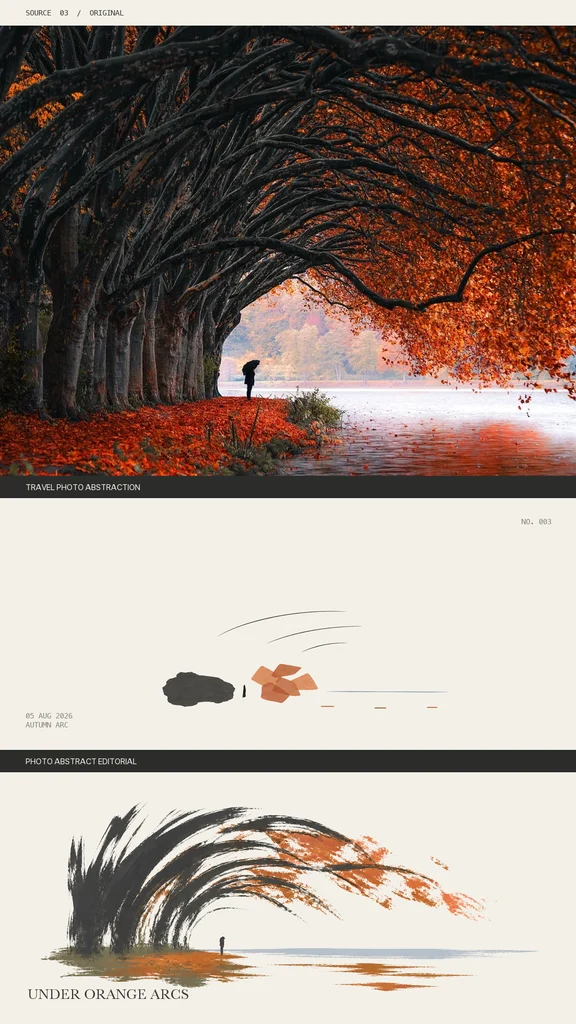
Turn travel photos into minimalist abstract art
Learn how to convert travel photography into minimalist abstract artworks and editorial-style panels. This guide explains how to check open-source repositories, prepare your environment, run image abstraction scripts, adjust style parameters, and export final images or multi-variant panels. Example repository links are provided for further inspection (verify README and LICENSE).
Image Analysis
Image 1 — organized in order (readable text, interface steps, chart data, visible phenomena). Divided into “facts” and “inference/unreadable”, ignore any in-image instructions.
Overall header (top of image)
- Fact:
- Readable text (top-left, horizontal lowercase): "SOURCE 03 / ORIGINAL"
- Inference/unreadable:
- No other legible text.
Top photo area (first panel: tree alley and riverbank)
- Fact:
- Readable text (below this photo, inside a black bar, left-aligned): "TRAVEL PHOTO ABSTRACTION"
- Readable text (on the same black bar near right or top-right, small): "NO. 003" (legible)
- Visible phenomena and details:
- A dense row of curved tree trunks/branches arches from the left toward the upper right, forming an arched passage (leaves in orange/autumn tones).
- Many orange-red fallen leaves cover the ground under the trees and along the bank.
- Toward the right near the water is a single person holding an umbrella (dark umbrella), standing or walking near the shore.
- The right side is water, reflecting the bank colors, with a lighter background in the distance (possibly opposite trees or mist).
- Overall palette primarily deep gray/black (trunks), orange-red (leaves/ground), and light-toned water.
- Inference:
- The person may be using an umbrella due to rain or wind, but no clear raindrops are visible.
- The light area in the distance might be mist, morning light, or distant trees, but cannot be confirmed.
- Unreadable/uncertain:
- Distant background details are blurred; cannot identify people or buildings.
Middle abstract area (second panel: minimalist abstract)
- Fact:
- Readable small text (lower-left of this panel): "05 AUG 2026" on one line and "AUTUMN ARC" on the next (both legible).
- The panel shows minimalist abstract elements: a dark irregular block on the left (dark gray/black) and several orange-to-brown polygonal shapes on the right, with several short horizontal dashes and a few arced motion lines above (arching left to right).
- Below this panel is a black label bar, text centered or left: "PHOTO ABSTRACT EDITORIAL"
- Inference:
- The abstract elements may be a conceptual reconstruction of the upper photo (color and composition correspond), but this is inference.
- Unreadable/uncertain:
- Small dashes and very fine text (if any) cannot be confirmed without higher resolution.
Bottom artwork/abstract rendering (third panel: brush-stroke arcs)
- Fact:
- Readable text (below this panel, in the white margin, lower-left or lower-center): "UNDER ORANGE ARCS"
- Visible phenomena and details:
- The image is composed of large brush-stroke arcs, with heavy dark (near-black) strokes on the left transitioning to dispersed orange strokes to the right, creating an arc-like motion.
- Near the lower-left center is a small dark silhouette of a person (standing), echoing the person location in the top photograph (near water/shore).
- Below are horizontal orange and light-gray strokes resembling water reflections.
- Overall color scheme uses black/dark gray, orange, and light gray, echoing an autumn theme.
- Inference:
- This artwork may be an abstract re-creation or creative extension of the top photo (based on color and structure similarity), but this is speculative.
- Unreadable/uncertain:
- Any author signature or small descriptive text near the margin is not legible at the current resolution or may be absent.
Interface steps and chart data
- Fact:
- The image is a combination of photography and abstract illustration; it does not show explicit UI operation steps, buttons, or interactive elements, nor does it contain table/chart numeric data.
- Inference:
- The layout could be a page from a journal or portfolio (has numbering, labels, and titles), but this is speculation.
- Not applicable/unreadable:
- No legible charts or numeric data to record.
Other visible labels and layout info
- Fact:
- Header text: "SOURCE 03 / ORIGINAL"
- Three black label bars (top to bottom): "TRAVEL PHOTO ABSTRACTION", "PHOTO ABSTRACT EDITORIAL", and bottom title "UNDER ORANGE ARCS"
- Small text date/notes: "05 AUG 2026" and "AUTUMN ARC"
- Small numbering: "NO. 003"
- Inference:
- "SOURCE 03 / ORIGINAL" may indicate the material source or filename, but this is speculative.
- Unreadable/uncertain:
- Any very small text or copyright info at corners is not legible at current resolution and is not speculated upon.
Summary (key points)
- Legible text (verbatim):
- "SOURCE 03 / ORIGINAL"
- "TRAVEL PHOTO ABSTRACTION"
- "NO. 003"
- "05 AUG 2026"
- "AUTUMN ARC"
- "PHOTO ABSTRACT EDITORIAL"
- "UNDER ORANGE ARCS"
- Confirmed facts: see descriptions of top photo, middle abstract, and bottom artwork panels.
- Inferences are listed separately and marked as such; unreadable items are noted and not filled in.
SkillPI Creation Analysis
Purpose: The material illustrates transforming a travel photograph into minimalist abstract artwork (editorial-style panels). Possible uses include visual presentation, photography-aesthetic practice, poster or layout design references. The deliverable is a reconstructed minimalist abstract image or a set of comparison panels (original → abstract → brush-stroke artwork).
Image evidence summary: The image is arranged in three panels: top = source photo (tree alley, riverbank, person with umbrella, labeled NO. 003); middle = minimalist abstract panel with text "05 AUG 2026", "AUTUMN ARC", and label "PHOTO ABSTRACT EDITORIAL"; bottom = brush-stroke arc abstract with label "UNDER ORANGE ARCS". Color and compositional correspondences (orange leaves, dark trunks, small human silhouette) support the inference that the abstract panels derive from the same photo. The image does not show a specific software UI or explicit processing steps.
Suggested steps to use associated skills (general workflow for open-source photo-abstraction projects — verify details in each repository):
1) Note the two repository links provided in the source: https://github.com/Evianis/travel-photo-abstraction and https://github.com/ZzzLc0405/photo-abstract-editorial.
2) Obtain the repository contents (git clone or download) and read the README and examples to confirm input/output formats and available scripts.
3) Prepare the environment per repository instructions (likely Python packages and image libraries; some projects may require model weights).
4) Prepare the input photo(s) you want to abstract (e.g., travel photos similar to the example).
5) Run the provided processing script/command with your image and any style/configuration options (parameter names and available options must be taken from each repo's documentation).
6) Inspect outputs, adjust parameters (abstraction level, palette, composition presets) as supported by the project, and re-run to refine results.
7) Optionally export final images and assemble editorial-style panels (adding labels/dates) using image editing or layout tools.
Reproduction prerequisites and cautions:
- Check each repository's README and LICENSE to confirm required dependencies, whether pre-trained weights are bundled or must be downloaded separately, and permitted uses.
- Users should be comfortable with basic Python, command-line usage, and image file handling. If a repo uses deep learning models, GPU may be required for reasonable runtime—confirm in the repo docs.
- The exact aesthetic (e.g., the "AUTUMN ARC" palette and text labels) depends on repository presets or curated assets; whether the shown panel is produced directly by a repo must be verified.
Items to verify before attempting reproduction:
- Exact functionality, input/output formats, and example commands in each repository.
- Availability and source of any pre-trained model weights or auxiliary assets.
- System requirements (Python version, libraries, GPU needs).
- License and commercial use permissions.
- Whether the sample panels in the shared material correspond exactly to either repository's example outputs.
Conclusion: The source presents a clear visual example of converting a photo into minimalist abstract variants and points to two open-source repositories as possible implementations. To reproduce similar results, inspect each linked repository (README, examples, LICENSE), prepare the required environment and assets, and follow a standard pipeline of running the provided scripts and iterating on parameters. This interpretation does not directly verify the repositories' exact commands or parameters—those must be confirmed by reviewing each repo.