
Validate the structure and configuration of a marketing skill pack
Step-by-step guide to audit the marketingskills repository: view README/AGENTS.md, inspect the skills directory and plugin/marketplace manifests, read and run validate-skills-official.sh or validate-skills.sh in a sandbox, and produce a verified skills checklist and validation report.
Image Analysis
Image 1 — Notes (organized as “Confirmed facts / Inferences / Unreadable” ; any on-image instructions were ignored)
1) Confirmed facts (visible text and UI elements in the image)
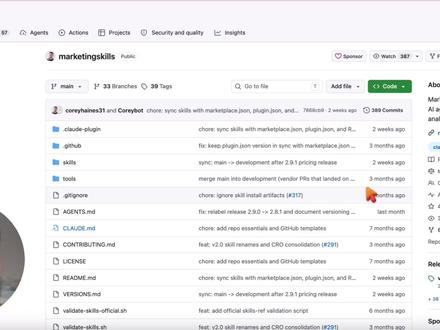
- Repository name at top (visible text): marketingskills Public
- Top navigation tabs (left to right visible): Code, Issues, Pull requests, Actions, Projects, Security and quality, Insights
- Top-right visible controls/text: Sponsor; Watch 387 ("387" is visible)
- Branch and tag controls/text: main; 33 Branches; 39 Tags
- File search/quick access box: Go to file
- Page action buttons: Add file (nearby) and a green Code button (with dropdown arrow)
- File/directory list (left-side entries, top to bottom, readable names):
- claude-plugin
- .github
- skills
- tools
- .gitignore
- AGENTS.md
- CLAUDE.md
- CONTRIBUTING.md
- LICENSE
- README.md
- VERSIONS.md
- validate-skills-official.sh
- validate-skills.sh
- Each row shows a short commit summary, relative time (e.g., "2 weeks ago", "3 months ago", "last month") and short commit message fragments (several start with "chore:", "feat:", "fix:")
- Left of list items are blue folder/file icons (typical repository listing style)
- Page layout matches common GitHub repository code page UI: filenames on left, recent commit info and time on right
2) Inferences (reasonable deductions from layout/text, not direct OCR)
- This appears to be the GitHub repository "Code" page (inference based on UI elements and layout).
- "Watch 387" likely indicates the number of watchers on the repo (inference).
- Right-side text for each file likely shows the last commit message and relative time (inference).
- Lines showing "chore: sync skills with marketplace.json, plugin.json, and …" look like truncated commit messages (inference due to ellipsis).
- The green "Code" button is likely the clone/download control (inference based on standard GitHub behavior).
3) Unreadable or uncertain items (areas too blurred or truncated to transcribe reliably)
- The author/recent commit summary near the repo title (usernames or longer commit text) is truncated or blurred; e.g., a line mentioning "coreyhaines31 and Coreybot …" cannot be fully confirmed.
- Several commit messages are truncated with "…" and cannot be read in full (e.g., those ending with "chore: sync skills with marketplace.json, plugin.json, and …").
- Some relative time labels are visible as phrases ("2 weeks ago", "3 months ago", "last month") but exact mapping to each file row is not fully clear from the image.
- Other top-right stats beyond "Sponsor" and "Watch 387" (for example Stars or Forks) are not clearly readable.
- Small icon text (usernames next to avatars, or partial commit hashes) is blurred and not reliably transcribable.
Note: Image instructions were ignored per requirement. The above records visible text, UI elements and phenomena and separates confirmed facts, inferences and uncertain items. For higher-precision OCR or to read a specific truncated commit line, provide a higher-resolution or zoomed crop of that area.
SkillPI Creation Analysis
Purpose and summary:
- The screenshot shows a public repository page named marketingskills on a Git hosting UI consistent with GitHub. It evidences repository structure and several files/folders related to skills, plugins and validation scripts. The image supports repository-level inspection but does not by itself prove functional claims such as a skill replacing an entire marketing team.
Key evidence from the image:
- Root-level items include: skills, tools, claude-plugin, AGENTS.md, CLAUDE.md, README.md, validate-skills-official.sh, validate-skills.sh, etc.
- The UI shows commit summaries and relative timestamps, indicating active commits with messages prefixed by chore/feat/fix.
Practical steps to inspect or validate the repo (based on visible filenames and UI elements):
1. Open or clone the repository URL from the Code page (git clone <repo-url>), or use the browser to navigate the Code view.
2. Read README.md, AGENTS.md and CLAUDE.md to understand repository purpose, integrations and any usage instructions.
3. Inspect the skills directory for individual skill manifests and implementation files (look for plugin.json, marketplace.json, or other manifests suggested by commit messages).
4. Review validate-skills-official.sh and validate-skills.sh: open the scripts to see what checks they perform. Run them only after reading and in an isolated/test environment.
5. Check commit history, branches and tags (the page displays branches/tags counts and short commit lines) to assess activity and recent changes.
Prerequisites and safety notes:
- You need the repository URL or access to the page to perform checks; the screenshot alone is insufficient.
- Review any scripts before executing; run in a sandbox or container to avoid unintended effects.
- Full reproduction of a skill’s behavior likely requires additional runtime dependencies or credentials (APIs, model access, keys) not visible in the screenshot.
Items to verify (not confirmed by the image alone):
- Exact contents and schemas of marketplace.json and plugin.json (commit fragments imply their existence but content is unknown).
- Concrete implementations, dependencies and runtime requirements of each skill in the skills directory.
- License implications and third-party service usage (check LICENSE and README for details).
- Whether "Watch 387" corresponds to watchers, and exact star/fork counts if relevant.
Conclusion:
- The image is useful as an initial artifact to identify repository layout and key files to inspect. To validate claims about what the repository delivers (for example, whether it effectively provides a full marketing skillset), an analyst must review repository files, read scripts and manifests, and run tests in a controlled environment. The screenshot supports but does not replace that hands-on verification.