
Caveman: AI code writing — cut the fluff by 75%
Learn how to inspect and configure JuliusBrussee/caveman to produce more concise AI coding-agent replies: read the README (example 69→19 tokens), install or integrate the project as a skill/plugin, configure output/caching parameters (example: “75% output tokens”), and test token reductions and answer quality. Includes practical steps to measure token counts and verify compatibility with target agents. Compatibility and exact steps should be confirmed in the repository and agent docs.
Image Analysis
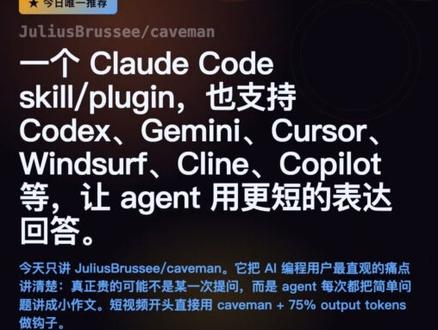
Image 1 — Observed readable text and visible elements:
- A small yellow rectangular label at the top-left containing an asterisk and Chinese text (small font, dark color).
- Near the top center/left a line of English: JuliusBrussee/caveman
- Main heading (large white text):
- "A Claude Code skill/plugin, also supports Codex, Gemini, Cursor, Windsurf, Cline, Copilot, etc., to make agents reply with shorter expressions."
- The heading includes the English words "skill/plugin" and several model/tool names: Codex, Gemini, Cursor, Windsurf, Cline, Copilot.
- Body text (smaller, blue/cyan/light-colored Chinese):
- "Today only talking about JuliusBrussee/caveman. It explains the most intuitive pain point for AI programming users: the expensive part may not be the first question but that agents write mini-essays for simple questions. The short video starts by using caveman + 75% output tokens as cache."
- Visual/background:
- Dark/black background with white and light-colored (blue/cyan) text.
- Several light circular/ring decorations on the right (decorative).
- Single-column layout, similar to a mobile/vertical screenshot.
- No clear charts, numbered steps, or visible interactive controls (buttons, forms) in the readable area.
Uncertain/illegible details:
- The exact Chinese wording inside the yellow label is not fully legible (looks like something like “today's only recommendation” but cannot be 100% confirmed).
- Some small text is slightly blurred; punctuation or spacing might differ slightly.
- The decorative circles on the right cannot be confirmed as interactive elements (appear decorative).
Inferred (marked as inference, not directly shown):
- The screenshot likely comes from a recommendation/share page or article preview (inferred from label and headline layout).
- The phrase "caveman + 75% output tokens as cache" likely describes a technique/strategy to reduce agent output length or cost, but this is an interpretation, not a direct image fact.
- "JuliusBrussee/caveman" is likely a repository name or a plugin/skill identifier (inferred from naming pattern).
Note: Interactive instructions or buttons in the image were ignored per requirements.
SkillPI Creation Analysis
Intended use:
- The material presents Caveman as a skill/plugin aimed at making coding agents produce more concise replies. The README referenced in the source shows a 69→19 token example, and a short video mentions “caveman + 75% output tokens” used as a cache strategy. These are source claims and examples; they do not guarantee identical results across different setups.
Key image evidence:
- The screenshot clearly displays the repository name JuliusBrussee/caveman and a headline identifying it as a Claude Code skill/plugin with listed support for Codex, Gemini, Cursor, Windsurf, Cline, Copilot. The screenshot text references the README token comparison and the short video cache note.
Practical steps to try or reproduce (actionable, needs verification):
1. Locate the repository: open JuliusBrussee/caveman and read the README to confirm feature descriptions and examples (retain the 69→19 token example for verification).
2. Prepare environment and permissions: ensure you have the target agent access and any API keys needed, and confirm whether the agent supports extensions/plugins/skills.
3. Install or integrate: follow repository instructions to install Caveman or integrate it as a middleware/skill in the request/response pipeline of the agent (exact commands and steps depend on the repo).
4. Configure output/caching: inspect and set parameters related to output length or caching (e.g., the referenced “75% output tokens” approach) per the repository's examples.
5. Test and measure: run representative prompts with and without Caveman, record token counts and output content to assess conciseness versus information loss.
6. Adjust or roll back: if responses become too terse or lose necessary context, tune parameters or disable the feature.
Prerequisites and items to verify:
- Prerequisites: access to JuliusBrussee/caveman repository, an agent that supports plugins/skills or the ability to intercept and post-process agent outputs, tooling to count tokens. API keys and appropriate permissions are required for cloud agents.
- To verify: the exact installation and integration instructions in the repository; whether each listed agent (Claude Code, Codex, Cursor, etc.) actually supports the described plugin mechanism or requires additional adapter code; the concrete meaning and default values for the “75% output tokens” caching mention; licensing and permitted usage.
Caveats:
- The provided examples (69→19 tokens, 75% caching) come from the source material and serve as test cases. Do not assume identical results in your environment—results depend on prompts, agent implementation, and configuration.