
2 skills to improve your AI-generated image aesthetics
Learn a concise, two-stage approach to improve AI-generated image aesthetics using a landing-page screenshot: extract and annotate visual elements, define measurable aesthetic metrics, generate candidate styles, and evaluate selections. This guide explains practical steps and verification points; confirm the original source for the named “2 skills.”
Image Analysis
Organized below into three parts — “Facts / Unreadable / Speculation” — for text, UI elements and phenomena visible in the first image.
Facts (directly readable or clearly visible)
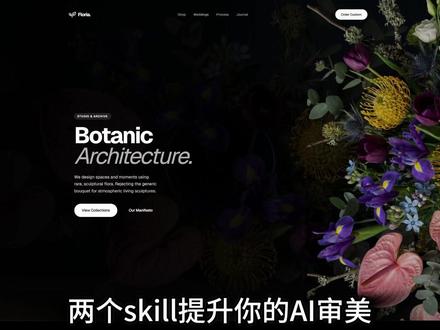
- Centered main heading (large, English): Botanic
- Second line of the main heading (italic, English): Architecture
- A block of English body text appears under the main heading (partly legible; transcribed with ellipses where uncertain):
- “We design spaces and moments using … sculptural forms. Repeating the … inspired by craftsmanship, natural materials.”
- Two side-by-side buttons (English, readable):
- Left button: View Collections
- Right button: Our Manifesto
- A set of colorful floral photographs on the right of the page (distinct purple, yellow, pink flowers and green leaves, dark/black background)
- A horizontal navigation area at the top (several text items) and a circular/oval button or label at the top-right of the page (contains text but not fully legible)
- A small graphic mark at the top-left of the page (icon + text like a logo)
- Large white Chinese overlay text at the bottom of the image (not part of the page; likely a screenshot overlay):
- “两个skill提升你的AI审美”
Unreadable / uncertain content (visually present but text unclear or incomplete)
- The exact text of the top-left logo (text beside the icon) is unreadable (possibly a brand name)
- The specific labels in the top navigation bar are not fully legible (some English words/tokens visible but cannot be confirmed)
- A small rectangular label/text above the main title (left of “Botanic”) is not fully legible
- Several words in the English body copy are uncertain due to spacing/resolution (see ellipses in the transcription)
- Text inside the circular/oval control at the top-right is partially unreadable
Speculation (reasonable inferences based on visual cues, not direct reading)
- The page appears to be a plant/flower-themed webpage or landing page (inferred from the “Botanic Architecture” title and floral photography)
- The “View Collections” and “Our Manifesto” buttons likely lead to product/portfolio and brand manifesto pages respectively
- The top navigation likely contains common site sections (e.g., Home / About / Collections / Contact), but exact items require verification with the source or a higher-resolution image
- The circular control at the top-right may be a login/cart/contact widget (common placement; only speculative)
Interface steps / chart data
- No obvious step flows, tables, or chart data are visible in the image (no recordable data items).
If needed, I can:
- Zoom or crop specific areas of the image to attempt further text recognition (requires a higher-resolution image or access to a larger version); or
- Mark suspected regions with rectangles and note which areas require verification.
SkillPI Creation Analysis
Intended use of the asset:
- The screenshot appears to be a landing page example focused on botanical/floral visuals. It can serve as a reference for visual aesthetic analysis, landing-page layout and color study, or as source material when curating examples for AI image-generation aesthetic guidance (note: this is a suggested use, not a verified training workflow).
Evidence from the image (summary):
- Readable elements include the headline “Botanic / Architecture”, a partially legible body paragraph, two primary action buttons “View Collections” and “Our Manifesto”, a set of colorful floral photos on a dark background, top navigation, and a circular top-right control. The Chinese overlay at the bottom reads “两个skill提升你的AI审美”.
Steps for using associated skills (material does not specify which skills; this must be verified — below are general, tool-agnostic steps for aesthetic improvement based on the screenshot):
1) Acquire a high-resolution source: obtain the original page or a higher-resolution screenshot so text and small UI details are readable (prerequisite for reliable analysis).
2) Annotate visual elements: mark headline, subheading, body text blocks, buttons, image regions, navigation, and interactive controls; record color swatches and layout proportions.
3) Define measurable aesthetic metrics: e.g., typography hierarchy clarity, color harmony, focal balance, and photographic contrast/saturation targets relevant to the intended aesthetic.
4) Apply a two-stage improvement approach (conceptual; specific skills/tools to be confirmed):
- Stage 1: Generate or select candidate visual variations informed by the annotations and target metrics (could be manual redesigns or AI-generated variants).
- Stage 2: Evaluate candidates via human review or automated scoring based on the defined metrics, select high-scoring variants as references for further generation or tuning.
5) Iterate: refine metrics and generation parameters based on evaluation results.
Reproducibility prerequisites:
- Access to a higher-resolution or original source image/page to read ambiguous text and confirm UI elements;
- Clarification of what the “2 skills” refers to (e.g., prompt engineering, style transfer, image fine-tuning). The provided material does not name them;
- If intending to use AI models, access to the chosen models and a validation/evaluation setup.
Items to verify before proceeding:
- The original video/post content at https://www.douyin.com/video/7664790197476789547 to see whether the author lists the two skills and provides procedural details;
- Unreadable UI labels (top-left logo text, navigation items, and the top-right circular control) to confirm brand/context;
- Licensing or reuse permissions for the floral photography if used in datasets or public examples.
Summary judgment:
- The screenshot is a usable visual example for landing-page aesthetic analysis, but the concrete “2 skills” referenced are not specified in the image. To produce an actionable, reproducible tutorial or workflow, confirm the exact skills/tools from the original source or author before asserting specific methods.