
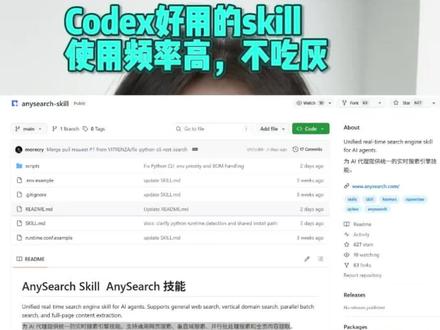
codex very useful skills — high usage frequency, not collecting dust
Step-by-step overview for developers: clone the anysearch-skill repo, read README and install dependencies, configure search backends or API credentials, integrate AnySearch Skill into an AI agent, and run general/vertical/parallel batch searches plus full-page content extraction to validate results.
Image Analysis
Image 1 — Itemized notes (English translation)
1) Facts (text, UI elements and visible phenomena directly readable from the image)
- Top green gradient banner text (Chinese): "Codex好用的skill 使用频率高,不吃灰" (Codex very useful skill, high usage frequency, not collecting dust)
- The page is a GitHub repository page; the repository name visible is "anysearch-skill"
- README area title (mixed English and Chinese visible): "AnySearch Skill AnySearch 技能"
- Readable README English sentence: "Universal real time search engine skill for AI agents. Supports general web search, vertical domain search, parallel batch search, and full-page content extraction."
- File/directory list shows several items; identifiable entries include:
- "memory"
- "README.md"
- Other items are present but partially blurred or truncated.
- Common GitHub UI elements are visible on the right/top (colored buttons and action bars); a green button is visible (similar color to GitHub's "Code / Clone" button).
- There is additional mixed English/Chinese text under the README block, but longer paragraphs are too small to read in the image.
2) Inferences (reasonable guesses, labeled as such)
- This is likely the homepage of the anysearch-skill repository with the README preview displayed, explaining the AnySearch skill's capabilities.
- The Chinese text in the README likely complements or translates the English description.
- The page likely includes standard GitHub action buttons (Code / Issues / Pull requests / Add file) and metadata (stars, forks, watchers), though specific values are not legible.
3) Unclear or indeterminate items (due to blur, cropping, or occlusion)
- The repository owner/organization prefix (full repo path) is not legible or is cropped.
- Many file names and short descriptions in the file list are not fully readable.
- Exact text on the green button (e.g., whether it reads "Code" or "Clone") is not clearly visible.
- Longer README paragraphs and small-font content below the visible sentence are not readable from this image.
- Stars, forks, watchers and similar numeric metadata are not legible.
4) Other visible phenomena (descriptive only)
- A green gradient banner is overlaid at the top with a Chinese promotional line (see above).
- The main page uses a light theme (typical GitHub default); left column shows file list preview and right column shows README content preview.
SkillPI Creation Analysis
Purpose of the item:
- The screenshot appears to show a GitHub repository named anysearch-skill whose README describes "AnySearch Skill," a universal real-time search engine skill for AI agents. Such a project is intended to provide AI agents with capabilities for general web search, vertical domain search, parallel batch search, and full-page content extraction.
Key image evidence:
- The README sentence visible in English: "Universal real time search engine skill for AI agents. Supports general web search, vertical domain search, parallel batch search, and full-page content extraction." The repository name "anysearch-skill" and visible files like README.md and memory support the interpretation that this is an open-source skill repository.
Usage steps for the associated skill (based on common open-source repo workflows and what the README suggests; exact commands/configs are not visible in the image):
1. Clone or download the anysearch-skill repository to your local or deployment environment.
2. Open README.md and follow installation instructions to install dependencies (look for requirements files or package manifests).
3. Configure search backends or API credentials as required (e.g., third-party search APIs or self-hosted search services) using provided config files or environment variables.
4. Integrate the AnySearch Skill into your AI agent framework according to examples (register the skill/plugin or call its exposed interfaces from your agent pipeline).
5. Run example queries to validate: perform general web searches, vertical-domain searches, parallel batch searches, and verify full-page content extraction output.
Reproduction prerequisites (minimum expected requirements to attempt verification):
- Access to the full GitHub repository (owner/organization and all files) — the screenshot does not show the full path or all files.
- README or documentation containing installation, configuration, and usage examples.
- Any required external services or API access (if the skill depends on third-party search APIs).
- A runtime environment satisfying the repository's language/runtime and dependency requirements (e.g., Python/Node or other — not specified in the image).
Items to verify before attempting to reproduce or deploy:
- Full repository path (owner/organization) and branch or release tag.
- Exact installation commands, dependency list, and configuration options in README or docs (only a fragment is visible in the screenshot).
- Presence of sample code, tests, or container configurations (Docker, etc.) to simplify running the skill.
- Whether external search APIs are required, and how credentials/quotas are managed.
- Compatibility and integration instructions for specific agent frameworks (which agent frameworks are supported or demonstrated).
Notes and caution:
- The above steps are inferred from the visible README excerpt and common project practices; they do not constitute a verified, step-by-step reproduction guide for this particular repository. Retrieve the repository in full and follow its README/documentation for authoritative instructions.