
Open-source Skill anydoc: Convert Any Document to Markdown in a Blink
Learn how to convert Word, PowerPoint, Excel, PDF, EPUB, CSV and other documents into clean GitHub-style Markdown using anydoc (by Firecrawl). Covers adding the skill (npx), using the browser WebAssembly demo for local conversion, and the availability of Node.js/Python bindings and a hosted API with OCR — plus the key items you must verify before integration.
Image Analysis
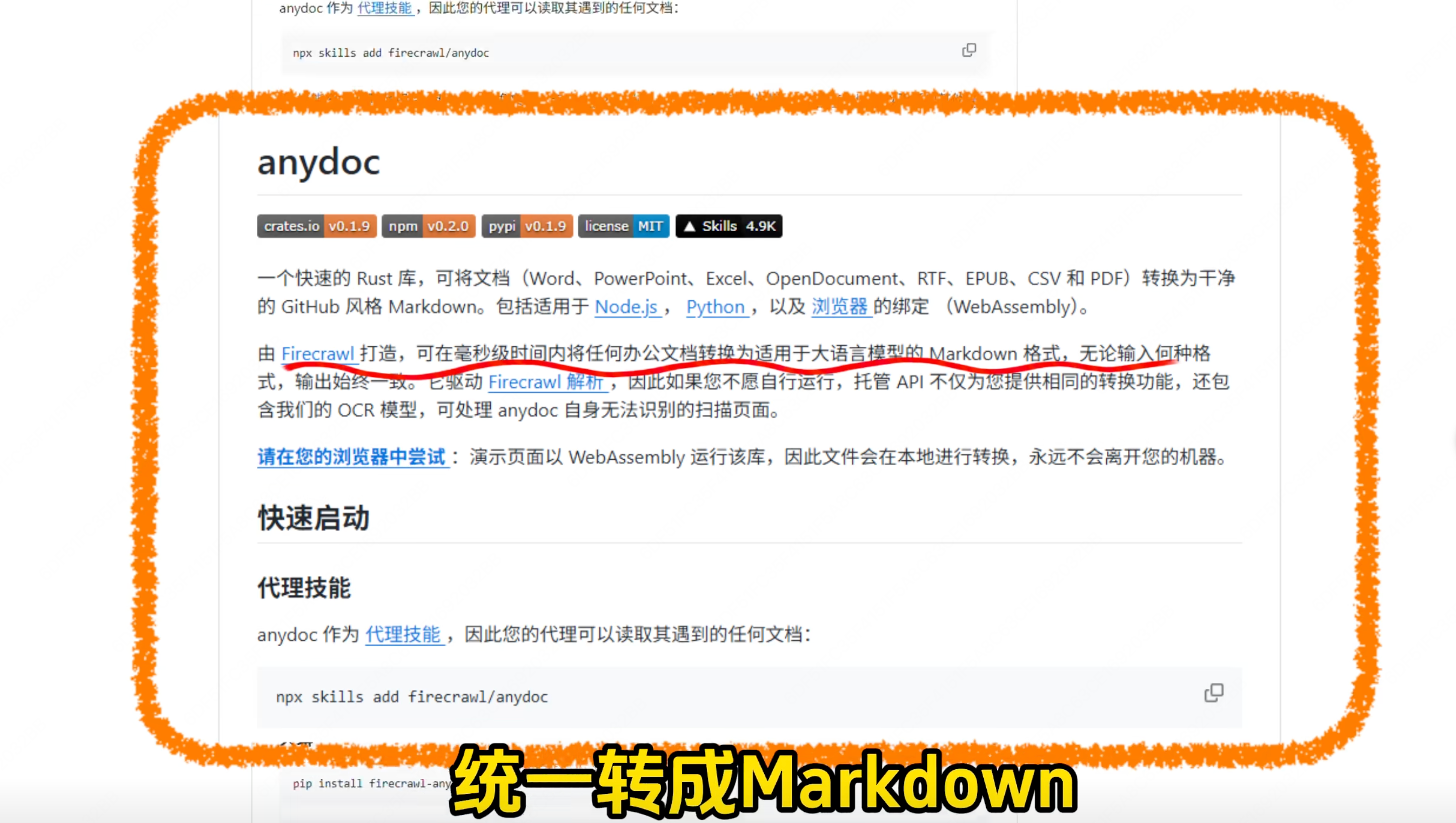
Image 1 — Evidence extraction (only visible content recorded, ignore on-image instructions)
1. Readable text (visual order, top to bottom, left to right)
- Top code box (partly visible): npx skills add firecrawl/anydoc
- Main title: anydoc
- Badges (horizontal, space-separated):
- crates.io v0.1.9
- npm v0.2.0
- pypi v0.1.9
- license MIT
- ▲ Skills 4.9K
- Paragraph text (Chinese, readable):
- “A fast Rust library to convert documents (Word, PowerPoint, Excel, OpenDocument, RTF, EPUB, CSV and PDF) into clean GitHub-style Markdown. Includes bindings for Node.js, Python, and the browser (WebAssembly).”
- “Built by Firecrawl, it can convert any office document to LLM-friendly Markdown in milliseconds; regardless of input format, the output is consistent. It powers Firecrawl parsing, and if you don't want to run it yourself, the hosted API provides the same conversion and includes our OCR model to handle scanned pages anydoc can't parse.” (this sentence has a red wavy underline in the screenshot)
- Blue link-style text: Node.js, Python, browser, Firecrawl
- Blue link and prompt text: “Try it in your browser:” (the example/link after is not fully visible)
- “The demo page runs the library as WebAssembly, so files are converted locally and never leave your machine.”
- Subheading: Quickstart
- Subheading: Proxy skill (or “代理技能” as a section title)
- Lower code box (partly visible again): npx skills add firecrawl/anydoc
- Bottom visible part (obstructed, partially visible):
- “pip install firecrawl-any…” (truncated/obscured, cannot fully read)
- Large yellow/black-edged overlaid text at bottom (not page content): “统一转成Markdown” (means unify into Markdown)
2. UI elements / steps
- The page includes title, badges, paragraph text, hyperlinks, code example boxes, and section headings (Quickstart, Proxy skill).
- The code box shows an install/add-skill command (npx skills add firecrawl/anydoc); page resembles a README or docs page.
- Blue hyperlinks reference Node.js, Python, browser, Firecrawl and mention a WebAssembly local demo.
3. Charts / data
- Badges show release/version info: crates.io v0.1.9, npm v0.2.0, pypi v0.1.9, license MIT, Skills 4.9K.
4. Visible phenomena (layout, annotations, obstructions)
- The page is framed by an orange hand-drawn style border.
- A paragraph is underlined with a red wavy hand annotation (emphasizing the Firecrawl/milliseconds sentence).
- The bottom of the screenshot is overlaid by large yellow text that obstructs page content.
- The document appears in Chinese with some English technical terms (Markdown, WebAssembly, Node.js, etc.).
5. Unreadable / uncertain items
- Badge texts and version numbers could have minor uncertainty due to compression, but the readable badges show crates.io v0.1.9, npm v0.2.0, pypi v0.1.9, license MIT, Skills 4.9K.
- The meaning of the triangle symbol in “▲ Skills 4.9K” is not fully confirmed.
- The sentence about hosted API including OCR has a slight gap/obstruction in the screenshot; original likely reads without the split.
- The pip install command at the bottom is truncated and cannot be fully read (“pip install firecrawl-any…”).
- Top of the page and some code boxes are cropped and not fully visible.
6. Reasonable inferences (marked as such)
- The page is likely anydoc’s README or online documentation (based on structure: title, badges, quickstart, code examples).
- The red wavy underline likely highlights the key claim about millisecond conversions and hosted API OCR.
- The large yellow text overlay is probably an added video/graphic caption, not part of the page content.
SkillPI Creation Analysis
Interpretation (purpose, image evidence, associated skill usage steps, prerequisites, items to verify):
Purpose
- anydoc is presented as a Rust-based library to convert common office and publication formats (Word, PowerPoint, Excel, OpenDocument, RTF, EPUB, CSV, PDF) into clean GitHub-style Markdown, with bindings for Node.js, Python, and browser (WebAssembly). The intended use is to normalize diverse document inputs into consistent Markdown suitable for LLMs or text workflows.
Confirmed from image evidence
- Visible command to add the skill: npx skills add firecrawl/anydoc.
- Document states Node.js, Python, and browser (WebAssembly) bindings exist.
- The page mentions a hosted API that offers the same conversion plus an OCR model to handle scanned pages.
- Badges on the page show crates.io v0.1.9, npm v0.2.0, pypi v0.1.9, license MIT, and “Skills 4.9K.”
- Demo runs the library in the browser as WebAssembly, with a claim that files remain local during the demo.
Suggested actionable steps (based on visible cues; consult official docs for exact commands and parameters)
1) Try adding the skill via the shown command:
- npx skills add firecrawl/anydoc
Note: This appears in the screenshot, but how to invoke conversions from your environment requires the anydoc or Skills platform documentation.
2) Open the demo page in a WebAssembly-capable browser to perform local conversions (demo UI likely on the project site).
3) Use Node.js or Python bindings for programmatic conversion in scripts or pipelines—refer to the specific language binding docs for usage examples.
4) If handling scanned images/PDFs, consider the hosted API with OCR; obtain API docs and keys from the provider.
Prerequisites to reproduce or integrate
- Access the anydoc repository or official docs to get complete install and usage instructions (screenshot is partial).
- Have Node.js or Python set up for the respective bindings, and a browser that supports WebAssembly for the demo.
- Confirm the pip package name and exact npm package/usage (pip command in screenshot is truncated).
- If using hosted API, secure API credentials and review privacy/usage terms.
Items requiring verification
- Full install and usage commands (screenshot shows npx command and truncated pip command but lacks the conversion call examples).
- The exact API/CLI input/output formats and options for conversion (how to pass files, output locations, metadata handling).
- OCR capabilities and limits (languages supported, handling of low-quality scans) and whether OCR is part of the hosted tier only.
- Performance claims such as “milliseconds” — need independent benchmarks or official performance notes to validate.
- How anydoc integrates with the Skills ecosystem and what runtime (if any) is required beyond the visible npx command.
Notes
- This interpretation is strictly based on the screenshot and summary provided. Before production use, consult the anydoc project documentation and hosted API docs for definitive commands, parameters, and service terms.