
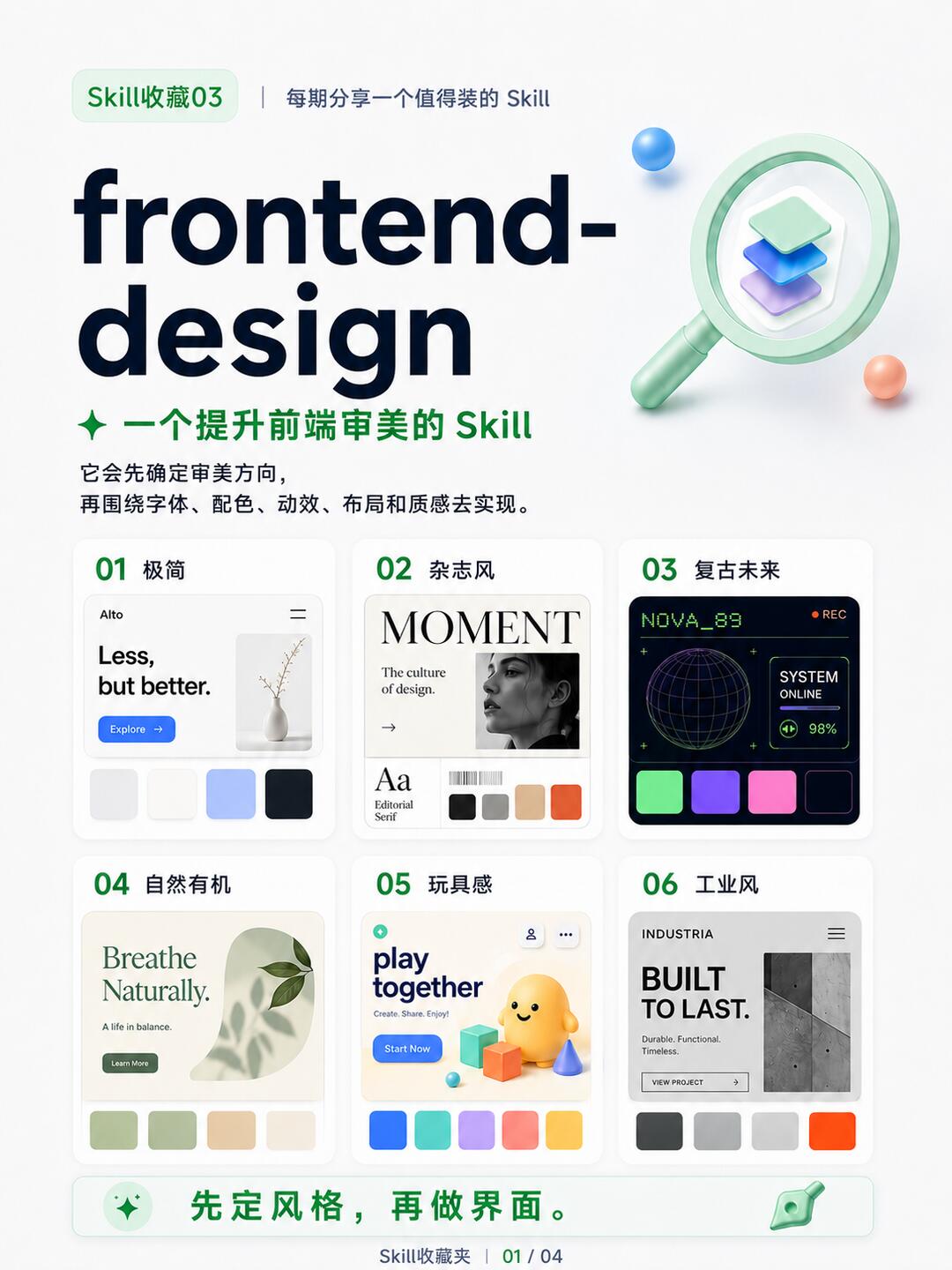
Skill Collection 03 | A Skill to Improve Frontend Aesthetics
Step-by-step: use the frontend-design-direction approach to choose an aesthetic direction (Minimal, Editorial, Retro‑Futuristic, Natural, Playful, Industrial), then generate recommendations for typography, color palettes, motion, spacing and texture to guide AI-generated UIs or front-end implementation. Source and install hint: https://github.com/affaan-m/ECC (version noted as 0.0.1). Verify installation steps, output format and framework compatibility before integration.
Image Analysis
Image 1 (extracted visible/readable information from the image; categorized as “facts / inferences / unreadable”)
1) Facts (directly readable or visually evident)
- Top text
- “Skill收藏03” (green small tag at top-left)
- “每期分享一个值得装的 Skill” (top line near the tag)
- Main title (large)
- “frontend-”
- “design” (together: “frontend-design”)
- Subtitle (green)
- “一个提升前端审美的 Skill”
- Explanatory short lines (below subtitle)
- “它会先确定审美方向,”
- “再围绕字体、配色、动效、布局和质感去实现。”
- Six numbered cards (left-to-right, top-to-bottom)
01 Minimal
- Card label/title: “01 极简”
- Readable content: “Alto” (small text at top-left of card), “Less, but better.” (large sentence), button/blue label “Explore →” (or “Explore” with an arrow)
- Color swatches: four square swatches at bottom (roughly light gray, white/beige, light blue, deep blue/ink)
02 Editorial / Magazine
- Card label/title: “02 杂志风”
- Readable content: big title “MOMENT”, subtitle “The culture of design.”, small text “Aa Editorial Serif”
- Visuals: a black-and-white portrait photo, and multiple color swatches (at least 4–5, including black/gray/beige/orange tones)
03 Retro-Futuristic
- Card label/title: “03 复古未来”
- Card elements: top text “NOVA_89” (green pixel-style text), top-right small red dot “REC”, inside the card “SYSTEM ONLINE” text and a “98%” numeric value, center has a wireframe globe/3D mesh sphere illustration
- Color swatches: 4–5 saturated swatches (green, purple, blue-purple, pink/magenta, etc.)
04 Natural / Organic
- Card label/title: “04 自然有机”
- Readable content: large text “Breathe Naturally.”, subtext “A life in balance.”, button “Learn More”
- Color swatches: four swatches dominated by greens, beiges, light browns/cream
05 Playful / Toy-like
- Card label/title: “05 玩具感”
- Readable content: large “play together”, small “Create. Share. Enjoy!”, button “Start Now”
- Visuals: yellow cartoon 3D character and colorful building blocks (3D style)
- Color swatches: five swatches (blue, teal, purple, pink, orange/yellow bright colors)
06 Industrial
- Card label/title: “06 工业风”
- Readable content: small top text “INDUSTRIA”, big title “BUILT TO LAST.”, note “Durable. Functional. Timeless.”, button/label “VIEW PROJECT →” (or similar)
- Color swatches: four swatches (neutral gray, dark gray, light gray, orange)
- Bottom banner
- Green text: “先定风格, 再做界面。” (Set the style first, then build the interface.)
- Bottom page/source small text: “Skill收藏夹 | 01 / 04”
- Other visible UI elements
- Top-right has a magnifier + stacked 3D icon (pale green handle, stacked blocks)
- Overall card grid layout; cards have rounded corners and drop shadows
- Main title uses bold sans-serif large type; subtitle and explanatory text use lighter fonts
- Overall white background with green accents and multiple style thumbnails
2) Structure / workflow shown (facts)
- Six numbered style directions or templates (01–06), each showing a thumbnail, color swatches, and sample text/button
- Page flows top-to-bottom: overview → six style cards in two rows of three → bottom slogan and page numbering
3) Charts / numeric data (facts)
- Card 03 contains “98%” with “SYSTEM ONLINE” (suggesting an online/system stat)
- Each card has 4–5 color swatches underneath indicating palettes
- Page numbering shows “01 / 04” (suggests this is page 1 of 4 in a series)
4) Unreadable / uncertain items (must be flagged)
- The phrase “每期分享一个值得装的 Skill” is visually readable but “值得装的” could be “值得藏的 / 值得装的” — recorded as shown in the image with slight uncertainty.
- Small barcode-like images or tiny copy under card 02 and other microtext cannot be resolved at current resolution.
- Card 01’s small “Alto” text is readable but small and possibly mis-spelled; most likely “Alto.”
- Card 03 has additional small green pixel text and UI elements that are not legible beyond “NOVA_89”, “SYSTEM ONLINE” and “98%”.
- Card 06’s “INDUSTRIA” is readable, but surrounding tiny menu text is not fully legible.
- The left-side source label “Skill收藏夹” around the page number is slightly blurred at small size, read as “Skill收藏夹” with some uncertainty.
5) Inferences (reasonable assumptions, not direct facts)
- The image is likely a poster or style library page demonstrating six UI aesthetic directions for front-end inspiration.
- Color swatches under each card represent that style’s palette.
- Bottom slogan “先定风格,再做界面。” suggests a recommended design flow: decide style first, then build the UI.
- “Skill收藏03” and page index “01 / 04” infer this is part of a series (first page of multiple pages in a third collection).
- Card 03’s HUD/REC motif suggests a retro sci-fi/dashboard aesthetic.
- Card 05’s toy visuals imply a style aimed at children’s or playful product interfaces.
6) Readable text summary by block (for verification)
- Top: “Skill收藏夹03”; “每期分享一个值得装的 Skill”
- Main title / subtitle: “frontend-design”; “一个提升前端审美的 Skill”
- Explanatory sentence: “它会先确定审美方向, 再围绕字体、配色、动效、布局和质感去实现。”
- Card texts:
- 01: “01 极简”; “Alto”; “Less, but better.”; “Explore →”
- 02: “02 杂志风”; “MOMENT”; “The culture of design.”; “Aa Editorial Serif”
- 03: “03 复古未来”; “NOVA_89”; “REC” (red dot); “SYSTEM ONLINE”; “98%”
- 04: “04 自然有机”; “Breathe Naturally.”; “A life in balance.”; “Learn More”
- 05: “05 玩具感”; “play together”; “Create. Share. Enjoy!”; “Start Now”
- 06: “06 工业风”; “INDUSTRIA”; “BUILT TO LAST.”; “Durable. Functional. Timeless.”; “VIEW PROJECT →”
- Bottom: “先定风格,再做界面。”; “Skill收藏夹 | 01 / 04”
SkillPI Creation Analysis
Purpose of the item:
- The post introduces a Skill concept (frontend-design / referenced as frontend-design-direction, version 0.0.1, GitHub source: https://github.com/affaan-m/ECC) intended to improve AI-generated front-end aesthetics by first defining a clear visual/esthetic direction, then applying typography, color, motion, spacing and texture guidance so generated UIs avoid generic “AI template” looks.
Image evidence summary:
- The image shows six numbered style cards (01–06) representing selectable aesthetic directions (Minimal, Editorial, Retro-Futuristic, Natural/Organic, Playful/Toy-like, Industrial). Each card includes a thumbnail, palette swatches and sample copy, and the page includes the slogan “先定风格,再做界面。” and page index “01 / 04.”
Steps to use the Skill (executable from source claims):
1) Select a target aesthetic direction (e.g., Minimal, Editorial, Retro-Futuristic, etc.).
2) Use the Skill to produce concrete visual guidance for that direction: typography recommendations, color palette samples, motion/animation style notes, spacing/grid suggestions, and texture/detail cues.
3) Feed those guidance items as prompts or as a small design spec to your UI generation tool or front-end developer.
4) Compare outputs to the chosen direction, adjust parameters and iterate.
Reproduction prerequisites (what you need to reproduce or apply this approach):
- Access to the Skill artifact: the source references a Red Skill component (copy-install) and provides a GitHub link: https://github.com/affaan-m/ECC.
- An AI UI generator or front-end development environment capable of consuming the Skill’s outputs as prompts, tokens, or style rules.
- A target front-end framework or tech stack (React, Vue, HTML/CSS, Tailwind, etc.) to validate whether the Skill’s outputs map directly to implementation.
Items to verify before practical use:
- Installation & usage details: confirm how to copy/install the Skill from the Red Skill component and any exact commands or import steps.
- Output format: does the Skill output plain design guidance/prompt text, design tokens, or executable front-end code (HTML/CSS/JS/components)?
- Framework compatibility: whether the Skill provides adapters or examples for React/Vue/Tailwind or other stacks.
- License and reuse rules for the GitHub repository.
- Maintenance & versioning: input lists version 0.0.1 — check for updates, changelog, and active maintenance.
Closing factual notes and verification checklist:
- The post and image confirm the core workflow: choose a style first, then build the interface guided by that style.
- To put this into practice, obtain the Skill from the provided GitHub or Red Skill component and verify installation steps, output type, framework support and licensing before assuming direct code-level integration.
- The image text (e.g., “NOVA_89”, “SYSTEM ONLINE”, “98%”) and the six sample directions provide concrete examples that can be used as starting prompts or style tokens, but do not alone specify implementation details—the above verification items are necessary to proceed.