
Open-source a commercial-grade scroll-interactive web Skill
Learn how to implement scroll-triggered and interaction-triggered icon vector animations using SVG + CSS/JavaScript (optionally GSAP or Web Animations API) and prepare an open-source demo. Covers vector asset prep, implementing SPIN/HOVER/ARC/PRESS states, scroll-trigger logic, and what’s needed to publish a reproducible example.
Image Analysis
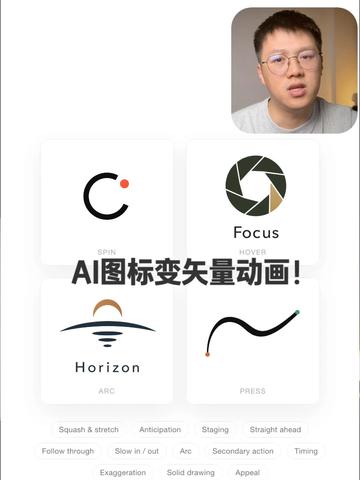
Image 1 — Facts and readable text (top-to-bottom, left-to-right)
Facts (directly readable or visually verifiable)
- Overall white background. A large line of Chinese text near the top-center reads: “AI图标变矢量动画!” (appears as a title in black).
- Top-right contains a small picture-in-picture square (video/avatar window) showing a close-up of a bespectacled man’s face (identity not determinable; simply a presenter image).
- Center area shows a 2×2 grid of four cards (each card contains an icon and text):
- Top-left card: a black semi-circle resembling a “C” with a small orange dot at the top-right; text below reads “SPIN” (all caps).
- Top-right card: aperture/shutter-like graphic (deep green, dark green, beige fan-like segments); text below reads “Focus” (capitalized) and a smaller line below reads “HOVER”.
- Bottom-left card: horizontal horizon/arc with a semicircle (colors deep blue/brown/beige); text below reads “Horizon” (capitalized) and a smaller line below reads “ARC”.
- Bottom-right card: a black wavy/curved line (green dot on the right end, orange dot on the left end); text below reads “PRESS” (all caps).
- Below the cards are one or more rows of small gray tags (appear as keywords/categories). Readable words (left-to-right, top-to-bottom):
- First row: Squash & stretch, Anticipation, Staging, Straight ahead
- Second row: Follow through, Slow in / out, Arc, Secondary action, Timing
- Bottom centered row (with larger spacing between words): Exaggeration, Solid drawing
- Overall style resembles a demo/teaching interface (white background, card grid, centered title, keywords listed below).
Not readable / uncertain (ambiguous or obscured in the image)
- Cannot determine whether the top-right portrait is a live video, recorded video, or a static avatar.
- There may be smaller explanatory texts on the cards beyond the identified words; some small text is blurred or occluded.
- Any additional interactive controls (buttons, hover indicators) between cards and title are not clearly visible or may be cropped out.
- It is unknown whether there are side navigation elements beyond the screenshot area.
Inferences (based on layout and common semantics — marked as inference)
- The screen likely belongs to a tutorial or demo about turning icons into vector animations with AI; the large central text is probably the title (inference).
- The small top-right window is likely the presenter’s live or recorded video (inference).
- The four cards likely represent example icons and different animation/interaction types (SPIN, HOVER/Focus, ARC/Horizon, PRESS) (inference).
- The bottom-listed phrases (Squash & stretch, Anticipation, etc.) resemble animation principles (e.g., the 12 principles of animation) or related keywords (inference).
No identification or inference about the pictured person’s identity or name was made (only described as a presenter image).
SkillPI Creation Analysis
Intended use of the piece:
- The screenshot appears to be a demo/tutorial interface titled “AI图标变矢量动画!” that showcases four sample icon animations/interactions (SPIN, Focus/HOVER, Horizon/ARC, PRESS). It is suitable as a visual mockup for a scroll-triggered or interaction-driven icon animation demo, a tutorial slide, or a component demo page.\n
Key image evidence (verifiable points):
- The central title and 2×2 card layout are the main visual elements. Each card is labeled SPIN, Focus/HOVER, Horizon/ARC, PRESS, indicating distinct animation/interaction states.\n- Bottom labels list animation principles (Squash & stretch, Anticipation, Arc, Timing, etc.), showing the author references classic animation principles when designing icon animations.\n
Associated skills and concrete implementation steps (using verified tools/methods):
- Primary implementation intent (recommended search/goal): implement scroll- or interaction-triggered vector icon animations and publish them as an open-source example project.\n- Recommended, commonly used tools (all are well-known and verifiable): SVG (vector icons), CSS animations/transitions, JavaScript, IntersectionObserver, GSAP (with ScrollTrigger), Web Animations API, optional Lottie (for AE→JSON vector animations).\n- Example reproducible steps:
1) Create/export icons as SVGs, keeping separate paths/groups for animatable elements.\n 2) Define animation states mapping to the labels: SPIN (rotation), HOVER/Focus (hover/focus state effects), ARC/Horizon (movement along an arc or arc-based easing), PRESS (press down + scale/shadow).\n 3) Implement animation snippets per state using CSS, Web Animations API, or GSAP timelines to keep animations composable.\n 4) Use IntersectionObserver or GSAP ScrollTrigger to bind animations to scroll position; use mouse events (mouseenter/mouseleave, pointerdown) for hover/press interactions.\n 5) Assemble a demo page with the 2×2 card layout and explanatory labels; add a README describing the animation principles and usage, then publish as an open-source example.\n
Prerequisites and resources needed to reproduce:
- Vector icon source files (SVGs or design files that can export SVG).\n- A front-end dev environment (Node.js optional; simple static hosting is sufficient).\n- Familiarity with DOM events, CSS animations, and at least one JS animation approach (GSAP or Web Animations API).\n- If using Lottie, After Effects + Bodymovin export pipeline.\n
Items requiring verification (not determinable from the screenshot):
- What exactly “Skill” refers to in this context (a platform-specific Skill, a component library, or simply a demo project).\n- Whether a code repository or demo project exists and where it is hosted (no link provided in the screenshot).\n- Whether the picture-in-picture is live presenter video or a static image.\n- Any additional micro-interaction controls or detailed animation parameters that are not visible in the image.\n- Whether specific AI tools or automated workflows were used to convert icons into vector animations (if so, tool names and export formats should be confirmed).\n
Notes:
- This interpretation is strictly based on the screenshot and visible text; it does not assume external assets or repositories.