
People still underestimate the value of nature-skills — lowering the barrier to academic writing and figure creation
Find and use the nature-skills repository on GitHub to adopt templates and scripts for academic writing and scientific figure generation. Learn to read the README, locate modules (nature-figure, nature-paper2opt, nature-polishing, nature-data), install Python dependencies, and run example figure scripts; verify external model integrations and license details in the repo.
Image Analysis
This is a整理 of image 1. Items are listed under “Facts (directly readable)”, “Unreadable or truncated content”, and “Inferences”; any in-image instructions are ignored. To protect privacy, readable personal usernames or avatars have been omitted or labeled as “omitted/restricted”.
1) Facts (directly readable text, UI elements, chart data, and visible phenomena)
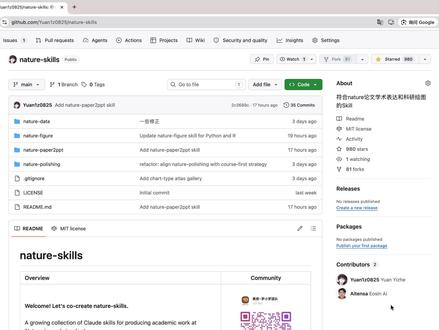
- Overall interface: a screenshot of a GitHub repository page (browser address bar shows github.com/.../nature-skills; repo name visible: "nature-skills").
- Top navigation (common GitHub menus) shows: Code, Issues, Pull requests, Actions, Projects, Wiki, Security and quality, Insights, Settings (some items appear as icons or text).
- Branch/search area: branch shown as "main" (label: 1 branch, 0 tags); search box present (placeholder similar to "Go to file"); buttons "Add file" and green "Code" button visible.
- Repository file/directory list (multiple items visible by line, with left-side icons/types):
- nature-data
- nature-figure
- nature-paper2opt
- nature-polishing
- .gitignore
- LICENSE
- README.md
- Each file/directory line shows a recent commit summary and time (phrases like "Add nature-paper2opt skill", "Update nature-figure skill for Python and ...", "refactor: align nature-polishing with course-first strategy"), with time labels like "3 days ago", "2 days ago".
- README portion visible in the page center:
- Repo title: nature-skills
- Section title: "Overview"
- Visible sentence start: "Welcome! Let's co-create nature-skills."
- Next visible English phrase starts: "A growing collection of Claude skills for producing academic work at" (truncated).
- "MIT license" displayed below the README block on the right.
- Right sidebar (About / Releases / Packages / Contributors):
- About block shows a line starting with # (likely topic tags or short description, in Chinese or mixed language).
- Releases appears empty or no releases.
- Packages shows a count (appears 0 or empty).
- Contributors shows "Contributors 2" and two avatar entries (avatars visible; usernames omitted/restricted).
- A small QR-code block is visible on the right side.
- Browser UI: address bar shows full URL (username portion omitted/restricted), browser tabs, bookmarks bar, and extension icons visible (names not captured).
2) Unreadable or truncated content
- Username/organization in address bar partially truncated or omitted for privacy.
- README contains truncated text (e.g., "A growing collection of Claude skills for producing academic work at ...").
- About text in the sidebar is partially obscured or blurred; full Chinese/mixed description not readable.
- Some commit messages are truncated or too small to fully read (e.g., "Update nature-figure skill for Python and ...").
- Watch/Star/Fork numbers in the top-right are not clearly readable.
- Contributor usernames next to avatars are not listed here (omitted/restricted).
3) Inferences (reasonable deductions beyond direct readables)
- The repo likely relates to converting or packaging “Nature”-style article tasks into reusable research-writing/figure “skills” or templates (based on repo name nature-skills and README phrasing).
- The README’s mention of "Claude skills" likely refers to a set of skills written for a model or tool named Claude (based on the truncated phrase), though implementation details are not visible.
- The repository appears public and recently updated (multiple recent commits visible).
- The sidebar shows 2 contributors, indicating a small number of collaborators.
Notes/caveats
- This整理 is based solely on the provided screenshot; unreadable or personal parts are redacted or labeled to protect privacy.
- For verbatim transcription of commits, full README text, or contributor usernames, a higher-resolution or cropped image is needed, or explicit authorization to transcribe usernames.
SkillPI Creation Analysis
Intended use:
- The repository named nature-skills appears to be a collection intended to lower the technical barrier for academic writing and figure production by providing reusable skills, templates, or scripts that researchers can adopt to produce papers and figures more easily.
Image evidence summary:
- Visible directories (nature-data, nature-figure, nature-paper2opt, nature-polishing) and a README Overview section support the interpretation that the repo contains modular components for data handling, figure generation, paper optimization, and polishing.
- Commit messages visible in the listing (including one that references Python for nature-figure) suggest at least part of the repository uses Python-based scripts for figure generation.
Steps to use the related skills (practical, based on visible repo structure — details must be confirmed in the repo):
1. Clone the repository locally: git clone <repo_url> (URL username is redacted in the screenshot).
2. Open README.md in the repo root to read Overview and per-module instructions; the screenshot shows README text but it is truncated, so open the full README to get exact usage.
3. Inspect module folders:
- nature-figure: likely contains Python scripts/templates for creating scientific figures; check for example scripts and dependency files (requirements.txt, pyproject.toml).
- nature-paper2opt and nature-polishing: likely contain workflows or scripts for paper formatting/optimization and polishing; review their README or example usage.
- nature-data: likely holds data processing utilities or example datasets.
4. Install environment and dependencies specified by the repo (Python version and libraries such as matplotlib/seaborn/plotly may be required if nature-figure is Python-based).
5. Run provided examples to generate figures or draft outputs; adapt templates to your data and manuscript structure.
6. If the repo references external models/services (e.g., the README phrase mentioning "Claude skills"), locate the invocation code and follow instructions to configure API keys or service credentials.
Reproduction prerequisites and items to verify:
- Prerequisites: access to the full GitHub repository, a compatible runtime environment (e.g., required Python version, libraries), and any external service credentials if the code integrates with third-party models or APIs.
- Items to verify by opening the repo:
1) Full README contents and per-module README files for precise usage and examples.
2) Exact dependency lists (requirements.txt, environment.yml) and installation instructions.
3) Implementation details for any mentioned external model integration (the screenshot shows the phrase "Claude skills" but the concrete code, API usage, and credentials handling must be checked in the repository).
4) License text (screenshot shows "MIT license" visually; confirm LICENSE file for scope).
5) Contributor activity and maintenance status (commit history, issues, pull requests) to assess project maturity.
Summary conclusion:
- The screenshot supports the view that nature-skills is positioned as a practical base of templates/skills for academic writing and figure generation, including modules that reference Python for figure-related tasks. Full practical use requires cloning the repo and reviewing its README and module files to determine exact commands, dependencies, and whether external model integrations are implemented and how they are invoked.