
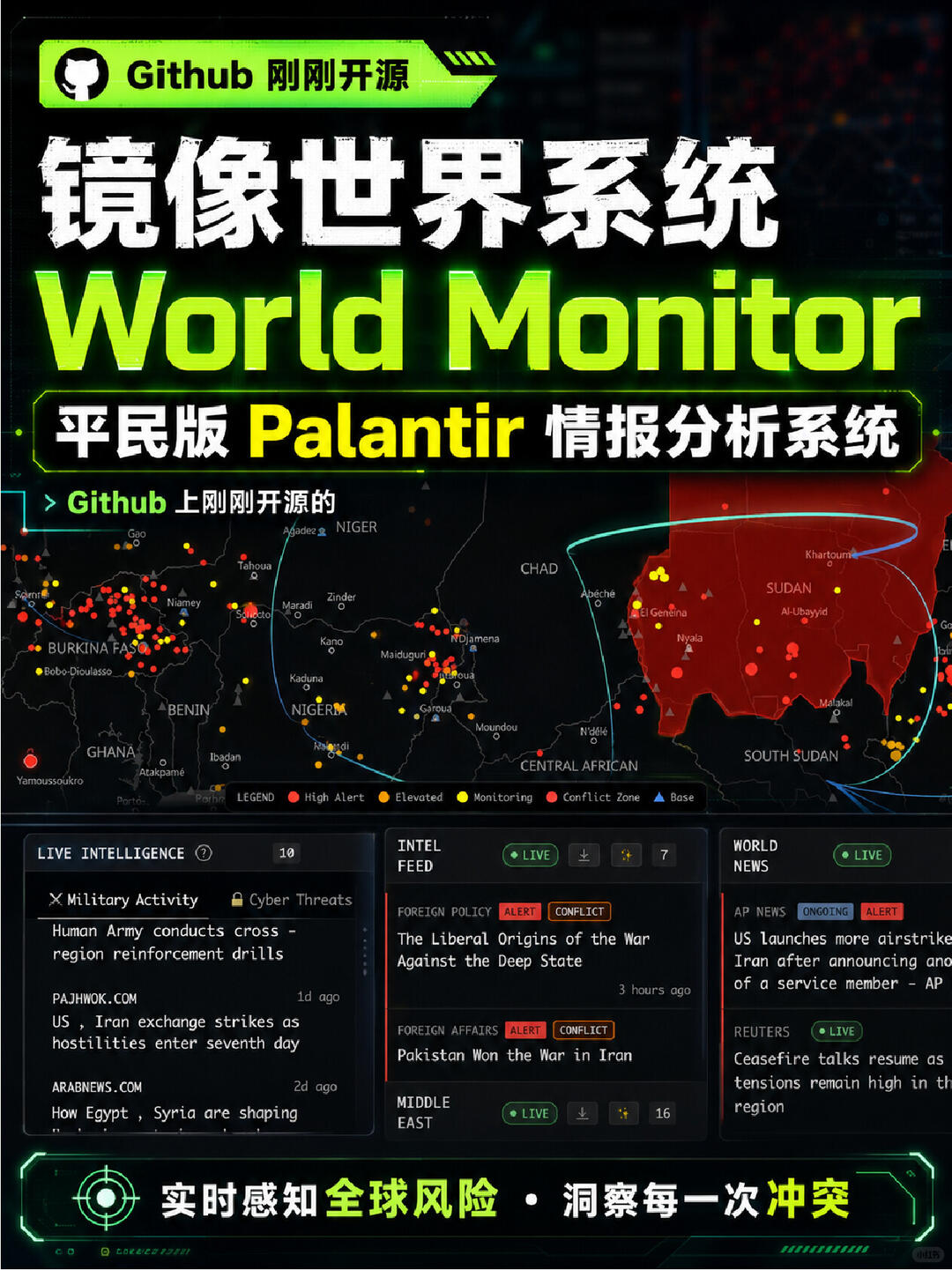
Open-sourced civilian Palantir — "World Monitor"
Step-by-step intent: clone and configure the open-source World Monitor on Windows/macOS/Linux, install and integrate Ollama to run AI locally (no cloud API key). After setup you can view a live 3D globe with 500+ news sources, 15 event types, 56 overlay layers, a 31-country stress index and integrated financial feeds. Verify repo README for exact dependencies, models and license.
Image Analysis
Below is an organized extraction of evidence visible in image 1. Items are separated into “facts” and “speculation/unconfirmed”; unreadable or unidentifiable content is explicitly noted.
SkillPI Creation Analysis
Use case summary:
- Based on the provided summary and the screenshot, World Monitor is an open-source situational awareness dashboard (project name: World Monitor) that aggregates news, military activity, natural disasters and financial feeds onto a live 3D globe with multiple overlay layers, a country stress index, and AI-generated summaries.
Image evidence (key verifiable points):
- The screenshot shows the title World Monitor, subtitle indicating a civilian Palantir-like system, a “Github just open-sourced” banner, map overlays (including red conflict zones), a legend (High Alert / Elevated / Monitoring / Conflict Zone / Base), and panels labeled LIVE INTELLIGENCE, INTEL FEED and WORLD NEWS with live badges and timestamps. These elements support the claim that the project is a real-time aggregation/visualization UI.
Practical steps to try/run (high-level, based on claims in the source — exact commands must be verified in the repository):
1) Find the World Monitor repository on GitHub and clone it locally (source states the project is open on GitHub).
2) Read the repository README/INSTALL instructions and install required dependencies listed there (the repository should enumerate exact requirements such as runtime, frameworks, and libraries).
3) Install and configure Ollama on the local machine to enable local AI inference (the source explicitly states the project can use Ollama to run AI locally without cloud API keys).
4) Obtain any required local models referenced by the project (model names and sizes must be checked in the repo and in Ollama documentation).
5) Configure any environment variables or data paths per the repository and start the local server; open the UI to view the 3D globe, overlays, INTEL FEED and WORLD NEWS panels.
Prerequisites and system considerations:
- The repository URL, exact dependency list and startup commands must be taken from the project’s README (not inferred here).
- Ollama installation and the presence of local models are required to run AI locally; availability and hardware requirements (CPU vs GPU, disk size) depend on chosen models and must be checked.
- Supported OS per source: Windows, macOS, Linux.
Items that require verification in source code or repo (do not assume from the screenshot alone):
- Exact GitHub repository URL and current commit/branch to use.
- License/terms of use (commercial use restrictions, redistribution rules).
- Full list of integrated news sources (the “500+ sources” claim), fetch frequency and copyright/usage terms for those sources.
- Specific configuration for Ollama integration: which local models are supported/required, model names/versions, and download instructions.
- Any locked/paid modules (e.g., the locked “Cyber Threats” tab) and whether they require credentials, payment, or separate services.
- Whether any data is sent to remote services by default (telemetry, optional cloud APIs) despite the claim of local AI via Ollama.
- The algorithm or formula for the “31-country stress index” and how event signals are mapped to scores.
Concluding verification summary:
- The screenshot and summary support the claim that an open-source project named World Monitor exists, exposes a 3D globe UI aggregating multiple feeds, and can integrate with Ollama to run AI locally. To reproduce or deploy locally, consult the GitHub repository for exact installation steps, dependency lists, required models, and licensing. Verify the locked modules, news-source list, model requirements and data-sharing behavior directly in the repository before deployment.