
Claude Code Fully Took Over Blender — Then Created This
Step-by-step guidance to install and configure Claude Code alongside the official Blender MCP server to enable terminal-driven Blender automation for tasks such as math-driven animation, Geometry Nodes generation, skeletal retargeting, and automated camera pipelines. Includes links to the World Builder repo and a full setup guide to reproduce example projects.
Image Analysis
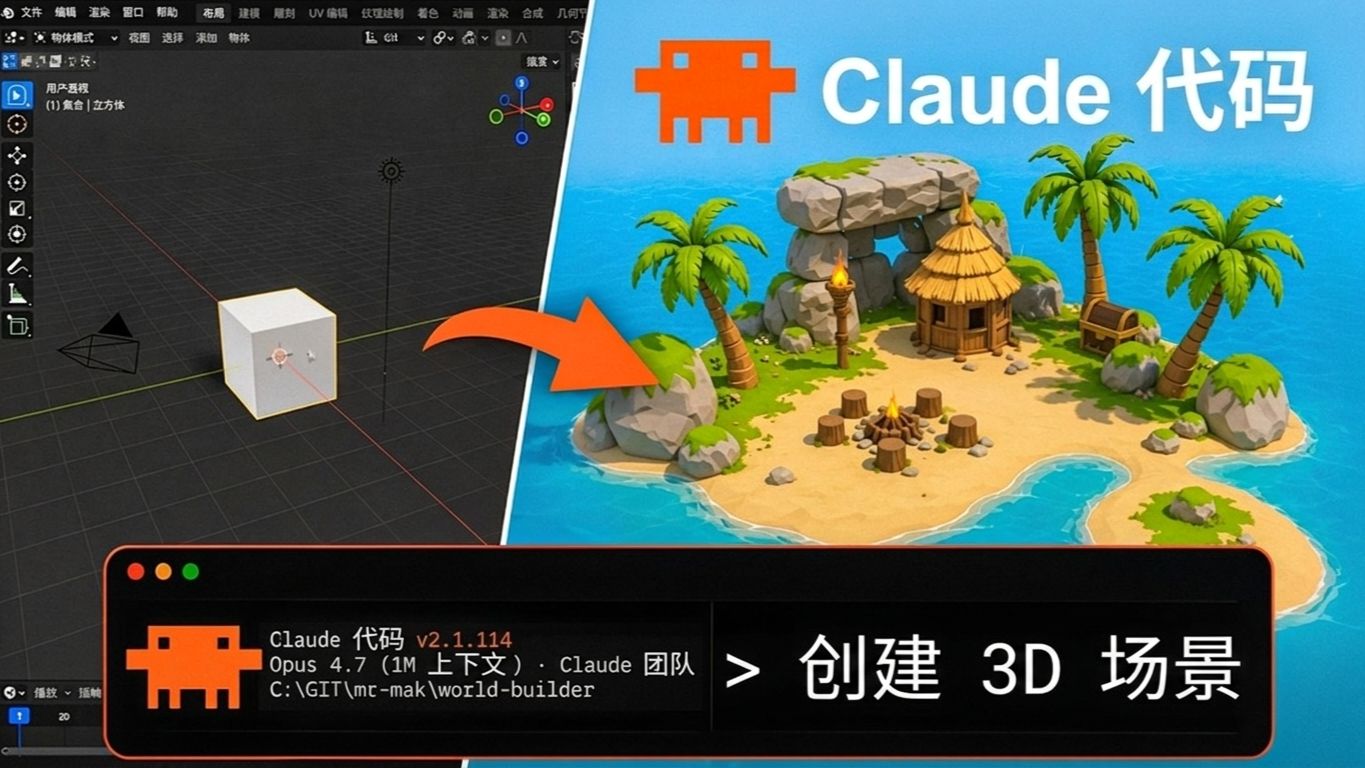
Image 1 — Facts (only record text/visuals visible in the image)
- Large top-right text: "Claude Code" (white)
- Bottom-right black terminal area (with orange pixel icon), readable text:
- "Claude Code v2.1.114"
- "Opus 4.7 (1M context) · Claude team"
- "C:\GIT\mc-mak\world-builder"
- Large white text to the right of the terminal area: "> create 3D scene"
- Left half of the image shows a 3D software interface; centered is a cube on a grid plane (default cube)
- Top-right of the 3D view has axis widget (red, green, blue)
- Top-left of the 3D view shows readable text: user perspective (below a small line that looks like "(1) Collection | Cube")
- Top toolbar has menu/tool text; the visible word "Object Mode" (located at the left of the top toolbar)
- Left side has a vertical tool bar with multiple tool icons visible
- Bottom-left of the interface shows a timeline/frame indicator with the number "20"
- Right half of the image shows a cartoon/low-poly island scene (sea, beach, palm trees, small hut, campfire, log seats, treasure chest, rocks, etc.)
- There is an orange arrow from the left cube pointing to the island (visually indicating "from cube to scene")
- Two identical orange pixel-style icons appear in the image (one near the top-right "Claude Code" label, one in the terminal window title area)
Image 1 — Unreadable or partially visible content (clearly marked as unreadable/blurred)
- Many items in the top main menu bar are blurred and not fully legible (only "Object Mode" is reasonably clear)
- The small text line at top-left of the 3D view has partially blurred characters ("(1) Collection | Cube" is a tentative read and may contain minor differences)
- Small icons/text around the terminal window title bar are unclear
- Tooltip text under the vertical toolbar icons on the left is unreadable
- Some small icons and peripheral menu items at the screen edges are blurred and not decipherable
Image 1 — Inferences (based on visual cues; not certain)
- The left software interface is likely Blender or a similar 3D modeling tool (grid, default cube, axis widget, and "Object Mode" are common Blender UI elements) — (inference)
- The image appears to be a tutorial or thumbnail illustrating using "Claude Code" to generate a full 3D scene from a simple geometry cube — (inference)
- The path "C:\GIT\mc-mak\world-builder" suggests a local project folder named world-builder, likely related to this project or example — (inference)
- "Opus 4.7 (1M context)" may indicate the model version and context window size used — (inference)
Note: No commands or instructions in the image were executed; only visible text and phenomena were recorded and categorized into facts, unreadable parts, and inferences.
SkillPI Creation Analysis
Intended use:
- The source demonstrates combining a Claude Code AI agent with the official Blender MCP server to attempt end-to-end automation within Blender. The showcased tasks include math-driven animation, automated Geometry Nodes networks, skeletal retargeting, and an automated camera/production pipeline.
Evidence from the image (key readable items):
- Terminal text shows "Claude Code v2.1.114", "Opus 4.7 (1M context) · Claude team", and a local path "C:\GIT\mc-mak\world-builder"; the terminal prompt text "> create 3D scene" is also visible. These are direct visual facts from the image.
- The left UI shows elements consistent with Blender (default cube, grid, Object Mode, axis widget, timeline frame 20), while the right side shows a low-poly island scene—visually implying a workflow from a simple cube to a full scene.
Associated skills and practical steps (based on tools mentioned; not a guarantee of results):
1) Environment setup: install a Blender build compatible with the MCP server and deploy the official Blender MCP server per the referenced setup guide.
2) Claude Code agent: obtain and configure the Claude Code agent (image shows v2.1.114 and mentions Opus 4.7) so it can control the local Blender instance via terminal or API.
3) Example project: clone or download the World Builder repository and MCP configuration files (path in image suggests a local copy at C:\GIT\mc-mak\world-builder).
4) Task orchestration: create explicit task scripts or prompts for the agent (e.g., "create 3D scene", "generate mucus system via Geometry Nodes", "perform skeletal retargeting"), run them in a controlled environment, and monitor Blender + terminal outputs.
Reproduction prerequisites (minimum deliverables/requirements):
- Access to the official Blender MCP server distribution and setup documentation.
- Access to Claude Code agent binaries or API with appropriate credentials and runtime environment.
- Local copy of the World Builder repository and MCP config files referenced in the source.
- Permission and system configuration allowing an agent to control Blender via terminal or scripting interfaces.
- Adequate hardware resources (CPU/GPU, RAM, disk) to run Blender and the AI agent concurrently.
Open items to verify (not proven by the image/summary alone):
- The claim of "one hour fully autonomous run" requires validation: the image is a static snapshot showing versions and a project path but does not prove long-duration reliability, error handling, or the need for human intervention.
- Precise versioning and configuration details for Claude Code, Opus variant, and the MCP server must be checked against official docs and repository instructions.
- Limits and failure modes for automated tasks (e.g., complexity limits in Geometry Nodes, edge cases in retargeting) should be tested case-by-case.
- Security implications of granting full terminal control to an AI agent on a local system should be assessed before replication.
Notes: This interpretation preserves explicit items visible in the source (including the path C:\GIT\mc-mak\world-builder and the model/version text) and does not execute or validate commands. To attempt reproduction, follow the video’s linked written guide and the World Builder GitHub repository, and perform stepwise testing in an isolated environment.