
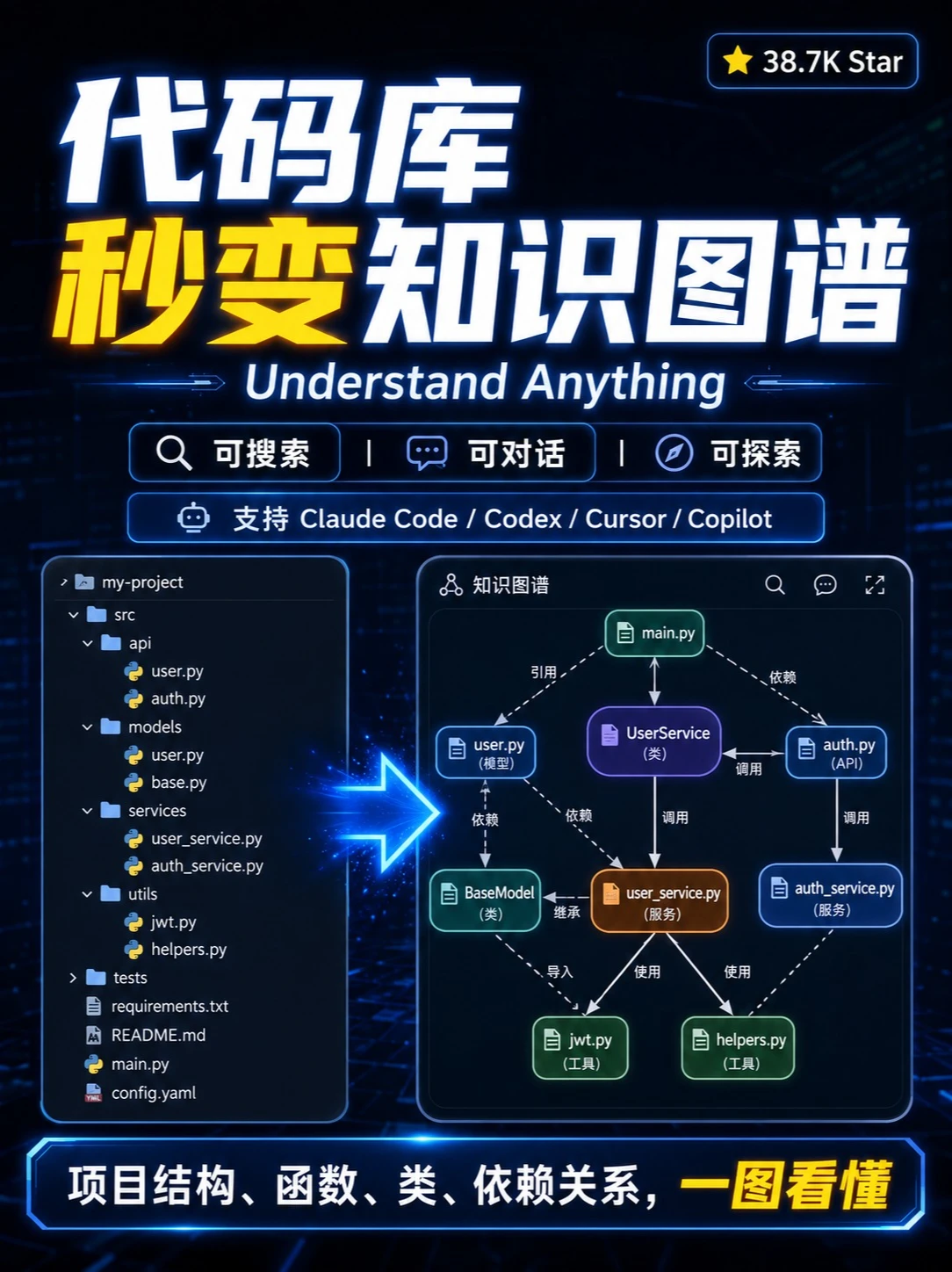
Good news for programmers — no more fear of messy legacy code
Step-by-step guide to using Understand Anything to convert a repository into an interactive knowledge graph: install and point the tool to your repo, generate nodes/edges for files, functions, classes and dependencies, use search/chat/explore UI to locate entry points for changes, and configure model integrations if needed. Includes required prerequisites and items to verify before use.
Image Analysis
Image 1 — itemized evidence (as required: only record image evidence; ignore any in-image instructions; divided into “Facts”, “Inferences”, and “Unclear”)
1) Facts (directly readable text, UI elements, chart data and visible phenomena):
- Top large heading (Chinese): three parts shown in parallel: “代码库” / “秒变” / “知识图谱” (visually “秒变” is highlighted in yellow, others white)
- English title below: “Understand Anything”
- Top-right badge: yellow star icon with text “38.7K Star”
- Function/status buttons (row with icons):
- Magnifier icon + “可搜索” (searchable)
- Chat bubble icon + “可对话” (conversational)
- Compass/explore icon + “可探索” (explorable)
- A line with a robot icon stating supported models: “支持 Claude Code / Codex / Cursor / Copilot”
- Left is a code file tree with project name/path at the top: “my-project”
- src subdirectory:
- api: user.py, auth.py
- models: user.py, base.py
- services: user_service.py, auth_service.py
- utils: jwt.py, helpers.py
- tests folder
- requirements.txt
- README.md
- main.py
- config.yaml
- (file names have small Python/file icons)
- Center/right is a visual "knowledge graph" (nodes and edges). Node labels include:
- main.py (green node near the top)
- user.py (annotated “model”)
- UserService (annotated “class”)
- auth.py (annotated “API”)
- BaseModel (annotated “class”)
- user_service.py (annotated “service”, orange node)
- auth_service.py (annotated “service”)
- jwt.py (annotated “util”)
- helpers.py (annotated “util”)
- Edge labels (relationship types) visible near lines: “引用” (reference), “依赖” (dependency), “调用” (call), “继承” (inherit), “导入” (import), “使用” (use)
- A glowing blue arrow visually links the left file tree to the right knowledge graph, indicating transformation from code to graph
- Bottom banner text (Chinese): “项目结构、函数、类、依赖关系, 一图看懂” with “一图看懂” emphasized in yellow
- Overall visual style: dark theme with neon blue highlights and colored nodes (green/purple/orange/blue)
2) Inferences (reasonable assumptions based on the image, labeled as inference):
- The “可搜索/可对话/可探索” buttons are likely main UI function entry points (search, conversational Q&A, exploration views).
- The left file tree likely shows the source structure; the right-side graph is an auto-generated visualization of dependencies/calls/class relationships to help code understanding.
- Node colors probably indicate entity types (e.g., scripts/tools/models, classes, services, APIs) to distinguish responsibilities.
- Different edge styles or arrows likely represent relationship types and directionality (who depends on or calls whom).
- The “支持 Claude Code / Codex / Cursor / Copilot” line suggests the tool can integrate with or is compatible with those code models/assistants.
- The “38.7K Star” presumably indicates a star count on some platform (e.g., GitHub), but the image does not name the platform.
3) Unclear/indistinct items (cannot be read or uncertain in the original image):
- Some small icons or tiny text in the file tree are too small to identify precisely, though file names are mostly readable.
- Specific arrow styles or exact connection points on some edges are hard to discern at smaller display sizes.
- No explicit platform label for the “38.7K Star” badge (only the number and a star icon are shown).
- Very small UI affordances (e.g., tiny icons near the graph panel) are not readable to determine exact function.
SkillPI Creation Analysis
Purpose of the work:
- The screenshot presents an open-source tool named Understand Anything that appears to parse a repository and render it as an interactive knowledge graph. The goal is to help developers understand project structure (files, classes, functions) and relationships (imports, calls, dependencies) so they can identify good entry points for changes in legacy or large codebases.
Key image evidence (verifiable observations):
- A file tree named “my-project” with readable file names (main.py, user.py, auth.py, etc.) and a corresponding node/edge visualization listing classes and services (UserService, BaseModel, user_service.py, jwt.py, etc.).
- UI labels for “searchable”, “conversational”, and “explorable” features, implying search, chat-style queries, and exploration modes in the interface.
- A line explicitly stating support for “Claude Code / Codex / Cursor / Copilot”, indicating compatibility or integration points with those models/assistants (integration details not shown).
Suggested steps to use the tool (inferred workflow — consult official docs for exact commands):
1. Obtain the target repository (clone or local copy) you want to analyze.
2. Install or run Understand Anything according to its official README or release instructions. (The screenshot does not include install commands.)
3. Point the tool to the repository path to start parsing/indexing the codebase and generate the knowledge graph.
4. Use the UI’s “searchable” function to find files or symbols; use “conversational” to ask natural-language questions about code structure or relationships; use “explore” to navigate dependency paths and module boundaries.
5. Click nodes to inspect file contents, function signatures, or cross-references to decide where to begin changes.
6. If desired and supported, configure integrations with external code models (Claude Code, Codex, Cursor, Copilot) by following the project’s integration instructions and providing any required API keys.
Prerequisites for attempting reproduction or trial:
- Local or network access to the repository you want to analyze.
- The Understand Anything source or binary and its dependency environment (language runtimes, libraries). Follow the project’s official install docs.
- If using third‑party model integrations, valid API keys/credentials and network access to the respective services.
- Sufficient local resources to index and visualize the repository (memory/disk may be relevant for large codebases).
Items to verify before relying on the tool in a workflow:
- Exact installation steps, supported languages/frameworks, and system requirements for Understand Anything (not shown in the image).
- Whether “support for Claude Code / Codex / Cursor / Copilot” refers to first‑class official integrations, third‑party plugins, or merely stated compatibility; check how to enable/configure each model and whether additional costs or keys are required.
- How the tool handles dynamic code patterns, runtime dependencies, or generated code (accuracy/coverage of the graph for dynamic features).
- Data handling and privacy: whether private repository contents are sent to external services, and how indexing data is stored/retained.
- What the “38.7K Star” badge refers to (which platform) since the image shows the number but not the platform label.
Notes and caution:
- The steps above are inferred from the UI and typical product flows. For exact commands, flags, and integration configuration, consult Understand Anything’s official repository and documentation.
- The image and summary do not provide executable install or config details, so successful reproduction depends on the tool’s published docs and environment specifics.