
Sharing a Practical Skill
Learn how to locate and download the heytea-doodle-poster skill (example referenced in Hchen1218/viral-content-breakdown), inspect the README, copy the skill into your local skills directory, and follow configuration steps to produce brandable store product images. The guide covers repo search, clone/copy, validation, and what dependencies and settings to check.
Image Analysis
Image 1 — Notes (record only readable text, UI steps, chart data and visible phenomena; separate facts and inferences; ignore in-image instructions)
1. Facts (directly visible/readable content and UI elements)
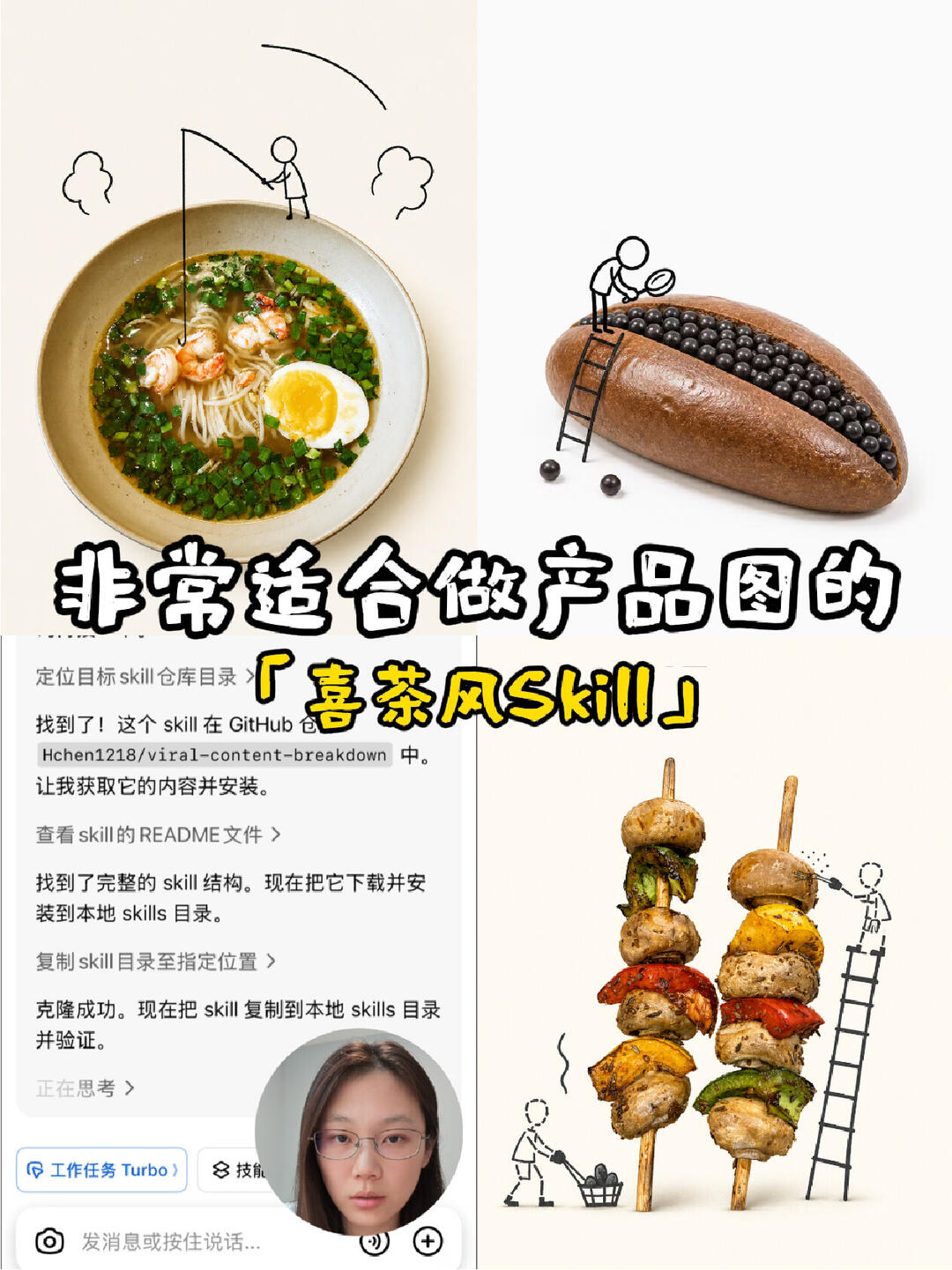
1) Large text (center-lower area, bold black-and-white, partial yellow highlight):
- “非常适合做产品图的” (Chinese: "Very suitable for product images")
- Yellow handwritten/colored text: "‘喜茶风Skill’" (quotes and the word "Skill" are in English)
2) Bottom-left UI screenshot (vertical dialogue or operation-flow style), readable lines from top to bottom:
- “定位目标 skill 仓库目录 >” ("Locate target skill repository directory >", with "skill" in English)
- “找到了!这个 skill 在 GitHub 仓库 Hchen1218/viral-content-breakdown 中。” ("Found it! This skill is in repository Hchen1218/viral-content-breakdown.")
- “让我获取它的内容并安装。” ("Let me fetch its contents and install it.")
- “查看 skill 的 README 文件 >” ("View the skill's README >")
- “找到了完整的 skill 结构。现在把它下载并安装到本地 skills 目录。” ("Found the complete skill structure. Now download and install it into the local skills directory.")
- “复制 skill 目录至指定位置 >” ("Copy the skill directory to the specified location >")
- “克隆成功。现在把 skill 复制到本地 skills 目录并验证。” ("Clone successful. Now copy the skill to the local skills directory and verify.")
- “正在思考 >” ("Thinking >"; this line has ellipsis or an icon indicating progress/state)
3) Bottom-left input/operation area visible elements:
- Circular user avatar (a face photo) near the input box (described only as "face-photo avatar", no identity inference)
- Input hint text (partly visible): “发消息或按住说话...” ("Send a message or hold to speak...")
- Bottom-left small button/label: “工作任务 Turbo” ("Work Tasks Turbo"; blue button style)
- Another adjacent label/button shows “技能” or truncated “技...” ("Skill" or truncated; incomplete)
4) Visual content of the main image (four food photos interacting with hand-drawn characters, placed at top-left, top-right, bottom-right, bottom-left):
- Top-left: a bowl of noodle soup (noodles, shrimp, soft-boiled egg, scallions); a hand-drawn stick figure stands on the bowl edge using a fishing rod to "fish" into the noodles; arcs and cloud-like hand-drawn lines above the bowl.
- Top-right: a long bun or roll with many small black balls (or chocolate beans) in a cut; a small ladder and a hand-drawn figure using a magnifying glass to inspect the black balls; two black balls have fallen outside the bun.
- Bottom-right: two skewers of grilled vegetables/meat (mushrooms, colorful peppers, etc.); a hand-drawn figure on a ladder appears to be "arranging" or "painting" the skewers; another small drawn figure pushes a cart or picks up debris.
- Overall four-panel style: real food photos combined with black-line doodle characters/ladders/tools forming a "micro-construction/interaction" visual effect.
2. Uncertain or unreadable content (to note):
1) Some top/left text in the bottom-left UI is truncated or obscured; cannot fully confirm:
- There may be a fuller navigation path or title above/left of “定位目标 skill 仓库目录 >” that is cut off.
- The second label/button near the bottom may read “技能” or be truncated; full text/icon meaning is not clear.
2) Some symbols/icons (e.g., the “>” at the right of each line) are visible in shape only; unclear whether they are clickable links or status indicators.
3) The circular avatar's identity (name, account) cannot be determined or inferred; only a face photo is visible.
3. Inferences (clearly marked as inferences, not verified facts):
1) Inference: The bottom-left UI appears to be a conversational AI or app installation/operation guide interface (based on phrases like “found skill, clone successful, copy to local skills directory”), but the image does not explicitly name the application (except the “Work Tasks Turbo” button), so this is a reasonable inference, not a confirmation.
2) Inference: The large text claiming “Very suitable for product images ‘Heytea-style Skill’” suggests the image is promotional or demonstrative of a visual style called “Heytea-style Skill”; this is interpretive, not an explicit factual claim from the image.
3) Inference: The four food photos combined with doodle figures likely illustrate a creative product-image style—personifying food and showing a staged production scene—this is an interpretation of the visual style, not an asserted fact.
4. Additional visible phenomena (non-textual):
1) The image is a collage layout: a UI window at lower-left and four food photos with doodle characters; bright overall tone, composed for visual presentation/promotion.
2) Typography: central large text is bold black with white outline; yellow text is handwritten/painted for emphasis.
3) In the top-right bun, the black balls are densely arranged; a couple of balls are shown outside the bun.
4) The skewers show red, yellow, green vegetables and relatively large mushrooms with grilling/roasting texture.
5) The soup bowl shows clear broth, noodles centered, and a semi-runny soft-boiled egg yolk (visible yellow fluid).
If needed, the readable left-bottom UI text can be transcribed verbatim for machine copy; current notes preserve visual uncertainties and remarks.
SkillPI Creation Analysis
Purpose:
The post showcases and recommends a skill called heytea-doodle-poster, indicating it is suitable for generating store product images and that the approach allows integrating brand style into the skill to reduce manual work and time.
Image evidence (supporting the above):
- Prominent text states the skill is “very suitable for product images” and labels it as a “Heytea-style Skill.”
- The bottom-left UI transcript explicitly states locating the skill in repository Hchen1218/viral-content-breakdown, viewing the README, downloading/cloning, copying the skill to a local skills directory, and verifying the installation—this supports a workflow of finding and installing the skill from a repository.
- Example images (food photos with doodle characters) demonstrate a target visual style that the skill presumably helps produce or template.
Associated skill usage steps (based on visible UI steps, expressed as actionable, verifiable steps):
1. Locate the target skill in the repository directory (search the repo or path shown).
2. Confirm the repository and path (image references Hchen1218/viral-content-breakdown).
3. Inspect the repository README to understand structure, requirements, and usage instructions.
4. Clone or download the repository, then copy the specific skill folder (heytea-doodle-poster) into the local "skills" directory for the host application.
5. Follow README instructions to install dependencies and validate the skill in the local environment.
Reproduction prerequisites (what you must prepare/confirm before trying to reproduce):
- Access to the repository Hchen1218/viral-content-breakdown (network access, and permissions if private).
- A host application or environment that uses a local "skills" directory as shown; the exact platform is not specified in the image and must be identified.
- Required runtimes and dependencies installed locally (to be confirmed in the repository README).
- Source assets or templates for branding if you plan to customize the skill’s visuals.
Items to verify (not fully specified in the image/summary and should be checked in the repo):
- Exact repository path and the location of heytea-doodle-poster within the repo (subdirectory names).
- Which host platform(s) and versions the skill supports (the image does not name the platform explicitly).
- Precise installation commands, dependency list, configuration files, and sample invocation/usage examples in the README.
- Licensing and permitted usage (commercial use, modifications, attribution) as stated in the repo license.
- The skill’s concrete capabilities and limits (e.g., whether it only provides templates, whether it includes automation for batch generation, whether external services or paid APIs are required).
Notes and cautions:
- This interpretation is strictly based on visible text and the provided summary. The actual behavior and outputs of the heytea-doodle-poster skill must be confirmed by inspecting the repository and running the code.
- Do not assume performance, time savings, or automation level until tested in the target environment.