
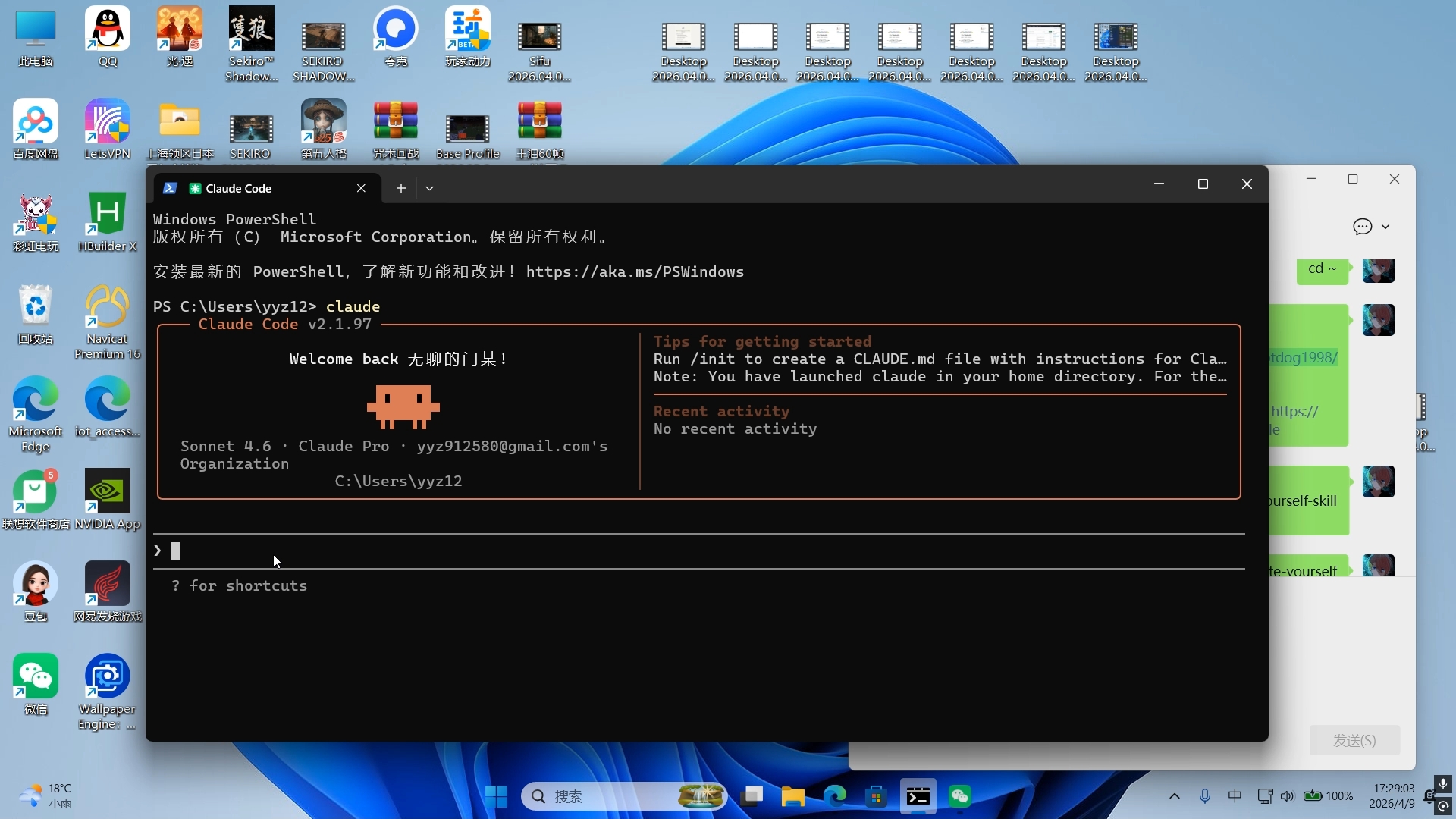
6-minute guide: Deploy Claude Code and integrate the yourself-skill project to create a personal digital twin
A practical quick guide showing how to run 'claude' in Windows PowerShell, use './init' to generate CLAUDE.md, and where to clone https://github.com/notdog1998/yourself-skill to follow integration instructions. Learn the initial commands to start Claude Code CLI and the next steps to inspect CLAUDE.md and the yourself-skill repo for integration details. Verify dependencies and credentials before attempting model distillation or personalization.
Image Analysis
Readable text and UI elements extracted from the screenshot (facts and inferences separated; code, links and proper names preserved)
1) Facts (directly readable or observable)
- OS and desktop
- Windows desktop (Windows 11 style background and taskbar).
- System tray time/date: 17:29:03, 2026/4/9.
- Weather shown near the tray: 18°C, light rain.
- Taskbar shows search icon, File Explorer, Microsoft Edge and other app icons.
- Desktop icons (some names readable)
- This PC, QQ, Sky: Children of the Light (光遇), Sekiro™ Shadow..., SEKIRO SHADOW..., Quark (夸克), 玩家动力 (Beta), Baidu Netdisk, LetsVPN, folder with partial Japanese text, Identity V (第五人格), Rainbow eMule, HBuilder X, Recycle Bin, Navicat Premium 16, Microsoft Edge, iot_access... (truncated), Lenovo App Store (with red badge “5”), NVIDIA App, 豆包, NetEase Games, WeChat, Wallpaper Engine, etc.
- Central-left window (terminal/CLI)
- Window tab shows a “Claude Code” icon and text (tabbed interface).
- The window is Windows PowerShell, with Microsoft copyright and link to https://aka.ms/PSWindows.
- Command prompt shows: PS C:\Users\yyz12> claude
- After running that command, an interactive framed interface loaded with top text “Claude Code v2.1.97”.
- Left panel readable text includes:
- “Welcome back 无聊的闫某!” (mixed Chinese/English)
- an orange pixel person/ASCII graphic
- “Sonnet 4.6 · Claude Pro · [email protected]'s Organization”
- “C:\Users\yyz12”
- Right panel titled “Tips for getting started” contains readable fragments:
- “Run ./init to create a CLAUDE.md file with instructions for Cla…” (truncated)
- “Note: You have launched claude in your home directory. For the…” (truncated)
- “Recent activity” and “No recent activity”
- Bottom shows a prompt and a caret; “? for shortcuts” is visible.
- Terminal theme is dark with orange border lines, resembling an interactive CLI dashboard embedded in PowerShell.
- Right-side IM window
- White chat window with green message bubbles; one readable message is “cd ~”.
- Other green bubbles truncated; some include “https://…” fragments (links truncated).
- Send button labeled “发送(S)” is partially visible at the bottom.
- Other UI details
- System tray battery shows 100%.
- Multiple desktop thumbnails at top named like “Desktop 2026.04.0...” (truncated duplicates).
2) Unreadable or truncated items
- Full filenames for “Desktop 2026.04.0...” entries are truncated.
- Several icon names truncated (e.g., iot_access...).
- The right-panel lines “Run ./init …” and “Note: You have launched …” are truncated and not fully readable.
- Most chat messages are truncated and cannot be fully transcribed.
3) Inferred UI actions (visible in the screenshot)
- PowerShell was opened.
- The command claude was executed from PS C:\Users\yyz12>.
- The command launched Claude Code v2.1.97 interactive interface, which includes a tip to run ./init to create a CLAUDE.md.
4) Inferences (not direct facts)
- The email [email protected] likely corresponds to the user account associated with Claude (inference).
- The right-side IM layout resembles WeChat or a similar messenger (inference).
- “Sonnet 4.6 · Claude Pro” may indicate the model or edition used in this session (inference).
- Desktop shortcuts suggest the machine is used for development and gaming (inference).
5) Visual notes
- Terminal partially covers the chat window.
- Desktop icons are densely arranged; multiple similar desktop files appear at the top.
If needed, I can list every readable terminal line in order or try to identify truncated areas more precisely with a higher-resolution or cropped image.
SkillPI Creation Analysis
Intended use and deliverables (based on visible screenshot and provided repo link)
- The screenshot shows starting a local CLI instance named claude from Windows PowerShell and loading Claude Code v2.1.97. Deliverable you can reasonably expect to reproduce from these artifacts: launching the Claude Code CLI on a Windows environment and following the CLI hint to run ./init to generate a CLAUDE.md instruction file.
Key evidence from the image useful for reproduction
- The command executed: PS C:\Users\yyz12> claude — indicates an executable named claude is available in the user's PATH or working directory.
- CLI hint: “Run ./init to create a CLAUDE.md” — this is an explicit next-step instruction displayed by the interface.
- Session metadata shown (Sonnet 4.6 · Claude Pro, [email protected], C:\Users\yyz12) — useful context but requires careful handling of account data.
Suggested integration steps with yourself-skill (actionable, but partial until repository and environment are verified)
1) Preconditions to check
- The claude executable is installed and runnable on your Windows machine.
- You have access to the repository: https://github.com/notdog1998/yourself-skill and can read its README/installation instructions.
2) Minimal reproducible flow (based on CLI hints and repository link)
- Open PowerShell.
- Run: claude
- In the Claude CLI, run: ./init (per the on-screen tip) — this should create a CLAUDE.md file with further instructions.
- Clone the yourself-skill repo locally: git clone https://github.com/notdog1998/yourself-skill
- Read the repository README and integration docs to see how to connect the project to the CLAUDE.md workflow or how to feed prompts/configs from yourself-skill into the Claude session.
- Follow any repository-specific setup (dependencies, env vars, API keys) listed in the repo.
3) Verification tests
- Confirm claude starts and prints version (v2.1.97) and the ./init hint.
- Confirm ./init generates a CLAUDE.md and inspect that file for integration instructions.
- Run example flows from yourself-skill and observe whether they interact with the Claude CLI as expected.
Prerequisites and items that must be verified before full reproduction
- Verify the source and installation method for the claude executable (is it an official client, third-party wrapper, or local tool?).
- Verify whether yourself-skill explicitly supports Claude Code integration and which runtime/dependencies are required (Python/Node versions, packages, etc.).
- Verify whether API keys, account access, or cloud services are required for distillation or model-related operations; determine data privacy and cost implications.
- Verify the exact behavior of ./init and contents of CLAUDE.md (screenshot shows the hint but not the generated file content).
Caveats and safety notes
- This analysis is based solely on the screenshot and the provided GitHub link. It does not audit repository code or confirm the claude executable origin.
- Do not upload sensitive personal data for any “distillation” or training steps without reviewing repository documentation, license terms, and privacy/security implications.