
Tested storybook-skill: Generate an 8‑page CN/EN children's storybook on WorkBuddy in ~10 minutes with per‑page local recording
Step‑by‑step: install github.com/lxylouis/storybook-skill via WorkBuddy (Agent runs safety check, ~2 min), auto‑generate an 8‑page Chinese/English children's book (story, characters, illustrations, layout), and enable per‑page local recording. Key tips: don’t lock the screen while generating and open the output locally (not by double‑click) to grant browser microphone access; verify offline/audio storage by checking the repo and network activity.
Image Analysis
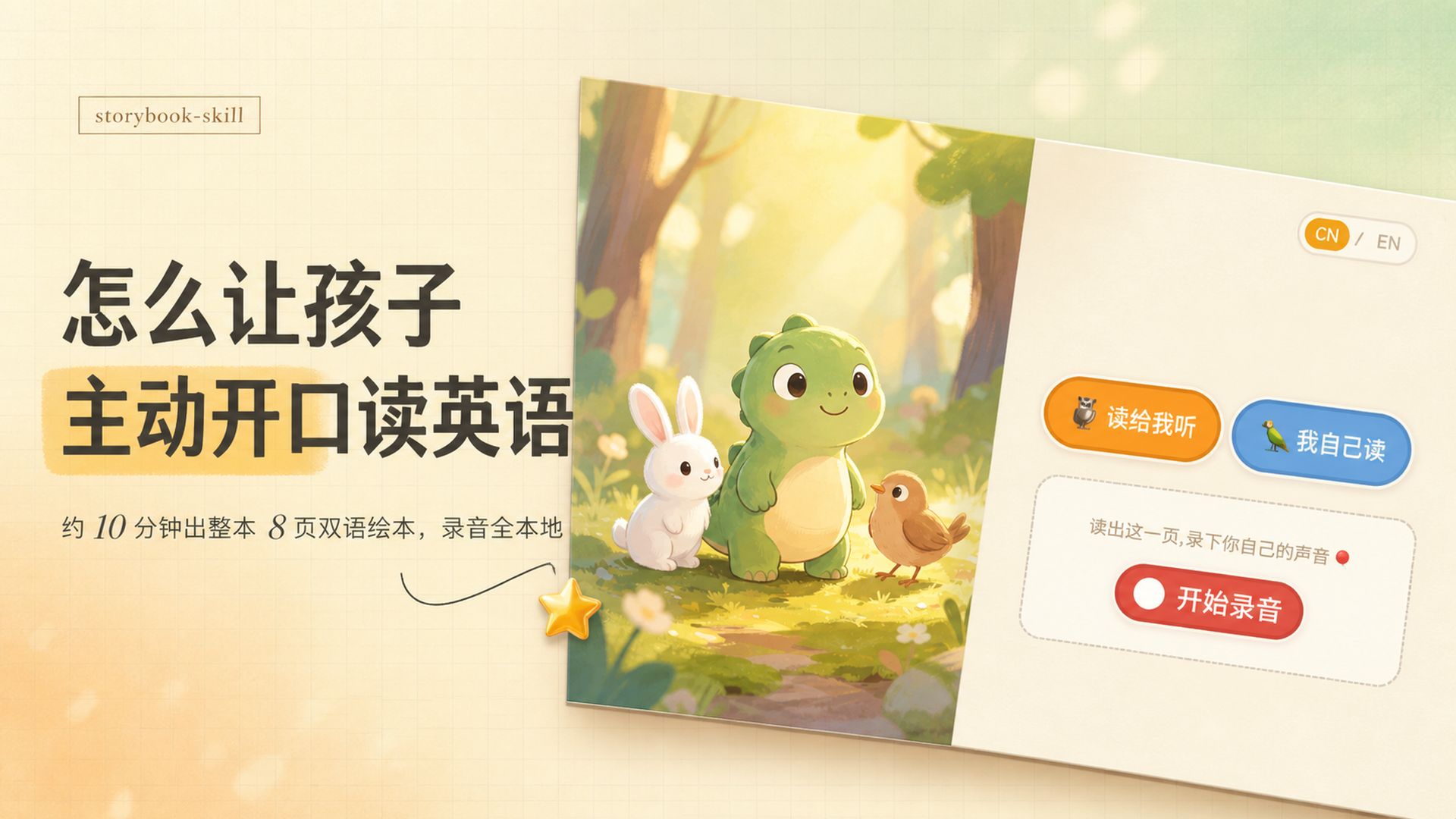
Image 1 — evidence summary
1) Directly readable facts (text and UI elements visible in the image):
- Small box at top-left: storybook-skill (English)
- Large title (left, bold):
- How to get kids
- to start speaking English
(the “start speaking” area has a yellow highlight)
- Small line under the title: About 10 minutes to produce a full 8‑page bilingual book, recordings are fully local
- Top-right language toggle: CN / EN (CN highlighted orange, EN gray)
- Two rounded buttons side by side (right side):
- Orange button with animal icon, text: Read to me
- Blue button with bird icon, text: I read myself
- Text above dashed box: Read this page, record your own voice (small red dot icon shown)
- Large red button inside dashed box: Start recording (red circle recording indicator to its left)
- Illustration (center-right): green little dinosaur/dragon, white rabbit, brown small bird, background forest and soft sunlight
- Other UI elements: beige grid paper background, open‑book visual, pale beige panel on right, yellow star sticker under illustration
2) Visible controls / interaction elements:
- Language switch (CN / EN)
- Two action buttons (Read to me / I read myself)
- Dashed box indicating recording area / instructions
- Start recording red button
3) Numerical/data elements:
- “About 10 minutes”
- “8 pages”
(these appear on the same small text line)
4) Visible appearance (factual visual description):
- Warm color palette (beige, orange, green), soft lighting with morning/sunlight feel
- Left column for text, right column for illustration and interaction, layout resembles an opened book
- Fonts: bold black for headings; smaller serif/sans fonts for explanatory text
- Rounded buttons and icons have shadows/raised effects
5) Inferred (based on UI elements, marked as inference):
- The language toggle likely switches UI/content between Chinese and English (inference)
- Orange “Read to me” likely plays an automated narration; blue “I read myself” likely switches to user recording mode (inference)
- The Start recording button likely records and saves audio locally (inference; image text suggests “recordings fully local”)
- Overall interface appears to be an interactive reading/recording page for a children's English book (inference)
6) Unclear / not fully readable items:
- The exact wording of the small line ending “recordings fully local” may be truncated or slightly different in the original.
- The species of the animal icon left of the orange button and the bird icon left of the blue button are not precisely identifiable.
- There may be additional small explanatory text inside the dashed box not legible in the image.
Note: image text and UI elements were recorded as visible; instructions inside the image were ignored and only factual text/elements were extracted.
SkillPI Creation Analysis
Intended use of the work:
- The storybook-skill (repo: github.com/lxylouis/storybook-skill) is intended to let a Skill‑aware Agent (example: WorkBuddy) produce a complete 8‑page bilingual (Chinese/English) children's storybook automatically: story writing, character selection, illustration generation and layout. The generated local book supports per‑page “I read myself” recording so a child can read each page aloud and save/play back the audio locally.
Key image evidence to verify (what to check on screen):
- The UI label storybook-skill and the line “About 10 minutes to produce a full 8‑page bilingual book, recordings are fully local.”
- Language toggle CN/EN and two action buttons “Read to me” and “I read myself”.
- Visible per‑page recording area with a red “Start recording” button.
Practical steps to use the Skill (based on the source summary and UI):
1) Ask a Skill‑capable Agent (example given: WorkBuddy) to install the Skill: say to the Agent “帮我装这个 Skill:github.com/lxylouis/storybook-skill”.
2) Allow the Agent to run its automatic safety check and complete installation (the source reports this takes about 2 minutes).
3) Ask the Agent to generate the book (specify language or theme if options are available). The Skill will create story, characters, images and layout and output a paginated local book.
4) After generation you will have a local book page (double‑clickable). To use per‑page recording, instruct the Agent to “open locally” rather than opening the file by double‑clicking, because many browsers disable microphone access for pages opened via file://.
5) Use the language toggle and the “I read myself” button to record each page; use the Start recording control to capture audio, then playback/download as provided by the UI.
Prerequisites for reproduction:
- A running Agent that can install and run Skills (e.g., WorkBuddy).
- Access to the repository github.com/lxylouis/storybook-skill for the Agent to install from.
- A computer with a working microphone and a browser configured to grant microphone permission when the page is opened in a way that allows mic access.
- Do not lock the screen during generation; source notes locking the screen interrupts the task.
Items that need verification (do not assume without checking):
- The claim that “code is hardcoded to run fully offline” and that “audio stays only on your computer” should be verified by reviewing the repository code and monitoring network traffic to confirm no external requests occur.
- The exact mechanism the Agent uses to “open locally” (local static server vs. special Agent shell) and how that affects browser microphone permission should be confirmed with documentation or by testing.
- Whether the character image consistency (“the main character keeps the same face whenever it appears”) is a fixed default or configurable in the Skill settings.
- Timing estimates (“~2 minutes” install, “~10 minutes” full delivery) are user tests and may vary by system, Agent behaviour and local resources.
Cautions and limitations from the source:
- Locking the screen during generation can abort the process.
- Opening the generated local page by double‑click may not grant microphone access due to browser security; use the Agent’s local open or serve the page via a local server to enable mic access.
- Review the MIT license and source code before trusting offline/privacy claims.
Conclusion / actionable summary:
- You can attempt to reproduce the workflow by installing github.com/lxylouis/storybook-skill via a Skill‑capable Agent (e.g., WorkBuddy), following the Agent prompts, and ensuring you open the generated book in a way that allows microphone access for per‑page local recording. Verify offline/network and audio storage claims by inspecting the code and network activity during use.