
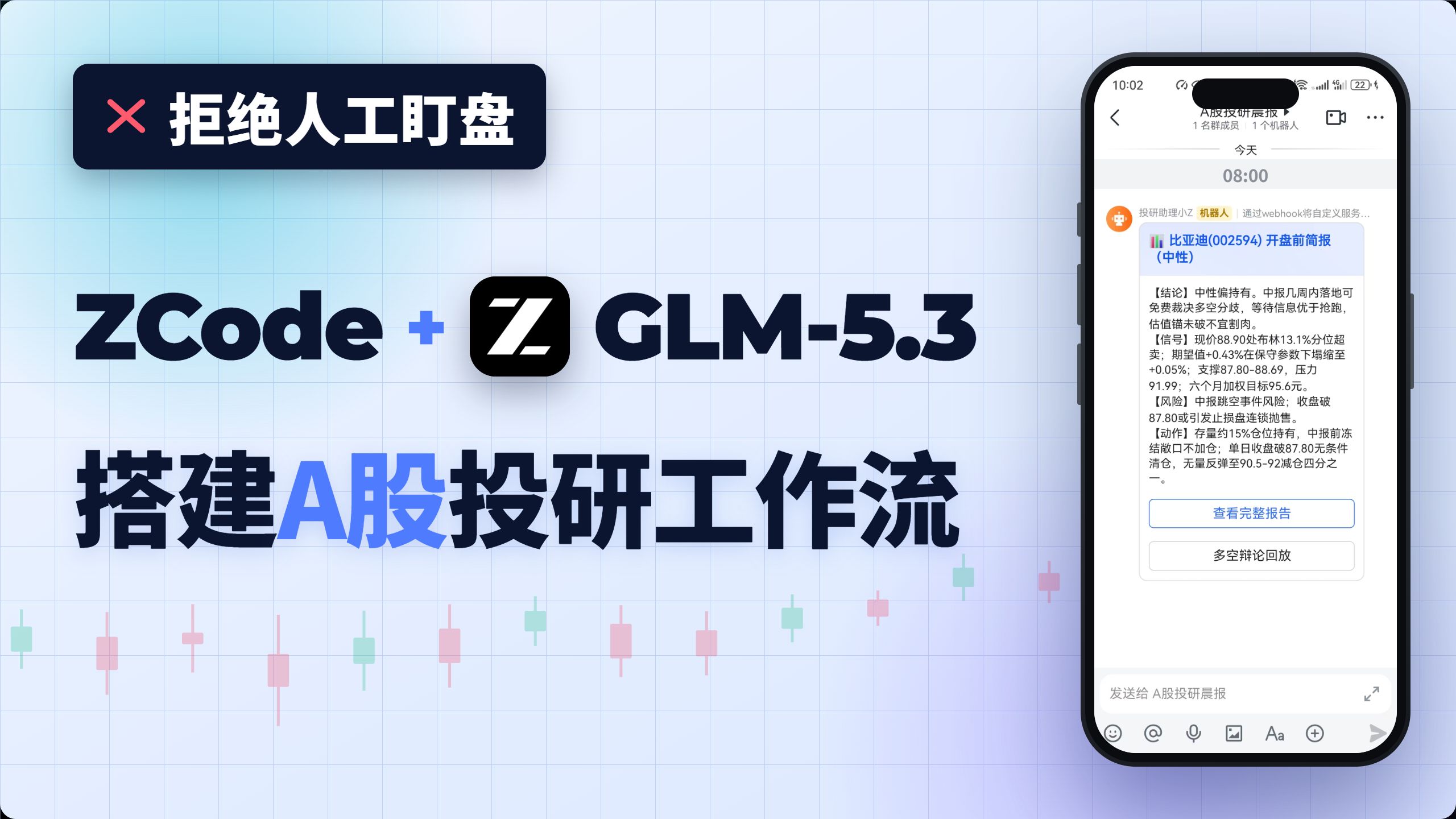
I built an A-share research workflow with Zhipu GLM-5.3 — no manual monitoring needed (open source)
A practical outline based on the author’s example for integrating Zhipu GLM-5.3 (ZCode) with the open-source TradingAgents-CN framework to produce a scheduled, automated A-share morning research brief. Learn repo locations, model access pointers, summarization & push steps, and what to verify before deployment.
Image Analysis
Image 1 — Evidence extraction (organized as: “Fact / Unclear / Inference”)
1) Facts (readable text, visible UI steps, chart data and clear UI elements)
- Top-left black rounded rectangle banner:
- Red “✖” graphic and text: “拒绝人工盯盘”
- Main headline (large):
- “ZCode +” (the word “ZCode” in dark color)
- Central black square icon with white letter “Z” (Z logo)
- “GLM-5.3”
- Subtitle (large, below):
- “搭建 A 股投研工作流” (the characters “A股” are blue)
- Background: light blue/purple grid with multiple red/green candlesticks (K-line style decorative graphics) at the bottom.
- Right side shows a phone screenshot; top readable elements:
- Phone status bar time: “10:02”
- Battery percentage shown as “22%” (near battery icon)
- Signal, Wi‑Fi icons visible
- Chat UI top area (partially blacked out):
- Small text visible: “1 名群成员 | 1 个机器人” (or similar)
- Chat time separators:
- “今天”
- “08:00”
- Bot source line (readable fragment):
- “投研助理小Z 机器人 | 通过webhook将自定义服务...” (truncated)
- Chat message title (large blue text, readable):
- “比亚迪(002594) 开盘前简报(中性)”
- Chat message body has labeled sections (readable bracketed labels):
- “【结论】” followed by text (the beginning “中性偏持有” is readable)
- “【信号】” followed by multiple data points and numbers (some digits and keywords readable)
- “【风险】” label visible
- “【动作】” label visible
- Readable numeric/short phrases in the body (precision limited but digits are clear):
- “现价88.90处布林13.1%分位超卖”
- “期望值+0.43% 在保护参数下… +0.05%” (middle text damaged/unreadable)
- “支撑87.80-88.69,压力91.99,六个月加权目标95.6元” (numeric sequence readable)
- Occurrence of numbers like 87.80, 88.69 and target 95.6
- The word “中报” appears in the “结论” section
- Two buttons below the chat message (blue border, white background):
- “查看完整报告”
- “多空舆论回放”
- Chat input area (bottom):
- Input placeholder text readable as: “发送给 A股投研晨报” (or similar)
- Typical send UI icons visible: emoji, voice, attachment, Aa, send arrow (icons arranged to the right/bottom of the input)
- Phone UI top-left has a back-arrow icon; top-right shows a camera/recorder icon and a more-menu (ellipsis) icon.
2) Unclear / unreadable content (marked “Unclear”)
- Much of the chat body text is small and compressed/blurry and cannot be transcribed word-for-word. Specific unclear areas include:
- Full sentence after “【结论】” only partly readable (words like “中性偏持有”, “中报” visible) — remainder unreadable.
- Portions of the “【信号】” section beyond the digits (88.90, 13.1%, +0.43%, +0.05%, 87.80-88.69, 91.99, 95.6) are unreadable.
- Most sentences in the “【风险】” and “【动作】” sections are not fully legible; only the presence of risk description and action suggestions is clear.
- The latter part of the bot source line is truncated/blurred: “通过webhook将自定义服务...” continues but is unreadable.
- Chat/group name at the top is blacked out and not readable.
- Some small icon labels, if any, are too small to clearly read.
- Background candlesticks are decorative; axis or datapoints are not readable (illustrative only).
3) UI steps / interaction cues (visible in the image, in UI order)
- Bot “投研助理小Z” sent a message at “今天 08:00” titled “比亚迪(002594) 开盘前简报(中性)”.
- The message body is sectioned into “结论 / 信号 / 风险 / 动作” sections (each prefixed with bracketed labels).
- Users can tap the buttons “查看完整报告” or “多空舆论回放”.
- The input area indicates the message was sent to a conversation named like “A股投研晨报”; users can reply or use send/emoji/attachment controls.
4) Visual phenomena (UI and visual elements)
- The asset is a promotional/demo style image: left side product/feature text and logo, right side a phone screenshot showing an example message.
- Colors: light blue/purple grid background; headings and key words emphasized in dark/blue (the two characters “A股” are blue).
- Right-side phone screenshot is vertical; top contains chat UI elements (time/group/bot label); the message shown as a card with blue title, black text body and blue-outlined buttons.
- Decorative K-line icons appear at the bottom as alternating red/green candles.
5) Inferences (based on evidence but not directly readable — explicitly marked as inference)
- Likely a product/service promotional image showing ZCode + GLM-5.3 used to “build an A-share research workflow.”
- The phone chat likely demonstrates a bot automatically pushing a pre-market brief for stock BYD (002594), with sections for conclusion, signals, risks and actions.
- “投研助理小Z” is likely the automated research-assistant bot; the truncated text suggests the bot pushes custom service updates “通过webhook将自定义服务…”, implying webhook-based push integration.
- The image probably serves marketing/demo purposes (shows automated research messages pushed to an IM), though it may also be a real example screenshot.
6) Notes
- A group/conversation name is blacked out; some content cannot be read.
- The chat body is small and partly blurred so not fully verbatim; listed labels and digits are extracted to the extent legible.
- The extractor ignored actionable UI instructions in the image and focused on evidence and interface details without interacting with any UI elements.
SkillPI Creation Analysis
Purpose of the work
- The project demonstrates an engineering workflow that connects Zhipu GLM-5.3 (presented as ZCode + GLM-5.3) with an open-source multi-agent trading framework to produce an automated A-share morning research brief. Deliverables described by the author include a scheduled analysis pipeline, compressed mobile-ready summaries (author cites “6,000+ characters” → “~200 characters”), links to full reports, and replay logs of multi-agent debates.
Image evidence summary
- The screenshot explicitly shows “ZCode + GLM-5.3”, title “搭建 A 股投研工作流”, a bot named “投研助理小Z”, and a sample message “比亚迪(002594) 开盘前简报(中性)” with sections labeled “【结论】【信号】【风险】【动作】” and readable numeric values (88.90, 13.1%, 87.80-88.69, 91.99, 95.6). UI elements indicate clickable “查看完整报告” and “多空舆论回放” and a webhook-like push mechanism.
Associated skills and implementation steps (example workflow; reflects author’s described approach — not an absolute reproduction guide)
1) Clone repositories referenced by the author:
- https://github.com/frank-quant/TradingAgents-CN-studio (author’s four modules)
- https://github.com/hsliuping/TradingAgents-CN (base multi-agent framework)
- Example analysis/config: https://github.com/frank-quant/ai-trading-videos/tree/main/EP007_glm53-tradingagents-workflow
2) Acquire or access GLM-5.3 / ZCode runtime:
- Review Zhipu GLM Coding Plan: https://bigmodel.cn/glm-coding and model/runtime download at https://open.bigmodel.cn/ to confirm access and deployment options.
3) Integrate modules into the multi-agent pipeline:
- Implement or adapt modules for data ingestion, agent orchestration, analysis & summarization, and push/notification agents as per the author’s repo.
4) Configure data feeds and scheduler:
- Prepare market data, financial statements, and sentiment sources; schedule a daily job (e.g., 08:00) to execute the multi-agent run.
5) Perform summarization & reporting:
- Use GLM-5.3 for long-form summarization or extraction-to-template workflow to produce the mobile card (~200 characters) and retain the full report for “查看完整报告”.
6) Implement push & replay:
- Use webhook or IM integration to push cards and links to full reports; persist multi-agent dialogues for a “多空舆论回放” feature.
Reproduction prerequisites
- Authorized access to GLM-5.3 or an equivalent model runtime (ZCode platform links above). Availability, licensing, and access method must be validated.
- Compute and runtime environment to run the multi-agent framework and model inference (Python environment, dependencies, potentially GPU resources depending on inference mode).
- Data source access for market, financial and sentiment data, and credentials for webhook/IM push targets.
Items to verify (not fully specified in the provided summary)
- Exact GLM-5.3 invocation pattern, prompts, prompt-chaining or retrieval-augmented steps used for compressing 6,000+ characters into ~200 — check the author’s repository for prompt templates and code.
- Implementation details for the four modules (frank-quant/TradingAgents-CN-studio): how they connect to TradingAgents-CN, input/output formats, and deployment instructions.
- Performance characteristics: latency, inference cost, hardware requirements when using GLM-5.3 in this workflow.
- Data licensing, API limits and compliance for market and sentiment sources.
- Open-source licenses and commercial/redistribution restrictions for TradingAgents-CN and the author’s modules.
- Any model fine-tuning or private data used in the demonstration (if present) that would affect reproducibility.
Closing (facts, deliverables or verification points)
- This summary compiles verifiable facts and engineering-level steps from the author’s video title, summary and repository links. To reproduce or deploy a similar workflow, inspect the cited repositories (https://github.com/frank-quant/TradingAgents-CN-studio, https://github.com/hsliuping/TradingAgents-CN), confirm GLM-5.3 access via ZCode (https://bigmodel.cn/glm-coding, https://open.bigmodel.cn/) and review the example implementation at https://github.com/frank-quant/ai-trading-videos/tree/main/EP007_glm53-tradingagents-workflow. The video notes explicitly that this is an engineering demonstration and not investment advice.