
A Skill Not to Miss! /show-me: Make AI Draw “I Understand”
Learn a practical three-step workflow using HumanLayer’s show-me skill: have the AI represent system understanding with sequence diagrams, call paths, component boundaries and a review map; define change contracts and decision points; then verify with source code, tests and runtime logs. Includes what to check for (retries, double-write, cache invalidation) and repository reference.
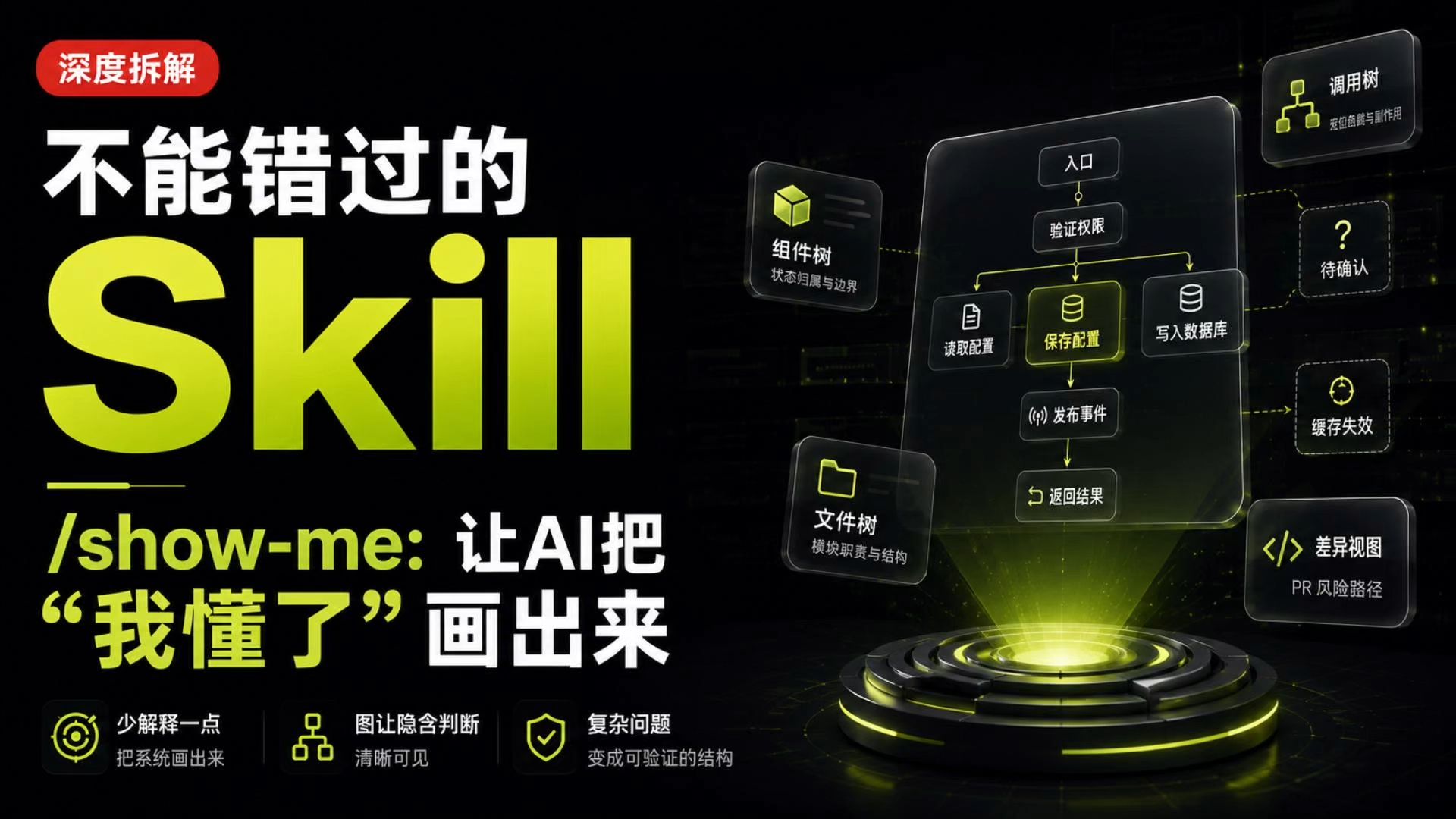
Image Analysis
Organized visible contents of image #1 as requested.
Facts (elements directly readable or visibly apparent in the image)
- Top-left red rounded label text: 深度拆解 (deep breakdown)
- Main title (white + fluorescent yellow/green mix):
- White text: 不能错过的 (not to miss)
- Large fluorescent text: Skill
- Middle-left mixed English/Chinese line: /show-me: 让AI把
- Quoted Chinese (large, fluorescent yellow): “我懂了” 画出来 (“draw ‘I understand’”)
- Three small icons and texts at lower-left (left to right):
1. Circular target icon; text: 少解释一点 把系统画出来 (explain less, draw the system)
2. Structure/tree icon; text: 图让隐含判断 清晰可见 (diagrams make implicit judgments visible)
3. Shield icon; text: 复杂问题 变成可验证的结构 (complex problems into verifiable structures)
- Right side: a flow/structure diagram (dark translucent panel with fluorescent lines and boxes); readable box texts (top to bottom, left to right):
- Top small box: 入口 (entry)
- Next box: 验证权限 (verify permissions)
- Under “verify permissions” branches/lines to three blocks:
- Left: 读取配置 (read config)
- Middle (highlighted, with DB icon): 保存配置 (save config)
- Right: 写入数据库 (write to database)
- From “save config” downward to: 发布事件 (publish event)
- From “publish event” downward to: 返回结果 (return result)
- To the right of the flow are dashed-framed auxiliary boxes (top to bottom):
- Top: 调用树 (call tree) with a small tree icon
- Middle: ? 待确认 (? to be confirmed, box contains a question mark)
- Lower-middle: 缓存失效 (cache invalidation)
- Bottom-right box: 差异视图 PR风险路径 (diff view PR risk path) with code symbol “</>” on the left
- Two floating label boxes left of the flow (near the flow):
- Upper: 组件树 (component tree, cube icon) with small text: 状态归属与边界 (state ownership & boundaries)
- Lower: 文件树 (file tree, file/folder icon) with small text: 模块职责与结构 (module responsibilities & structure)
- Visual/style elements:
- Dark background with fluorescent yellow/green highlights
- “保存配置” (save config) is prominently highlighted (fluorescent yellow background/outline)
- Flow boxes connected with yellow-green arrows/lines; some connections use dashed frames (indicating unconfirmed or external)
- Bottom-right has a glowing circular pedestal/3D effect (beam lighting the flow panel)
- Overall tech aesthetic with glow effects and layered floating panels
Inferences (reasonable deductions based on layout and common meanings; not direct text)
- The flow likely represents a backend/system process for saving configuration: after permission verification it reads/saves/writes config, publishes an event, and returns a result.
- Dashed boxes (to-be-confirmed, cache invalidation, call tree) probably denote external impacts, exceptional cases, or modules needing further confirmation.
- Floating labels like component tree, file tree, and call tree suggest different inspection views/tools (component state, module structure, call relations).
- The diff view (PR risk path) likely shows change diffs and potential risk paths for code review/PR analysis.
- Bottom three items (explain less, diagrams make implicit judgments visible, complex problems into verifiable structures) are likely the three key messages or principles.
Unreadable / Uncertain parts (areas recommended to be marked as illegible or unclear)
- Small text under the call tree is not fully clear; it may read something like “宏/函数与副作用” or similar, but the handwriting/resolution is insufficient to confirm.
- Some arrow directions and exact linkages (e.g., whether write-to-database directly leads to a to-be-confirmed box or cache invalidation) overlap and are not fully unambiguous.
- Very small auxiliary notes (edge labels, small icon captions) are below readable resolution and cannot be transcribed verbatim.
- Several tiny annotations near top and bottom right icons are blurred and not fully legible.
Optional follow-ups:
- Convert the above into a more structured table (e.g., numbered flow nodes with certainty annotations), or
- Zoom into the right-side flow area and provide node-by-node connectivity detail with uncertainty flags.
SkillPI Creation Analysis
Purpose of the work:
- The video and the show-me skill demonstration are intended to have an AI agent ‘represent’ its understanding before producing code changes: generate sequence diagrams, call paths, component boundaries, and a review map so ambiguous descriptions become checkable items. The recommended workflow is three steps: represent, implement, verify.
Key image evidence (from image_text):
- The flow emphasizes a “save config” node and shows a path: entry → verify permissions → read/save/write → publish event → return result. Auxiliary panels list call trees, items to confirm, cache invalidation, and a PR risk/diff view.
- Visual emphasis (highlighting, color, layout) signals which nodes and boundaries the designer expects to scrutinize (notably the highlighted “save config”).
Steps to use the Skill (practical, based on video and the show-me repo):
1) Represent (have the agent draw)
- Prompt the agent to produce a sequence diagram or flowchart for the problem scenario (e.g., “config saves then reverts”), explicitly including: entry points, permission checks, read/save/write paths, event publication, and result return.
- Ask for multiple perspectives: component tree (state ownership & boundaries), file/module tree (responsibilities & structure), and call tree (call paths and side effects).
2) Implement (turn diagrams into concrete contracts and code guidance)
- From the diagrams, define a change contract: who can change what, which modules will be impacted, event semantics, and rollback conditions.
- Make decision points explicit in code: write order, transaction boundaries, retry policies, and cache invalidation hooks.
3) Verify (confirm with source, tests, and runtime data)
- Map the review checklist to specific artifacts: unit/integration tests, CI logs, application logs, event bus traces, and DB write traces (to detect double-writes or race conditions).
- Use the PR diff/risk path output to focus code review on high-risk changes.
Reproduction prerequisites (what you need to apply this workflow):
- Access to the code repository and runtime/test logs (CI logs, application logs, event traces).
- An AI code agent and/or the show-me plugin that can generate diagrams (Mermaid, PlantUML, JSON flow, or renderable images).
- Sufficient understanding or read permission of the system architecture and permissions model to map agent output to real code.
- Reference: https://github.com/humanlayer/skills/tree/main/plugins/show-me/skills/show-me
Items to verify and limitations (what diagrams do not guarantee):
- Dynamic calls, retries, and double-write risks: diagrams can show intended control flow but do not prove behavior under retries, concurrency, or failure; verify via logs, tests, and transaction/lock inspection.
- External systems and async boundaries: dashed/uncertain boxes usually indicate external dependencies or uncertain modules—verify their semantics, retry guarantees, and event delivery semantics.
- Completeness of agent-generated diagrams: confirm whether the agent derived diagrams from source/trace data or only from a textual description; the latter may miss implementation specifics.
- show-me plugin capabilities to confirm: can it read repositories/logs directly, what output formats it supports, and whether generated diagrams are editable/annotatable.
Scope and limitations:
- This interpretation is based on the video summary and visible image elements (and references the show-me repository). Diagrams are useful to convert fuzzy descriptions into checkable items, but they do not replace checking the source code, tests, and runtime traces before making or accepting changes.