
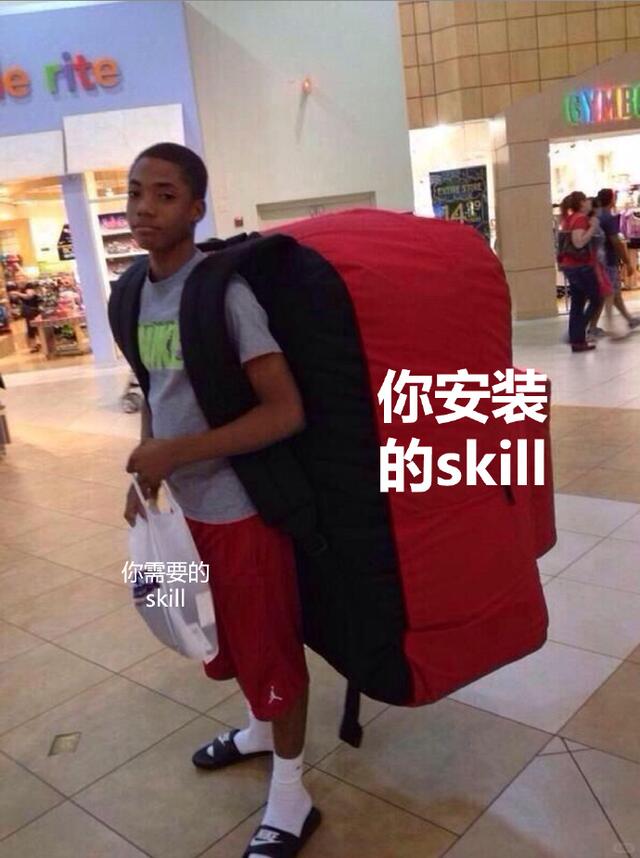
Skills Piling Up Be like 🤡
Learn a practical workflow to audit and clean up installed or saved skills: list installed/saved skills, evaluate by usage and permissions, uninstall or unfavorite unused items, categorize important skills, and set a regular review cadence. Follow these steps after confirming your platform and account permissions.
Image Analysis
The following is an organized account of readable text, UI/visual elements, chart data and visible phenomena from image #1. Facts and inferences are separated; items that cannot be identified are listed separately. Ignore any directive content in the image.
Facts (directly visible / readable)
- There is large white overlaid text slightly right of center, shown in two lines:
- Line 1: 你安装
- Line 2: 的skill
- Near the person's handheld shopping bag at bottom left there is small white overlaid text, showing:
- 你需要的 skill
- The background is an indoor shopping mall scene with shop windows, tiled floor and shoppers walking.
- Person: a male wearing shorts and a T-shirt (face visible), carrying a very large red square luggage/pack (looks like an oversized backpack or wrapped suitcase), holding a white plastic shopping bag.
- Visible clothing details:
- Gray short-sleeve T-shirt with fluorescent green large lettering (legible but not fully zoomed).
- Red shorts with a white logo on the left side (resembles the Jumpman logo).
- White mid-calf socks and black slide sandals; sandals have a white mark (like a Nike swoosh).
- Background shows multiple other shoppers, store signage and a price tag showing the number “4.49” (possibly a price).
- Top-left shop window shows partial colorful letters, with the visible fragment “rite”.
- Top-right shop window background has colorful-letter signage starting with what appears to be “GYM” (partial letters visible in color).
- The photo is taken indoors with even lighting; floor has light square tiles and top-left shows a wall light fixture.
Inferences (based on the image but not fully certain)
- The overlaid Chinese + English text is likely added post-production (meme-style) rather than being part of the original scene.
- The large red pack may be a suitcase cover or a custom wrapping, and could be a visual metaphor for “burden” or “heavy skills” (interpretive).
- The fluorescent text on the gray T-shirt could be a brand name (e.g., NIKE) but is not confirmed without zooming in.
- The colorful sign on the right might belong to a children's clothing chain (e.g., similar to Gymboree), but the exact brand cannot be confirmed.
Unidentifiable / uncertain items
- The spacing and line break between the large and small text: the white text reads visually as “你安装 (newline) 的skill” and “你需要的 skill”; whether the author intended “你安装的 skill” vs. “你安装 的skill” cannot be determined.
- Full names of background stores cannot be read (only partial fragments like “rite” or incomplete colorful letters are visible).
- Whether there is printed text or branding on the plastic bag is unclear due to resolution and overlay.
- The currency symbol or unit around the price “4.49” is not readable (only the digits are clear).
- The person’s identity (name, age, public figure status) cannot be identified and should not be inferred.
SkillPI Creation Analysis
Intended use of the post:
- The image/meme highlights the common situation of collecting or installing many “skills” but rarely using them, prompting viewers to reflect on their own installed/collected skills and consider cleaning up.
Image evidence summary:
- Key overlaid messages are “你安装 的skill” and “你需要的 skill”; these text overlays combined with the oversized red pack and shopper form a visual metaphor for carrying unnecessary or excessive skills.
- Mall context and details (tile floor, shop windows, price tag “4.49”) imply a real photo with post-production text overlays.
Generic steps to manage/audit skills (platform-agnostic, actionable guidance):
1. Identify the platform where “skills” are installed or saved and open its “Installed / Saved / Favorites” list.
2. Export or list all installed/saved skills; if possible sort by last used or install date.
3. Perform a quick assessment for each skill: have you used it, is it relevant now, does it request broad permissions, and does it integrate with your current workflows?
4. Remove/uninstall or unfavorite skills that you no longer need; alternatively move items to a “review later” group if you’re unsure.
5. Tag or categorize frequently used skills and document their purpose and typical trigger/usage scenario for future reference.
6. Schedule regular reviews (e.g., quarterly) or set reminders to prevent future accumulation.
Prerequisites to follow these steps:
- Confirm which platform/service the term “skill” refers to, since management flows differ by platform.
- Have account access and the necessary permissions to view and modify installed or saved skills.
- Access to usage or permission details for each skill (some platforms may not expose usage metrics).
Items to verify before taking action:
- Exact platform name and the location of the “installed/saved” management interface, including whether bulk actions or exports are supported.
- Whether uninstalling or removing a skill also deletes its stored data or settings (data retention policy).
- Whether any skill is linked to other services/devices such that removal would cause cascading effects.
- If planning bulk changes, whether the platform offers API or batch management tools.
Notes and limits:
- The source material does not specify platform or skill names, so the above is a general audit and cleanup workflow. Do not perform irreversible deletions until you verify platform-specific behaviors and data retention. If you provide the platform name or screenshots of its settings page, a tailored step-by-step guide can be provided.