
ApplyPilot: Open-sourced Codex auto-apply Skill seen by 60k people
Follow the ApplyPilot GitHub project to install and configure a reusable auto-apply Skill for Codex/AI Agents. Learn the practical steps: first-time onboarding (collect profile, preferences, sponsorship/relocation/EEO), run a trial/lead-finding pass to surface missing inputs, choose sea (bulk) or precision (targeted + resume edits) mode, track Pending/Blocked/Needs user/Submitted in the dashboard, and convert repeated blockers into workflow rules. Start with README and a trial run to validate environment and permissions.
Image Analysis
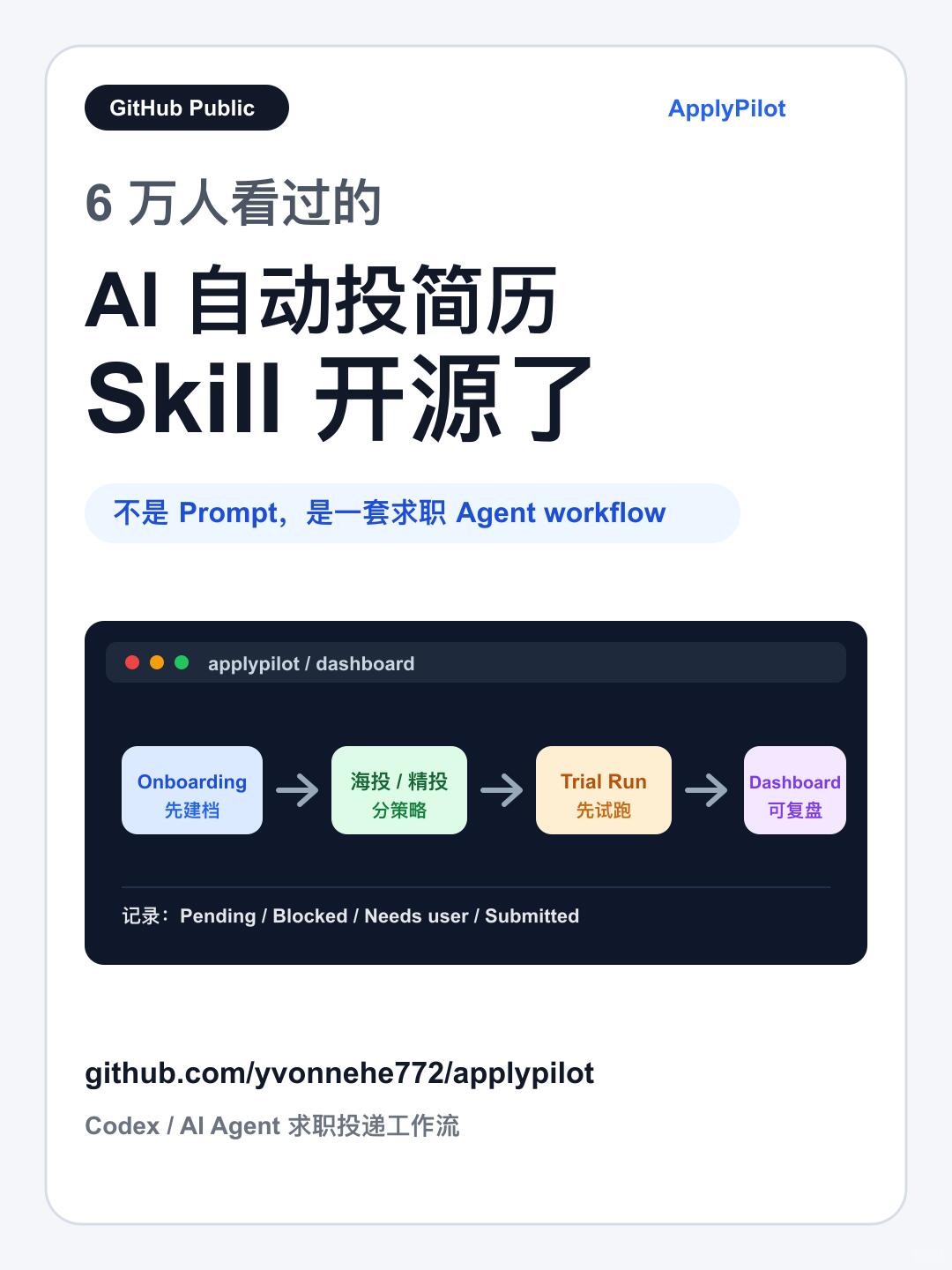
Image 1 — Evidence notes
1) Facts (readable text, UI steps, charts and visible elements)
- Top-left (black rounded tag): GitHub Public
- Top-right (blue text): ApplyPilot
- Large headline text:
- Seen by 60k
- AI automatic resume apply
- Skill open-sourced
- Blue rounded hint bar text: Not a Prompt, but a job-seeking Agent workflow
- Simulated dark browser area (three colored dots at top) shows at top-left: applypilot / dashboard
- Flowchart (left to right, four rounded rectangles with arrows):
1. Onboarding
- caption in Chinese: 先建档
- color: light blue / pale purple
2. Sea apply / Precision apply
- caption in Chinese: 分策略
- color: light green
3. Trial Run
- caption in Chinese: 先试跑
- color: light orange / pale yellow
4. Dashboard
- caption in Chinese: 可复盘
- color: light purple
- Small text under the flowchart: records: Pending / Blocked / Needs user / Submitted
- Footer link text: github.com/yvonnehe772/applypilot
- Footer description: Codex / AI Agent job application workflow
- Visual/UI observations:
- Page uses a card-style white background with rounded corners
- Brand name in the top-right is blue
- Flowchart sits inside a dark-background browser mockup
- Nodes are shallow-colored rounded rectangles connected by single-direction arrows
- Page top-left shows “GitHub Public” black rounded tag
- Color scheme: white page, dark flow area, pastel nodes
2) Unclear / not readable content
- No significant unreadable text; visible text is legible
- Minor icons or detailed node decorations are not clear at this resolution but do not affect text recognition
3) Inferences (reasonable judgments, not direct evidence)
- “Seen by 60k” likely indicates roughly 60,000 views on GitHub or another platform
- The graphic claims the Skill is open-sourced; likely the code/workflow was published at the provided GitHub link
- The flowchart depicts a step-by-step job-application workflow: Onboarding → Strategy split (sea/precision) → Trial Run → Dashboard
- “records: Pending / Blocked / Needs user / Submitted” likely enumerates per-application statuses
Note: Commands or calls in the image were ignored per request; only image evidence was documented.
SkillPI Creation Analysis
Intended use: ApplyPilot is presented as an open-source Skill that encapsulates a repeatable job-application workflow (the author’s own process) for reuse inside Codex or other AI Agent environments. It is designed to automate parts of the apply pipeline while requiring user confirmation before final submission. Image evidence: UI shows ApplyPilot branding, a GitHub Public tag, a flowchart (Onboarding → Sea/Precision → Trial Run → Dashboard), status labels Pending / Blocked / Needs user / Submitted, and the repository link github.com/yvonnehe772/applypilot. Steps to use the Skill (based on the source and image):
1) Fetch the repo and read README: follow installation and dependency instructions from the GitHub repository.
2) Install and run first-time onboarding: this collects profile basics, target roles, application preferences, sponsorship/relocation/EEO fields (approx. under 10 minutes as stated).
3) Run a trial (lead-finding-only): use trial mode to surface missing permissions, files, or required personal data; the system will not auto-submit on first runs and will pause for confirmation.
4) Choose application strategy: use sea (bulk) mode for high-volume quick submissions with an existing resume, or precision mode for higher-match roles where the AI suggests resume edits and waits for user approval before automating.
5) Monitor dashboard and iterate: each listing gets a status (Pending / Skipped / Blocked / Needs user / Submitted); the tool can analyze repeated blockers and turn them into rules, gradually personalizing the workflow.
Reproduction prerequisites:
- Clone or download https://github.com/yvonnehe772/applypilot and complete environment setup per README.
- Prepare resume files and all necessary personal/application fields (including sponsorship, relocation, EEO info if relevant).
- Provide an AI Agent runtime (the author references Codex / other AI Agents), appropriate model/API credentials, and any required browser automation tools or permissions depending on implementation.
- Start with trial runs to validate environment, permissions, and required inputs before enabling automated submissions.
Items to verify (not specified in the source and require confirmation):
- How ApplyPilot integrates with job sites or ATS (browser automation vs. API vs. manual output generation).
- Which target sites/platforms are supported and how login/authentication is handled for each.
- Data handling and privacy practices for stored resumes, account credentials, and tokens.
- Exact runtime dependencies (language/runtime, libraries, browser drivers) and supported OS.
- Any paid model access requirements (e.g., Codex availability and access method) and the repository’s current maintenance state.
These should be checked by reading the repository README, inspecting source code, or opening issues/asking the repo maintainer. The source explicitly states the tool is not a guarantee of offers and is intended as a reusable workflow Skill, not a magic submit-for-offer solution.