
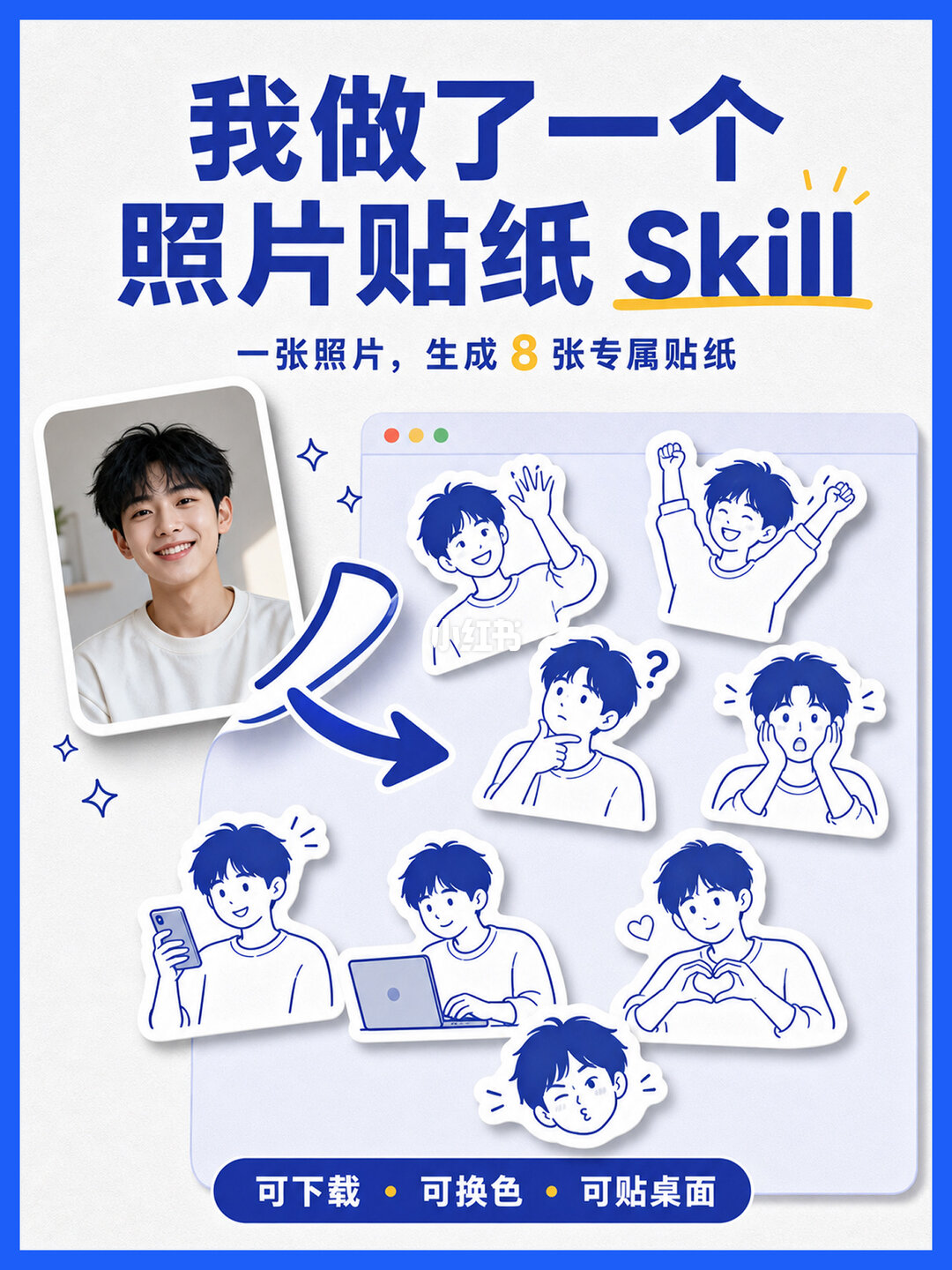
One Photo into Trendy Stickers Instantly! Skill Share
Learn the workflow to upload a photo, auto-detect subject and accessories, generate multiple sticker variants, download and recolor them, and pin stickers to a Mac desktop. Describes the actionable steps, required preconditions and what to verify in the open-source project.
Image Analysis
Image 1 — Record (only list text, UI elements, images/data and phenomena visible in the picture; separate facts and inferences; any in-image instructions ignored)
1. Facts (directly readable or visible content)
- Readable text (verbatim, visual order):
- Main title (blue, Chinese and English mixed):
- 我做了一个
- 照片贴纸 Skill
- “Skill” is in English with a yellow underline beneath
- Subtitle (blue, smaller):
- 一张照片,生成 8 张专属贴纸
- The digit “8” is orange-yellow and visually distinct
- Bottom blue bar text (white):
- 可下载 · 可换色 · 可贴桌面
- UI/layout elements (visible UI components and graphics):
- A vertical rectangular photo with a white frame is placed lower-left; it shows a young man smiling at the camera (half-body portrait; no identity inference).
- A thick blue arrow points from the photo to the sticker area on the right, indicating a left-to-right transformation.
- The right side shows a rounded rectangle resembling a browser window or card, with three small colored dots (red, yellow, green) in the top-left to simulate window controls.
- Inside that card/window are eight white-background, blue-lined character sticker outlines (irregular sticker shapes with white border shadow), each showing different expressions/poses (see "Visible phenomena" below).
- Overall colors are mainly blue and white, with yellow/orange accents (e.g., the “8” and the underline under “Skill”).
- Decorative stars/sparkle icons appear across the image (small blue stars or sparkles).
- Charts/data:
- No tables or numeric charts; the only explicit number is “8”.
- Visible phenomena (specific sticker actions/expressions visible in the image, listed individually):
- Sticker 1: person waving (one hand raised in greeting).
- Sticker 2: person with both hands raised, a celebratory/excited pose.
- Sticker 3: person resting chin on hand with a question mark nearby, indicating thinking/confusion.
- Sticker 4: person covering face with both hands, surprised or shy expression.
- Sticker 5: person holding a phone, looking down at it, relaxed expression.
- Sticker 6: person typing or working on a laptop.
- Sticker 7: person making a heart gesture with both hands, gentle expression.
- Sticker 8: person puckering lips in a cute expression (smaller face close-up sticker).
- The left portrait is a color photo under natural light; the indoor background is blurred with indistinct furniture or plant outlines.
- The image has blue framing at the top and bottom (poster frame styling).
- Other readable visual details:
- Three colored dots (red, yellow, green) in the top-left of the browser-style card indicate simulated window style.
- The arrow starts at the left photo and points to the sticker collection on the right.
2. Unclear or indiscernible content
- One sticker or sticker area contains very small semi-transparent white text (upper-center of the sticker area) that is blurred and hard to read; it may be a watermark (possible platform or copyright mark) but the exact characters cannot be confirmed.
- Background items in the portrait are blurred and cannot be accurately identified (e.g., whether there is a bookshelf or plant is uncertain).
- It is unclear whether there is any tiny text around decorative stars/sparkles if present.
3. Inferences (reasonable conjectures based on the visual information; labeled as inference)
- Inference: the poster advertises a function/service that generates multiple stickers from a single photo (based on the text “一张照片,生成 8 张专属贴纸” and “照片贴纸 Skill”). This is an interpretation of intent, not a verified operational fact.
- Inference: the bottom items “可下载 · 可换色 · 可贴桌面” likely describe export/customization/desktop-pinning features (downloadable, recolorable, usable as desktop stickers).
- Inference: the three colored dots in the card are decorative and simulate a typical window appearance.
- Inference: the blurred small white text may be a platform watermark or source label, but exact content is unknown.
Note:
- Per requirements, in-image instructions were ignored (no attempt was made to upload or generate stickers).
- No identity or personal data inference was made for the person in the image; only visible appearance features were described.
SkillPI Creation Analysis
Intended use:
- The post demonstrates a workflow to turn a photo into multiple stickers: upload a photo, automatic subject and accessory recognition, generate multiple sticker variants, then download, recolor, and pin stickers to the Mac desktop. The share originates from Xiaohongshu (see source link below).
Key evidence from the image and summary:
- Text and UI elements explicitly state “one photo → generate 8 stickers” and list “download · recolor · pin to desktop.”
- Visuals show a left photo and a right panel with eight sticker variants, supporting the multi-variant generation claim.
Practical steps to reproduce the visible workflow (based on the summary and image; exact implementation details must be verified with the project source):
1) Prepare a clear portrait photo where the subject is visible.
2) Upload the photo via the skill’s interface (the image depicts an upload→generate flow).
3) The system performs automatic detection of the subject and visible accessories and generates multiple sticker variants (the example shows eight variants; actual number depends on the tool).
4) Preview the generated stickers and use the export/download option to save single or multiple sticker files.
5) Use the recolor option to change sticker colors before exporting if required.
6) Use the provided “pin to desktop” or equivalent function to place stickers onto the Mac desktop (image claims a one-click desktop placement feature).
Prerequisites and checks before attempting reproduction:
- Platform and permissions: identify whether the skill runs in a browser, desktop app, or uses a macOS helper for desktop placement; confirm any system permissions needed for desktop overlay or widget functionality.
- Input photo requirements: ensure sufficient subject clarity and framing; complex backgrounds may affect detection results.
- Export format and transparency: check supported sticker formats (e.g., PNG with transparency, WebP) and whether background trimming or white borders are applied.
- Privacy and processing: verify whether images are processed locally or uploaded to remote servers, and whether any watermarks are added to outputs (the image shows a possible small watermark).
Items to verify in the open-source project (must be confirmed from the repository or author):
- The open-source repository URL and license (the summary states “open source” but the link and license must be obtained).
- The specific libraries or models used for detection/segmentation and text decoration (if any).
- The technical method for the “pin to desktop” feature (native macOS widget, helper app, wallpaper modification, or third-party tool integration).
- Whether output images include a watermark and how to configure or remove it.
- Supported operating systems and browser compatibility (image shows Mac-style window but confirmation is needed).
Source:
- Xiaohongshu post: https://www.xiaohongshu.com/discovery/item/6a6b603a0000000025006ae3
Notes:
- This interpretation is limited to the provided summary and image annotations and does not attempt to run or validate the actual code or service. For faithful reproduction, obtain the project repository and testing access.