
Open-source game combat-design skill share — act-combat-design
Use the open-source act-combat-design skill to input your project's combat conventions (or co-create a new set) and produce character/monster design docs, combat effects and progression designs (mechanics, buffs, numeric validation). Supports multiple AI agents; repository includes README, getting-started guide, SKILL.md and USAGE.md. Repository: https://github.com/koisama0411/act-combat-design
Image Analysis
(Image evidence extraction — records visible UI text/elements/charts and observable facts only)
Facts (directly readable/visible)
1. Repository and top bar
SkillPI Creation Analysis
Intended use:
- The repository act-combat-design presents itself as a project-agnostic combat-design skill and knowledge base for anime/action games, intended to be used by AI agents (e.g., Claude, GPT, Cursor). Claimed outputs include character and boss design, move lists, combat mechanics, buff/progression design, and numeric validation materials. The repo provides README, a getting-started guide, SKILL.md and USAGE.md, suggesting a workflow and example outputs. Repository: https://github.com/koisama0411/act-combat-design.
Image evidence summary:
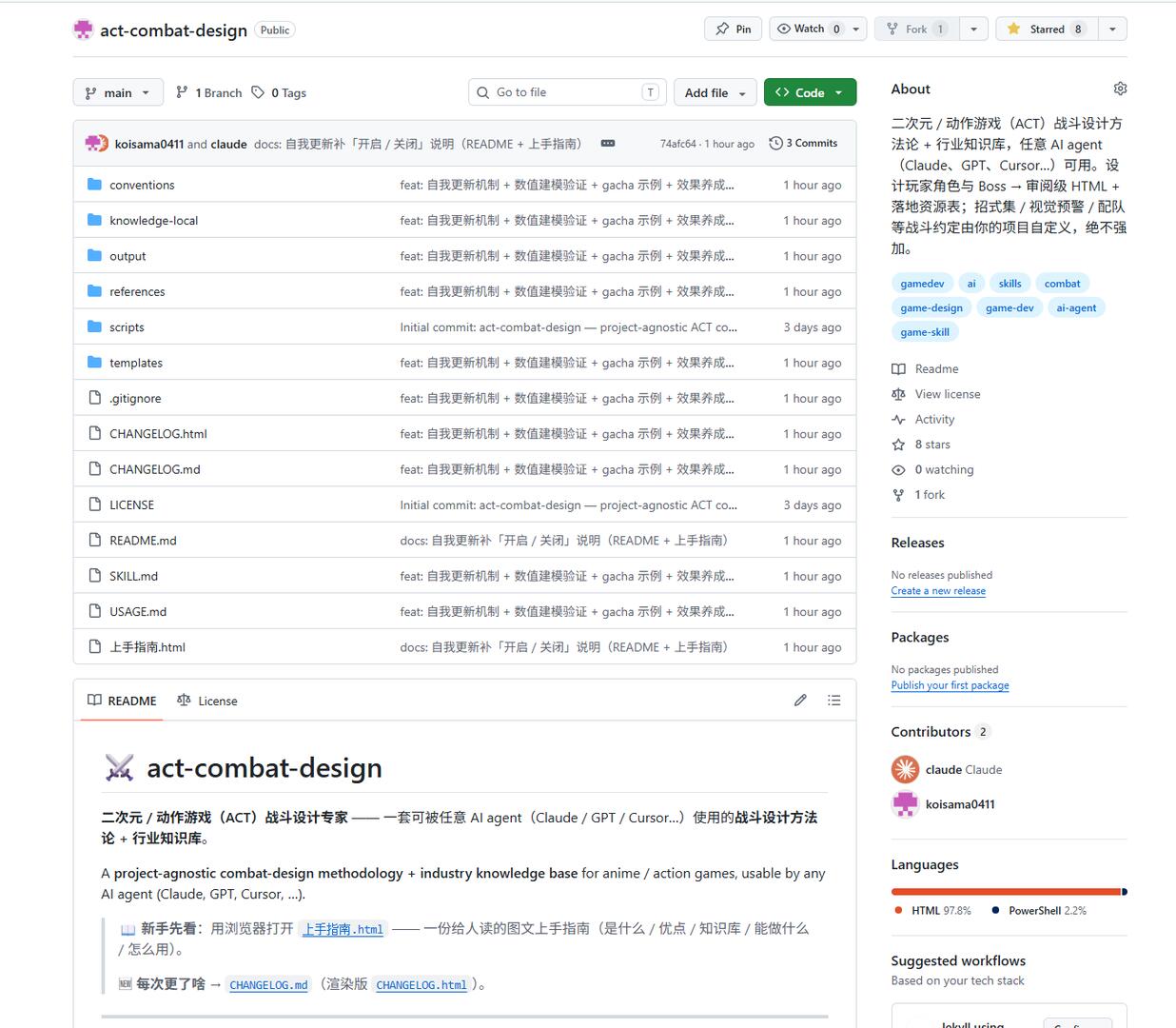
- The screenshot shows a public GitHub repo on branch main, with folders (conventions, knowledge-local, output, references, scripts, templates) and files (README.md, SKILL.md, USAGE.md, CHANGELOG, LICENSE, 上手指南.html). Most recent commits are labeled ~1 hour ago. About panel lists topics (gamedev, ai, skills, etc.), contributors (claude, koisama0411), and language percentages (HTML 97.8%, PowerShell 2.2%). These items are visible in the image and support the repository’s stated purpose.
Steps to use the linked skill (according to the repository’s claims — not a reproduction):
1. Prepare your project’s combat conventions (rules, attributes, skill formats). The skill claims to accept an existing set or help create one for a new/indie project.
2. Choose and provision an AI agent/model environment (the repo mentions agents like Claude, GPT, Cursor and recommends Claudecode and its models). Confirm how to call the chosen model (API, local runtime, or agent integration).
3. Follow the repository’s getting-started guide (上手指南.html) and USAGE.md to feed conventions and requirements to the skill/agent and request outputs: character/monster design docs, combat effects and progression designs, and numeric validation steps or scripts.
4. Check SKILL.md / README for the enabling procedure.
5. If you have an AI-driven configuration pipeline, map the repository’s output artifacts (document formats, JSON/config files) into your pipeline so agents can perform automated configuration or deployment.
Reproduction prerequisites:
- Clone and read the repository documentation (README, 上手指南.html, SKILL.md, USAGE.md, conventions, output) to understand expected inputs/outputs.
- A prepared set of combat conventions (or time to co-author new conventions with the skill).
- Access to a runnable AI agent/model (e.g., Claude or GPT) and knowledge of how to pass inputs and receive outputs programmatically.
- Clarify whether and how to enable the self-update feature and how stored knowledge is persisted and versioned.
Items to verify (not fully specified in the visible content):
- Exact meaning and integration method for the recommended “Claudecode and its models” (which APIs/SDKs, sample calls, authentication, etc.). Verify in SKILL.md/USAGE.md.
- Implementation details of the self-update mechanism (where data is stored, retention, versioning, privacy and compliance implications).
- Output artifact formats and schemas (JSON, CSV, markdown, HTML) for direct agent/pipeline consumption — check output directory and USAGE.md for concrete examples.
- What scripts/tools exist for “numeric modeling validation” and “gacha example” (are there runnable scripts in scripts/ or example datasets in output/?).
Conclusion / recommended next steps:
- Review the repository documentation locally and inspect the output/ and scripts/ folders to confirm deliverable formats and available examples.
- Set up a test environment with a chosen model (Claude or GPT) and run sample inputs from the getting-started guide to verify generated design documents and numeric validation steps.
- Before enabling any self-update persistence in production, confirm storage, access controls, and versioning behavior in the repo docs.