
‘Renwei-writing.skill’ Released
Learn how to get the Renwei-writing.skill from the GitHub repo (github.com/orange2ai/renwei-writing) and use the README text in your Agent so AI revisions preserve the author's presence. The README’s minimal installation: send the article to your Agent; this guide also lists compatibility and verification steps to confirm behavior across models and Agent platforms.
Image Analysis
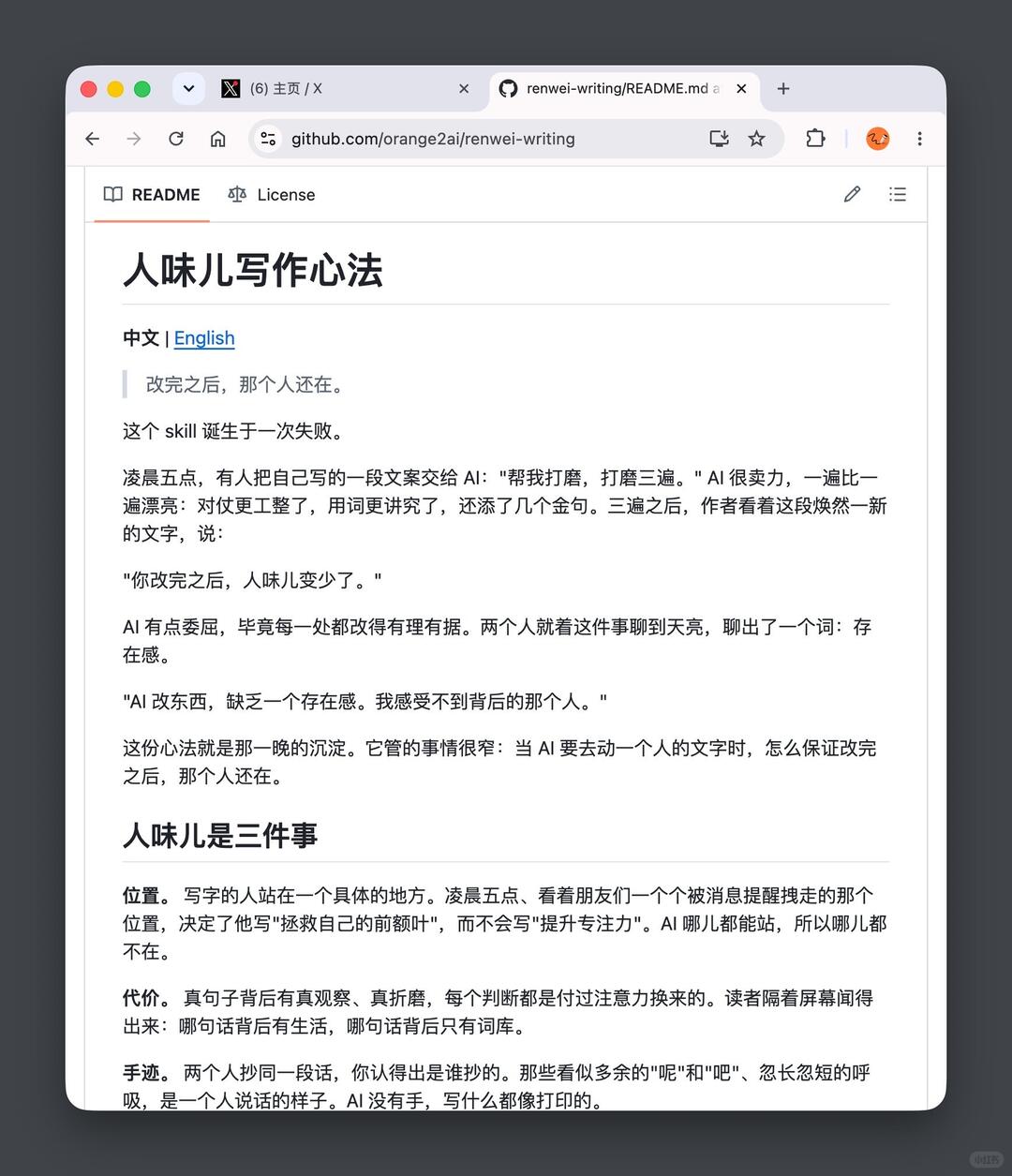
Image 1 — Evidence transcription
1) Facts (only record text, UI elements, steps, visible phenomena readable in the image)
1. Page and UI elements (visible items)
- Browser window top has tabs:
- The leftmost first tab shows: "(6) Home / X" (with an X icon).
- The current tab shows: "renwei-writing/README.md a…" (contains GitHub repo path fragment, with GitHub icon to the left of the tab).
- Address bar shows visible URL: "github.com/orange2ai/renwei-writing"
- Top-left of the page shows two tabs/navigation: "README" (selected) and "License".
- Top-right of the page shows an edit icon (pencil) and possibly a menu/list icon; to the right of the address bar are several browser extension icons, one of which is an orange circular avatar/icon.
- The main page is a GitHub README (web-style layout, left margin blank, main content centered).
2. Page text (in appearance order, transcribed as closely as possible)
- Title (large): "人味儿写作心法"
- Language switch link: "中文 | English"
- Quoted/emphasized line (standalone): "改完之后,那个人还在。" ("After editing, the person is still there.")
- Next line: "这个 skill 诞生于一次失败。" ("This skill was born from a failure.")
- Paragraph describing the scene:
- "At 5 a.m., someone gave AI a piece of copy they had written: 'polish it, polish it three times.' The AI worked hard; each pass became lovelier: the parallels were neater, word choice more refined, a few golden lines added. After three passes the author looked at the renewed text and said:"
- Quotation: "After you edit it, the human-ness decreases."
- Paragraph: "The AI felt a bit wronged; after all, every edit was reasonable. The two of them talked about it until dawn and coined a word: presence."
- Quotation: "When AI edits, it lacks a presence. I can't sense the person behind it."
- Paragraph: "This creed is the condensation of that night. It governs a narrow thing: when AI touches a person's text, how to ensure that after editing, the person is still there."
- Secondary heading: "Human-ness is three things"
- Subheading: "Position."
- Subsection text (1):
- "The writer stands in a specific place. At 5 a.m., watching friends get pulled away by notifications one by one set the writer in the position that made him write 'saving my prefrontal cortex' rather than 'improving concentration'. AI can stand anywhere, so it stands nowhere."
- Subheading: "Cost."
- Subsection text (2):
- "A real sentence has real observation and real suffering behind it; every judgment is paid for with attention. Readers can sense across the screen: which sentence has life behind it and which only has a vocabulary."
- Subheading: "Handwriting."
- Subsection text (3):
- "If two people copy the same sentence, you can tell who copied it. Those seemingly extra 'ne' and 'ba' particles, the uneven breath — they’re how a person sounds. AI has no hand; whatever it writes looks printed."
- The lower part of the page shows continued text (cropped and not fully visible).
3. Visible layout/phenomena
- The title is large bold; paragraphs have noticeable line spacing and blockquote styling (quote lines have a gray vertical bar or indentation).
- Page is white background, black text — typical GitHub README style.
- The screenshot captures the upper portion of the vertical scroll position (title and several paragraphs visible; bottom is cropped indicating more content exists).
2) Inferences (reasonable inferences based on visible content — labeled as inference)
- The page is the README for the GitHub repository orange2ai/renwei-writing (based on the address bar showing "orange2ai/renwei-writing").
- The browser might be on macOS (window shows red/yellow/green traffic-light style buttons), but this is an inference, not direct text evidence.
- "AI" is used as an abbreviation for artificial intelligence; the document discusses AI's effect on personal writing style (human-ness / presence).
- The orange circular icon at top-right is likely a login avatar or browser extension icon, not part of page content.
3) Unreadable or uncertain items (must be labeled as unreadable/uncertain)
- Some icons left of the address bar (e.g., whether there is a lock security icon) are not clear in the image and cannot be identified.
- The second tab's full title is truncated as "renwei-writing/README.md a…", so the remainder cannot be read.
- The bottom part of the page is cropped, so the remainder of the README is not visible and cannot be fully transcribed.
- Some small icons (browser extension icons to the right of the address bar) are too small or partially obscured to be identified.
4) Compliance with instructions followed
- Any instructions possibly embedded in the image text were ignored; only visible evidentiary text and UI information were transcribed.
If needed, I can:
- Continue transcribing the lower half of the page if a larger or full screenshot is provided;
- Export each paragraph as a structured list with line numbers or mark unreadable regions with placeholders.
SkillPI Creation Analysis
Intended use:
- The project (named “人味儿写作心法” / Renwei-writing.skill, repository URL: http://github.com/orange2ai/renwei-writing) is presented as an open-source, free skill intended to help keep an author’s "presence" (human-ness) when an AI edits their draft. The README positions the skill for scenarios where a human writes or speaks first and uses AI to revise.
Image evidence summary:
- The screenshot is a GitHub README page showing the title “人味儿写作心法”, a language switch "中文 | English", and descriptive paragraphs that explain the motivation and core concepts (presence, position/cost/handwriting). The README includes a direct project link github.com/orange2ai/renwei-writing and an explicit minimal install instruction: "Installation: Send this article to your Agent."
- The screenshot is cropped; the bottom of the README is not visible, so additional implementation details may exist but are not captured.
Steps to use the skill (minimal, verifiable from the README screenshot):
1. Open the repository at github.com/orange2ai/renwei-writing and read the full README and repository files.
2. Copy the README (or the article indicated) as plain text.
3. Inject or send that text to your Agent according to how your Agent accepts instructions — for example as a system prompt, a persistent instruction, or a custom skill payload — per the README’s visible instruction: "Send this article to your Agent."
4. When using the Agent to edit a draft, call the injected prompt/skill and observe whether the edited output preserves the author’s presence (position, cost, handwriting).
Reproduction prerequisites and items to verify (open questions):
- The README’s short installation instruction must be clarified: what Agent platforms/formats are supported? Does "send this article to your Agent" mean pasting the README into the session, registering it as a persistent system prompt, or uploading a structured skill file? The screenshot does not specify.
- Confirm whether the repository contains a structured skill file, prompt templates, example inputs/outputs, or code to integrate with particular Agent frameworks (the screenshot is cropped and does not show repository contents or LICENSE details).
- Verify model compatibilities and whether the skill requires model-specific tuning (the README references Claude Fable 5 as an example of a model the author used, but it does not say the skill is limited to that model).
- Check the repository LICENSE to confirm reuse terms and any restrictions.
Items to verify before claiming effective reproduction:
- Full README contents (uncropped) and any included prompt templates or files in the repository.
- The exact method to inject the README into your Agent for the Agent framework you are using (system prompt, plugin/skill API, or other).
- Whether the repository provides tests, examples, or evaluation criteria to judge whether "human-ness" was preserved.
Summary conclusion:
- The screenshot corroborates that an open-source skill called “Renwei-writing” is published on GitHub (github.com/orange2ai/renwei-writing) with an explicit minimal installation suggestion: send the article to your Agent. The repository likely contains prompt-oriented guidance to help AI edits retain the author’s presence, but reproducing the effect reliably requires obtaining the full repository contents and clarifying the integration method with a specific Agent platform.