
Open-source tool — Let AI take over your legacy project without teaching from scratch
Learn how to create a persistent, searchable project cognition layer (a .turritopsis/ directory) that records Current Truth, Historical Decisions, and Handover notes so multiple humans and AI agents can quickly understand and take over a codebase. The guide explains the core structure and recommended steps; check anhe2021212-spec/Turritopsis for implementation details and integration requirements.
Image Analysis
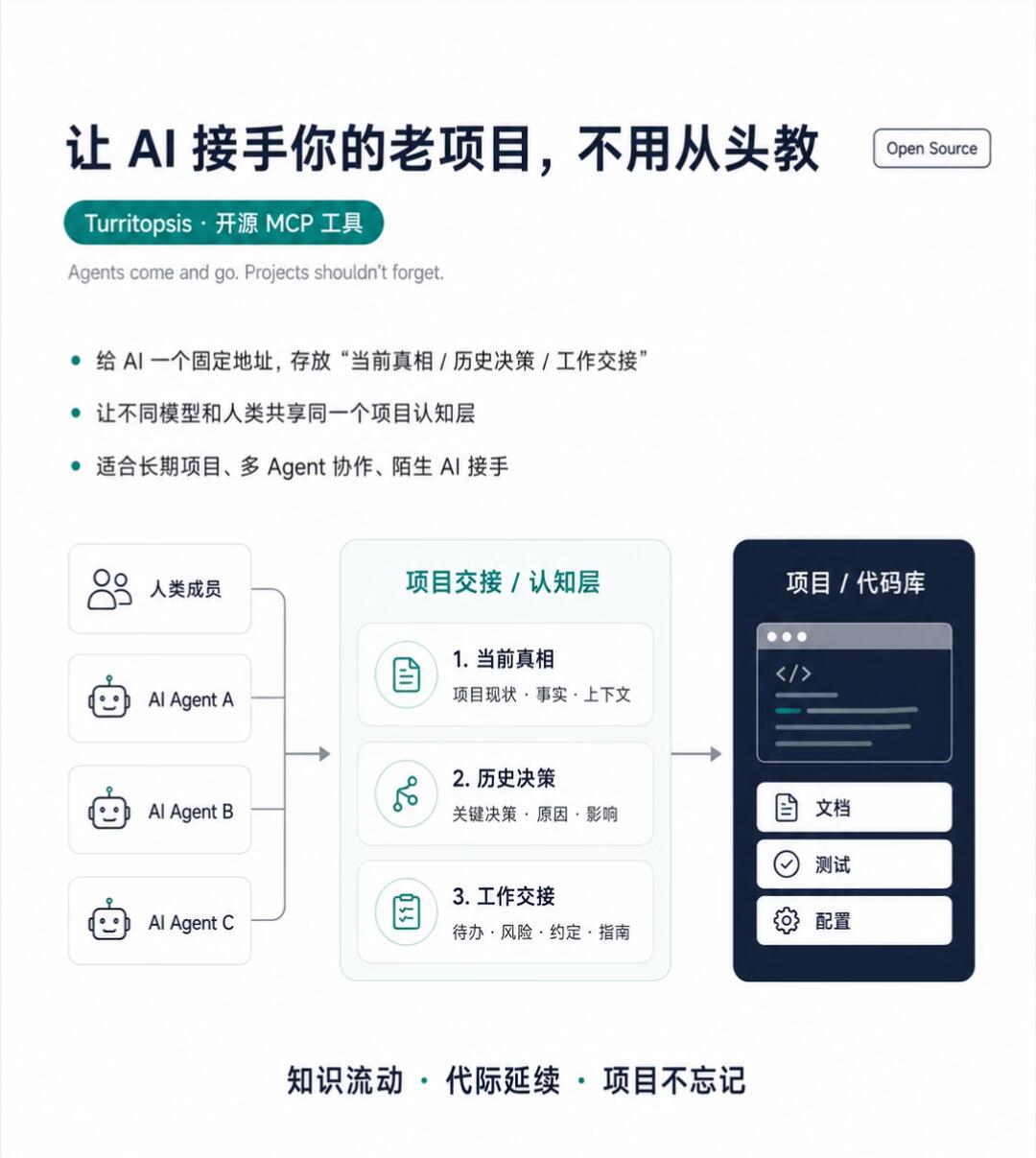
Below is a transcription and structured reading of visible text, UI elements, diagrams, and phenomena from the image, listed top-to-bottom, left-to-right. First are “facts” (directly readable text/UI elements), then “inferences,” then “indistinguishable” items. Any instructions visible in the image are ignored.
1) Facts (directly readable text and UI elements)
- Top main title (Chinese): “让 AI 接手你的老项目,不用从头教” (Let AI take over your old project without teaching from scratch)
- Top-right button/label (English): “Open Source”
- Green pill label below: “Turritopsis · 开源 MCP 工具”
- English subtitle (grey): “Agents come and go. Projects shouldn't forget.”
- Three bullet points (each preceded by a dot):
1. “Give AI a fixed address to store ‘Current Truth / Historical Decisions / Handover’”
2. “Let different models and humans share the same project cognition layer”
3. “Suitable for long-term projects, multi-agent collaboration, unfamiliar AI taking over”
- Left vertical list of persons/agents (each row has an icon):
- Icon + text: “Human member”
- Robot icon + text: “AI Agent A”
- Robot icon + text: “AI Agent B”
- Robot icon + text: “AI Agent C”
- Center large box (green border) title: “Project Handover / Cognition Layer”
- Inside the center box three numbered items:
1. “Current Truth”
- small text: “Project status · Facts · Context”
2. “Historical Decisions”
- small text: “Key decisions · Reasons · Impact”
3. “Handover”
- small text: “To-dos · Risks · Agreements · Guides”
- Right dark rectangle (represents “Project / Codebase”) label: “Project / Codebase”
- Inside the top of the right rectangle is a code window illustration (stylized lines of code)
- Inside the right rectangle three buttons/entries listed vertically:
- “Docs”
- “Tests”
- “Config”
- Bottom short phrases (three items separated by dots): “Knowledge flow · Intergenerational continuity · Projects don't forget”
- Visible interaction hints/graphics:
- Arrows from left (human members & AI agents) pointing to the central “Project Handover / Cognition Layer”
- Arrow from central “Project Handover / Cognition Layer” to the right “Project / Codebase”
- Left-side entities use simple icons (human shape and robot icons)
- Each central item has a small icon (file/flow/list type) indicating different categories
- Colors and layout (visual cues):
- White background, deep-blue and green/teal accents
- Three-column logic: explanatory text (top-left), flow diagram (center/left/right), bottom slogan
- Right-side code window illustration uses dark background and light code line stripes
2) UI steps (inferred sequence from diagram arrows)
- Step 1 (sources): Human members and multiple AI agents (A, B, C) act as contributors/participants.
- Step 2 (central): Inputs converge to the “Project Handover / Cognition Layer,” divided into:
- Current Truth (project status, facts, context)
- Historical Decisions (key decisions, reasons, impacts)
- Handover (to-dos, risks, agreements, guides)
- Step 3 (target): The cognition layer communicates with the Project/Codebase, which includes Docs, Tests, Config.
3) Chart/data
- Only numbered labels (1, 2, 3) and textual explanations are present; no numeric data.
4) Visible phenomena (visual elements)
- Clear left→center→right arrows showing information flow.
- Multiple robot icons imply multi-agent collaboration.
- Small icons next to the three central items emphasize different information types.
- The right-side code window is illustrative; the three items below show modular project assets (Docs/Tests/Config).
5) Inferences (conclusions not explicitly stated in the image)
- “Turritopsis” is likely the tool/project name (inference).
- “MCP” likely denotes a category or architecture (e.g., Memory/Context/Project), but the image does not define it (inference).
- The central “Project Handover / Cognition Layer” appears designed as a long-term, shared knowledge layer accessible by different models and humans (inference).
- The right-side entries (Docs/Tests/Config) likely represent typical project assets in the repository (inference).
6) Indistinguishable / uncertain items
- The specific code inside the right-side code window is unreadable; it’s only a stylized stripe pattern.
- Small icon details and tiny annotations are not legible at the image’s thumbnail resolution, though their category (file/flow/list) can be guessed.
- The precise meaning of “MCP” and the internal workings of the touted “four MCP tools” are not provided in the image and cannot be confirmed.
- Very small footer notes or copyright marks (if any) are not legible at this resolution.
SkillPI Creation Analysis
Purpose of the work:
- The poster and associated project present a method to create a persistent, project-owned “project cognition layer” so that multiple human contributors and AI agents can share the same, retrievable knowledge about a codebase. The intent is to reduce onboarding friction when agents change or new humans join a project. The source explicitly contrasts this layer with agent memory, code indexing, and session continuation — emphasizing persistence and project ownership.
Image evidence summary:
- The image clearly displays three central content types: Current Truth, Historical Decisions, and Handover — each described as storing facts, reasons/impacts, and to-dos/risks/guides respectively. Arrows show contributions flowing from humans and multiple AI agents into the cognition layer, which then relates to the project/codebase (Docs, Tests, Config).
Suggested integration steps (inferred from image and summary; require confirmation from the repository):
- The project name in the source is Turritopsis (repository path referenced: anhe2021212-spec/Turritopsis). The image suggests a working pattern that can be followed; a likely workflow is:
1. Inspect the Turritopsis repository to confirm architecture, file conventions, and provided tools.
2. Add a .turritopsis/ directory to the target codebase as the canonical location for project cognition artifacts.
3. Create and maintain documents or records under that directory for:
- Current Truth: project status, facts, context
- Historical Decisions: key decisions, reasons, impacts
- Handover: actionable to-dos, risks, agreements, guides
4. Provide agents and team members a consistent retrieval path (file paths, API, or an indexing layer) so they can read and, where appropriate, update these records.
5. Link or surface these artifacts alongside Docs/Tests/Config to ensure agents know where to look first when handling issues or feature work.
Prerequisites to reproduce or adopt this approach:
- Access to the Turritopsis repository and its documentation to validate exact installation, components, and file/schema requirements.
- Permission to add a .turritopsis/ directory into the project repository or to provide an equivalent persistent storage location accessible to agents.
- Agents or middleware capable of reading files (or an API) in the chosen storage location and performing retrieval relevant to agent context.
- Team agreement on templates, update policy, and access control for the cognition layer to avoid conflicting edits or leaking sensitive data.
Items that must be verified (not shown or detailed in image/summary):
- The exact meaning and implementation of “MCP” and what the “four MCP tools” are and how they operate.
- Turritopsis’s installation steps, supported platforms, and integration methods (CLI, API, UI, or only a file/directory convention).
- File naming conventions and schema (whether specific filenames like current_truth.md / decisions.md / handover.md are required, or if JSON/YAML schemas exist).
- How multi-agent access is handled in practice (which agent frameworks are supported, whether adapters are provided, or if a custom retrieval layer is needed).
- Security and permissioning model (who can write/update the cognition layer, how to handle secrets or sensitive info).
- Persistence, backup, and long-term availability guarantees (e.g., whether data must be mirrored to external storage).
Caveats and next steps:
- The above workflow and steps are inferred from the poster and short summary. To implement this in a project, first read the anhe2021212-spec/Turritopsis repository README and code to confirm exact schemas, APIs, and supported integrations. Do not assume integration details from the image alone.
- Test any integration in an isolated environment to validate agent read/update behaviors and to confirm permissioning and data retention policies before production use.