
🎶An update to netease-music-mcp
Step-by-step guidance to run netease-music-mcp v3.1: obtain the single-file Python script from github.com/Vael-KY/netease-music-mcp, supply your NetEase cookie, and run the script to use features such as search, lyrics extraction, personal FM, liked songs, play timestamps, artist hot tracks, song details, playlist reorder and description updates. Check README and CHANGELOG (v3.0.0/v3.1) for CSRF fixes and exact commands.
Image Analysis
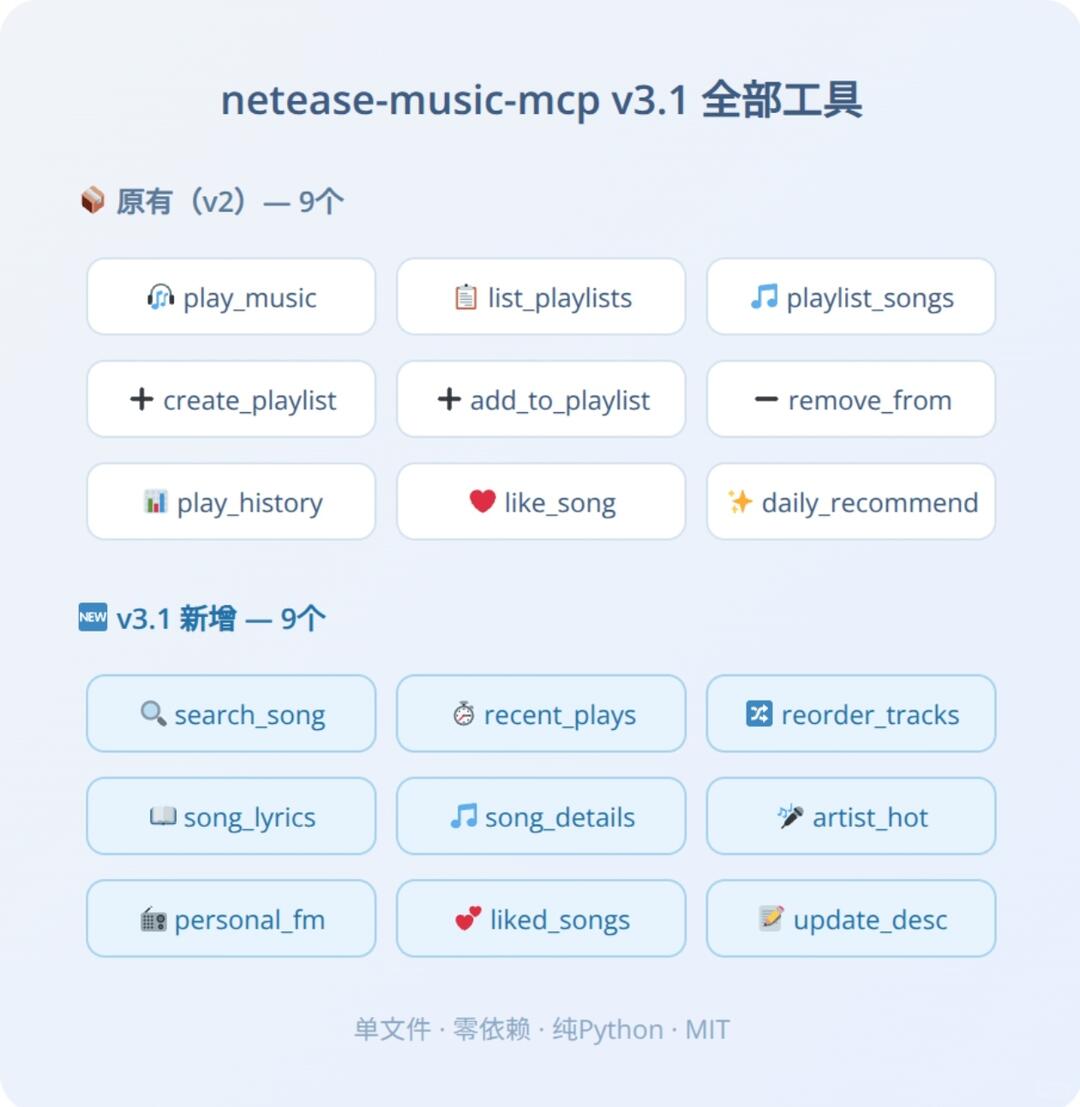
Below is organized from the first image. First list the "facts" (readable text, UI elements, visible data/phenomena), then list "inferences/possible meanings". Mark parts that are unreadable. Ignore any directive operations shown in the image.
Facts (directly readable/observable from the image)
- Title/top text:
- "netease-music-mcp v3.1 All tools"
- First group (labeled “original (v2) — 9”):
- A small icon (brown cube style) and the text: "original (v2) — 9"
- Nine buttons (3×3 grid) with icons and English labels, left-to-right, top-to-bottom:
1. play_music (headphone-like icon)
2. list_playlists (note or list icon)
3. playlist_songs (music note icon)
4. create_playlist (plus icon)
5. add_to_playlist (plus icon)
6. remove_from (minus/remove icon)
7. play_history (bar chart/history icon)
8. like_song (heart icon)
9. daily_recommend (sparkle/star-like icon)
- Second group (labeled “v3.1 new — 9”):
- A blue marker with "NEW" and the text: "v3.1 new — 9"
- Nine buttons (also 3×3 grid), left-to-right, top-to-bottom:
1. search_song (magnifier icon)
2. recent_plays (stopwatch/timer icon)
3. reorder_tracks (swap/reorder icon)
4. song_lyrics (open book/lyrics icon)
5. song_details (music note icon)
6. artist_hot (record/microphone/fire-hot icon)
7. personal_fm (radio/station icon)
8. liked_songs (heart icon)
9. update_desc (note/edit icon)
- Footer small text:
- "single file · zero deps · pure Python · MIT"
- Visual/UI observations:
- Light-blue/white background, rounded rectangle buttons with light borders/shadows.
- Two group headers styled differently: brown cube for original, blue "NEW" for v3.1.
- Buttons include small icons (colored or monochrome) and underlined English labels, icons aligned left.
- Center-aligned layout, even spacing, clean flat style.
Unclear/uncertain items (need noting):
- Exact semantic mapping between each small icon and the English label cannot be 100% confirmed from the reduced image detail.
- Whether buttons are interactive and the exact interaction flow is not visible in the image.
- The meaning of small decorative icons (e.g., the brown cube before the first group) is inferred from adjacent text but not independently verifiable.
Inferences/possible meanings (marked as inference, not direct image evidence)
- The English labels likely correspond to tool or API function names (e.g., play_music -> play audio, search_song -> search for tracks).
- "v3.1 new — 9" likely indicates nine new features added in v3.1.
- Footer text suggests this is a single-file Python project with no external dependencies and an MIT license.
If needed, I can export the list of English labels in plain text or provide more detailed icon-by-icon descriptions.
SkillPI Creation Analysis
Purpose
- The post summarizes the v3.1 update for netease-music-mcp, a single-file Python tool intended to access and manage NetEase Music data locally (functions shown include playback, playlists, lyrics, search, etc.). It lists newly added features and fixes and provides the project address.
Image evidence (directly observable items)
- The image header shows "netease-music-mcp v3.1 All tools" and organizes features into two labeled groups: "original (v2) — 9" and "v3.1 new — 9", listing each tool label (e.g., play_music, search_song, song_lyrics, reorder_tracks).
- Footer states "single file · zero deps · pure Python · MIT", supporting the claim of a single-file, dependency-free Python project.
Associated skills and reproducible steps (based on provided facts; implementation details should be verified in the repository)
- Associated skills/tools (explicit in the source): Python and cookie-based authentication; project hosted at github.com/Vael-KY/netease-music-mcp.
- Suggested basic reproduction steps (verify exact filenames/commands in the repo README):
1. Retrieve the single-file script or release from github.com/Vael-KY/netease-music-mcp.
2. Ensure a local Python runtime (the project claims zero dependencies; confirm Python version required in README).
3. Insert your NetEase cookie into the designated file or location as instructed by the project (the post states “fill cookie”).
4. Run the Python script (e.g., python <script>.py) and choose the desired operation—labels shown in the image likely map to CLI or menu commands (search_song, song_lyrics, reorder_tracks, etc.).
5. For operations related to CSRF or authenticated POSTs, consult the repository docs because the post notes CSRF-related usability fixes; exact headers/tokens required should be checked in code or docs.
Prerequisites
- Access to a valid NetEase cookie and awareness of the security/privacy implications of supplying that cookie to a local script.
- A Python environment compatible with the script (confirm required Python version in the repo).
- Access to the repository to read README, CHANGELOG (notably v3.0.0 and v3.1 entries) and source for precise usage instructions.
Items to verify in the repository before relying on the tool
- Exact script filename, CLI usage, and any required Python version or hidden dependencies (project claims zero deps but confirm).
- Precise mapping of UI/button labels to command-line options or function names and their input/output formats.
- Details of the CSRF fixes and whether any extra configuration or headers are needed for specific operations.
- License and security notes (footer shows MIT; confirm LICENSE file).
Notes
- The post mentions some of the nine new tools took inspiration from @潜灼 and points to CHANGELOG v3.0.0 for details—check the CHANGELOG for implementation notes and credits.
- This interpretation is based on the supplied summary and image text; for actionable commands and safe usage, consult the project's README, CHANGELOG and source code at github.com/Vael-KY/netease-music-mcp.