
Main model switched from Fable 5 to GLM-5.3 — recent experience
Step-by-step guidance for modifying Axum routes and syncing frontend fetch calls, running SQLite migrations, implementing SSE event push, and adding sensitive-field masking to audit logs in a local MCP gateway (Moor). Includes local verification tips (cargo check, running the local endpoint).
Image Analysis
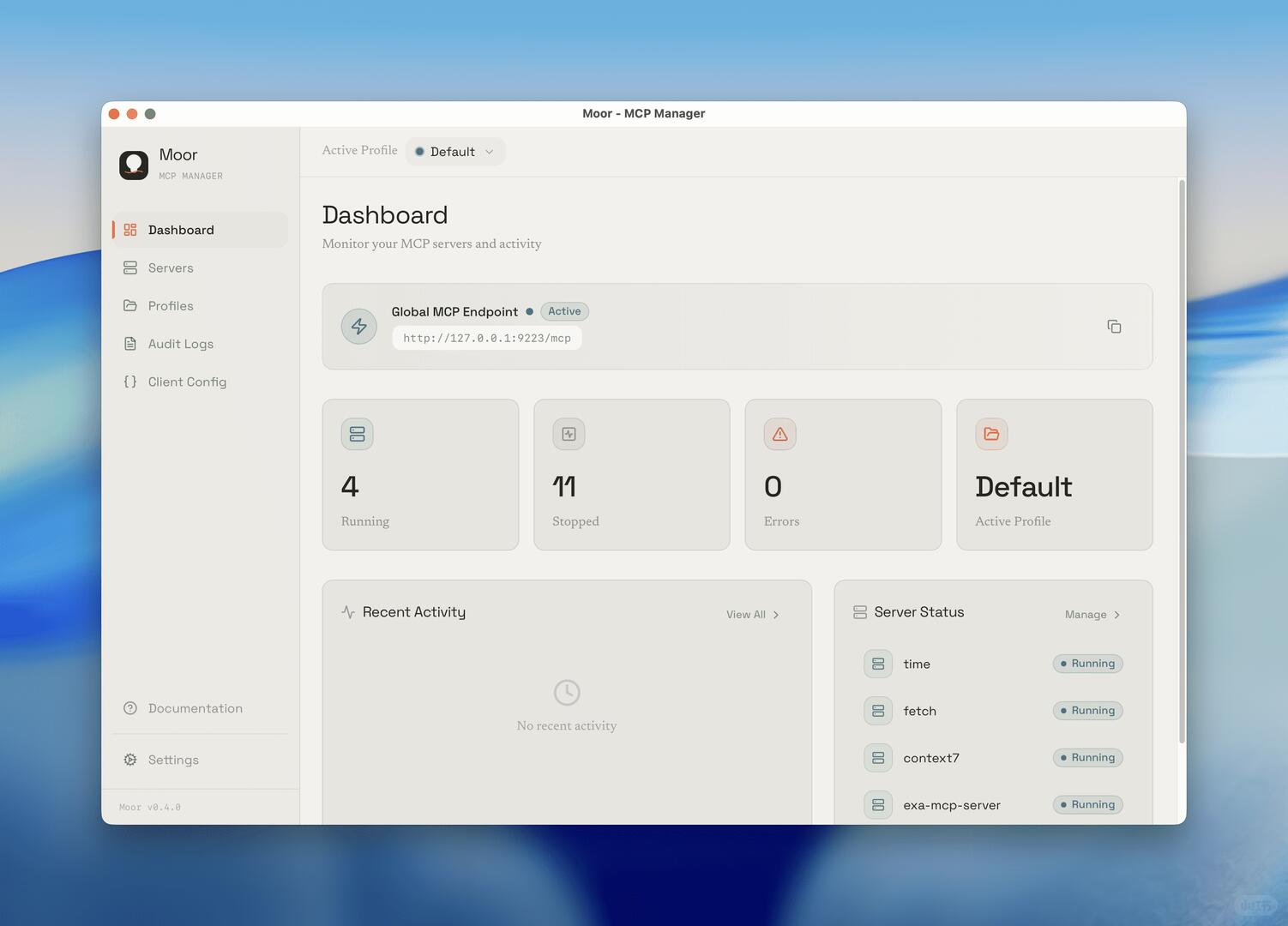
Image 1 — Evidence summary
Visible facts (readable or clearly visible on the UI):
- Window title (top center): Moor - MCP Manager
- macOS-style red/yellow/green window control dots at top-left (suggests macOS-like appearance)
- Top-left text line: Active Profile · Default (a solid dot appears before "Default")
- Main page title: Dashboard
- Subtitle: Monitor your MCP servers and activity
- Top panel card:
- Text: Global MCP Endpoint · Active ("Active" shown as a status badge)
- Readable URL below: http://127.0.0.1:9223/mcp
- A copy (or similar) icon on the right (square with arrow/copy symbol visible)
- Four statistic cards (left to right):
1. Icon + large number “4” with label “Running” below
2. Icon + large number “11” with label “Stopped” below
3. Icon + large number “0” with label “Errors” below
4. Icon + large text “Default” with small text “Active Profile” below
- Bottom-left panel:
- Title: Recent Activity
- Small link at top-right: View All >
- Panel center text: No recent activity
- Bottom-right panel:
- Title: Server Status
- Small link at top-right: Manage >
- List items (each row shows a small icon on left and a "Running" status badge on right) with readable server names from top to bottom:
- time (status: Running)
- fetch (status: Running)
- context7 (status: Running)
- exa-mcp-server (status: Running)
- Each "Running" has a small colored dot plus text
- Left sidebar top:
- App name: Moor
- Descriptor: MCP MANAGER
- Left sidebar menu items (readable in order):
- Dashboard (currently selected/highlighted)
- Servers
- Profiles
- Audit Logs
- Client Config
- (below) Documentation
- Settings
- Small text in bottom-left: Moor v0.4.0
- Vertical scrollbar on the right indicates scrollable content
- Overall style: card-like light gray/beige interface, generous spacing, rounded cards with subtle shadows
Unclear or partially blurred content (not reliably readable):
- Small icons to the left of each sidebar menu item (details not clear)
- Some small icons in the main panel (e.g., the circular icon left of Global MCP Endpoint not fully clear)
- Very small text/labels at extreme bottom-right or edge areas not legible
- Server Status list may include more servers below but the view is truncated or blurred
Inferences (reasonable but not explicitly stated in the image):
- The URL http://127.0.0.1:9223/mcp points to a local endpoint (loopback IP), likely the locally running MCP endpoint.
- "4 Running / 11 Stopped / 0 Errors" likely summarizes counts of managed server instances by status.
- "Default Active Profile" card and the top "Active Profile · Default" indicate the active profile name is Default.
- The macOS-style window controls suggest the app runs on macOS or uses a macOS-like window theme.
- The small dots next to each "Running" are status indicators (likely green/blue) representing healthy running state.
(Operational hints or buttons were ignored per instruction; only visible facts and reasonable inferences are listed.)
SkillPI Creation Analysis
Purpose and core takeaway:
This note describes the author's experience switching the primary development model from Fable 5 to GLM-5.3 while developing Moor, a local MCP gateway built with Tauri 2, a Rust backend, and a React frontend. The author reports improved cross-layer context handling: when editing Axum routes in Rust, the model also accounted for frontend fetch calls. Rust changes (SQLite migrations, SSE event push) often compile through cargo check on first attempt. The model also keeps long, multi-module tasks (for example, adding sensitive-field masking to audit logs) coherent end-to-end. The trade-off is that multimodal UI joint debugging is less convenient than with Fable 5, requiring screenshots.
Image evidence summary:
The screenshot shows the Moor desktop UI (macOS-like), with Dashboard view, Active Profile set to Default, Global MCP Endpoint at http://127.0.0.1:9223/mcp, four status cards (4 Running, 11 Stopped, 0 Errors, Default Active Profile), a Recent Activity panel (no recent activity), and a Server Status list including time, fetch, context7, exa-mcp-server (all Running). Left sidebar shows navigation including Dashboard, Servers, Profiles, Audit Logs, Client Config. Version is Moor v0.4.0.
Associated skills and recommended steps (based on the mentioned stack):
- Core stack: Tauri 2, Rust (Axum), React, SQLite, SSE (Server-Sent Events), cargo.
- Typical workflow to implement and verify cross-layer changes:
1) Clone the repository and install prerequisites: Node.js, Rust toolchain, Tauri dev requirements.
2) Modify Axum routes in the Rust backend; run cargo check regularly to catch compile-time issues.
3) Update corresponding frontend fetch calls in React to match route changes; test locally via the UI or direct HTTP calls to the local endpoint (e.g., http://127.0.0.1:9223/mcp).
4) For database changes, create SQLite migration scripts or Rust migration code and apply locally; verify with the running app.
5) Implement SSE endpoints in the backend and subscribe with EventSource or equivalent in the frontend to validate real-time updates.
6) For audit-log sensitive-field masking: define masking rules, update storage schema/migrations, apply masking at write time, and adjust frontend display depending on profile/permissions.
Reproduction prerequisites:
- Local development environment with Tauri 2 support, Rust toolchain, Node.js, and project dependencies.
- Ability to run the Moor app locally (project: github.com/varandrew/moor) and access the example endpoint (http://127.0.0.1:9223/mcp).
Items to verify (not proven by the current note):
- Quantitative comparison between GLM-5.3 and Fable 5 for multimodal debugging, long-task stability, or code-quality outcomes—the current text is an individual developer's experience, not a measured benchmark.
- The generality of the claim that many Rust changes pass cargo check on first try—this may vary by change complexity and project area.
- Cross-platform UI/behavior differences (the screenshot suggests macOS-like UI; behavior on other OSes may differ).
Notes: The author references model names (GLM-5.3, Fable 5) as tools used; these are reported as part of the development experience. For tutorials or SEO targeting that mention specific models, verify model availability and documentation before inclusion.