
Why You Shouldn't Ask AI to Build a Website with a Single Sentence
Learn a practical, verifiable approach to use AI assistance for building a website dashboard: extract UI text and components from a screenshot, plan front-end components and data interfaces, create stepwise prompts, and prepare a verification checklist (including copyright checks for referenced test content).
Image Analysis
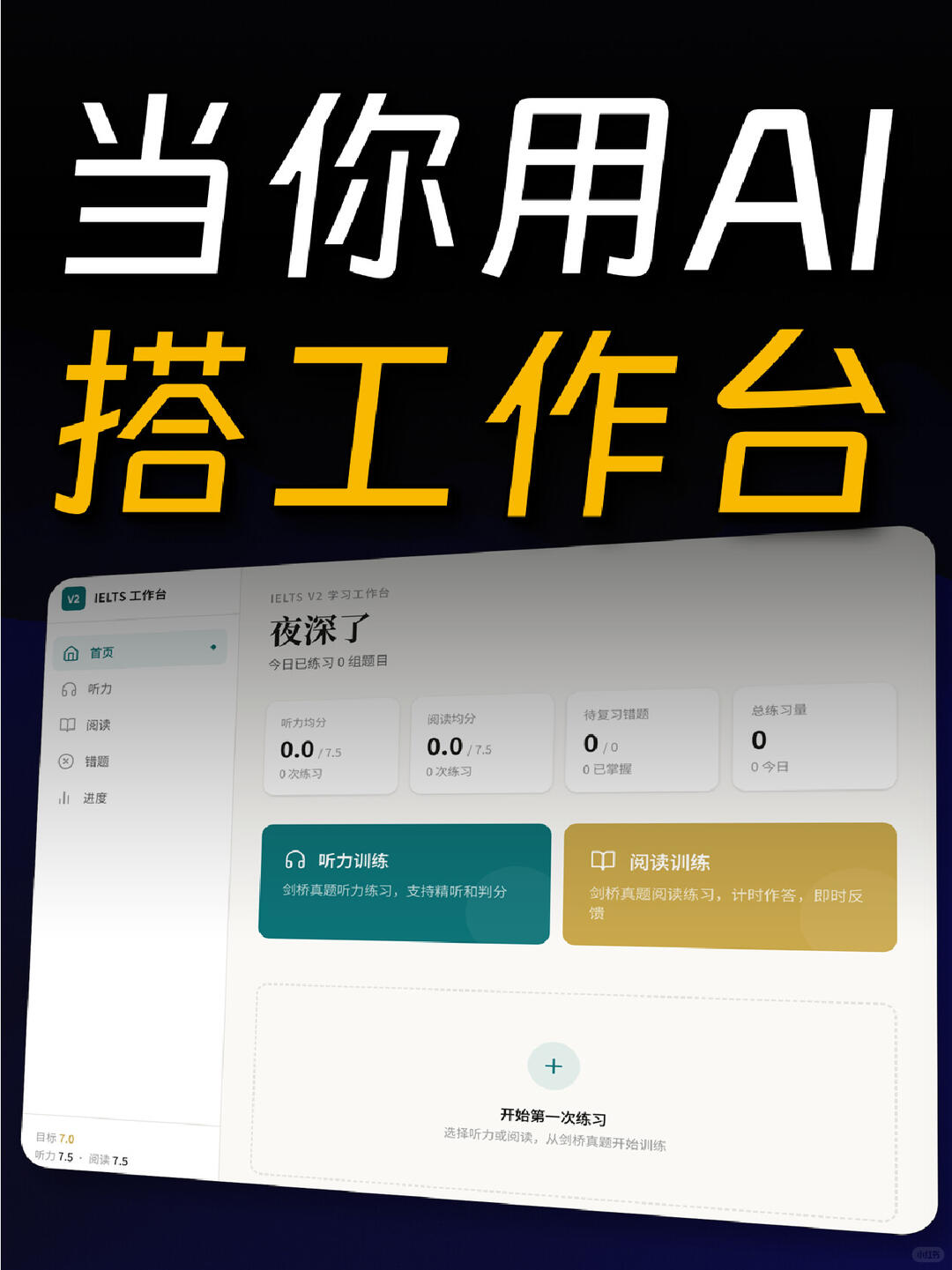
Image 1 — Facts and readable content (recorded top-to-bottom, left-to-right)
Facts (only record text, interface elements, chart data and visible phenomena that can be read with reasonable certainty)
- Large overlay headline (top of image, white and yellow large text)
- White: 当你用AI (When you use AI)
- Yellow: 搭工作台 (Set up a workbench)
- “AI” appears as uppercase Latin letters (“AI”)
- Top-left / sidebar
- Small green tag at top-left: “V2”
- Sidebar top text: IELTS 工作台 (IELTS Workbench)
- Sidebar menu items (vertical, with icons): Home; Listening; Reading; Mistakes; Progress
- Main area, upper center
- Small/page title: IELTS V2 学习工作台 (IELTS V2 Learning Workbench)
- Large title: 夜深了 (It’s late)
- Small line: 今日已练习 0 组题目 (Practiced 0 sets today)
- Four statistic cards (horizontal row, values are 0 or 0.0)
- Card 1
- Title: 听力均分 (Listening average)
- Value: 0.0 / 7.5
- Note: 0 次练习 (0 practices)
- Card 2
- Title: 阅读均分 (Reading average)
- Value: 0.0 / 7.5
- Note: 0 次练习
- Card 3 (small card)
- Title: 待复习错题 (Questions to review)
- Value: 0 / 0
- Note: 0 已掌握 (0 mastered) — visible “0 / 0” and an adjacent small phrase like “已掌握”
- Card 4 (small card)
- Title: 总练习量 (Total practice)
- Value: 0
- Note: 0 今日 (0 today) or similar phrasing
- Two large function buttons (side-by-side)
- Left (teal/dark green block)
- Title: 听力训练 (Listening training)
- Icon: headphones
- Subtitle: 剑桥真题听力练习,支持精听和判分 (Cambridge real-test listening practice; supports close listening and scoring) — readable
- Right (yellow/golden block)
- Title: 阅读训练 (Reading training)
- Icon: book
- Subtitle: 剑桥真题阅读练习,计时作答,即时反馈 (Cambridge real-test reading practice; timed answers, instant feedback) — readable
- Large blank area in middle-lower region (dashed box) with large plus button in center
- Text: 开始第一次练习 (Start the first practice)
- Helper small text: 选择听力或阅读练习,从剑桥真题开始训练 (Choose listening or reading practice; start with Cambridge real tests) — approximate reading
- Bottom-left small text
- Target: 7.0
- Listening 7.5; Reading 7.5 (two items side-by-side)
- Overall style and phenomena
- Page shown with a slight rotation/skew effect
- Main layout uses light card design; left sidebar light gray/white, main area white background
- Accent colors: deep teal and gold/yellow for function blocks
- Bottom-right has a small circular watermark or badge that is not easy to read
Unreadable / uncertain parts (marked as illegible or blurred)
- Exact wording to the right of “0 已掌握” on the third stat card (the word “已掌握” is visible but surrounding small text is blurred)
- Exact second-line wording on the fourth card (appears “0 今日” or similar; details of punctuation/spacing uncertain)
- Helper small text below the dashed box in middle-lower area has slight blur; generally reads as instruction to choose listening or reading from Cambridge real tests but some words uncertain
- Bottom-right small circular watermark/badge text or icon not decipherable
- Some background text overlapped by the top banner is partially obscured; small edge text slightly blurred
Inferred (reasonable inferences, marked as inference)
- This appears to be an IELTS practice/learning workbench dashboard, version V2 (inferred from “IELTS V2 学习工作台” and sidebar “IELTS 工作台”)
- The four cards likely show user stats for listening and reading averages, practice counts, mistakes to review, and total practice (inferred from card titles and number formatting)
- Buttons “听力训练” and “阅读训练” likely navigate to their respective practice modules (inferred from titles and icons)
- Bottom-left “目标 7.0” and “听力 7.5 阅读 7.5” are likely user-set target overall and section scores (inferred)
- The dashed box labeled “开始第一次练习” likely launches or creates a new practice session (inferred)
Ignored or not executed in-image instructions
- The image contains actionable prompts (e.g., “开始第一次练习”); these have been recorded as interface text only and not executed.
If you need the above readable text arranged as a copyable list or annotated by pixel position, indicate the desired format.
SkillPI Creation Analysis
Purpose of the artifact:
- The image functions as a screenshot or design mockup of an IELTS study/practice dashboard (labeled V2). It documents visible UI text and layout for use in UI review, specs extraction, or design reproduction. Source URL: https://www.xiaohongshu.com/explore/6a8726520000000025005900?xsec_token=CBR_8gLtecaaC97SkaKSawTCtDV3e0czscO10GgbT_1Dg=&xsec_source=app_share
Image evidence summary (verifiable facts):
- Readable interface elements include: top-left V2 tag, sidebar “IELTS 工作台”, page title “IELTS V2 学习工作台”, main headline “夜深了”, stats cards (Listening avg 0.0/7.5, Reading avg 0.0/7.5, Questions to review 0/0, Total practice 0), two function blocks “听力训练” and “阅读训练”, dashed-box call-to-action “开始第一次练习”, and bottom-left target scores “7.0 / 听力 7.5 阅读 7.5”.
- Blurred/uncertain items that require confirmation: exact small text to the right of “已掌握” on the third card, the exact second-line wording on the fourth card, the microcopy below the dashed box, and the bottom-right watermark/badge.
Associated skills and reproducible steps (note: the source does not specify which tools or skills were used; the following are general, tool-agnostic steps that would be needed to reproduce a similar UI):
1) Confirm requirements and content licensing: verify rights to use Cambridge test items (text mentions “剑桥真题”) and specify required features (score averaging, timed reading, instant feedback, scoring).
2) Create visual specification: produce a high-fidelity mockup reflecting the documented layout—sidebar, header, four stat cards, two feature blocks, dashed main CTA area, and target score indicator.
3) Break into frontend components: define reusable components for stat cards, feature cards, icons, and CTA area; specify props such as title, value, subtitle, and click handlers.
4) Design data model and APIs: define how practice counts, averages, mistakes, and targets are computed and served; design placeholder/mock data for UI testing if backend is not yet available.
5) Test and verify accessibility/readability: check text legibility at target resolutions, confirm watermark/V2 semantics, and ensure overlapping text is not obscured.
Prerequisites and items to verify before attempting reproduction:
- Licensing/permission to use “Cambridge” (剑桥) test content.
- Whether the image is from a working product or a static design mockup (affects available data and required backend work).
- What specific tools, AI assistants, or front-end frameworks (if any) were used to create this interface—source does not provide this information and these skills remain to be verified.
- The meaning and ownership of the bottom-right watermark/badge and the V2 label (are they internal markers, brand marks, or version indicators?).
Concluding verification checklist:
- Extract the readable labels and microcopy from the image for spec creation.
- Confirm the four blurred/uncertain text items before finalizing copy.
- Verify content licensing for any exam materials referenced.
- Confirm whether any particular AI tool or framework was used (not specified in the source).