
"Paper Beijing" homemade skill: github.com/wnby/photo-relic-editorial
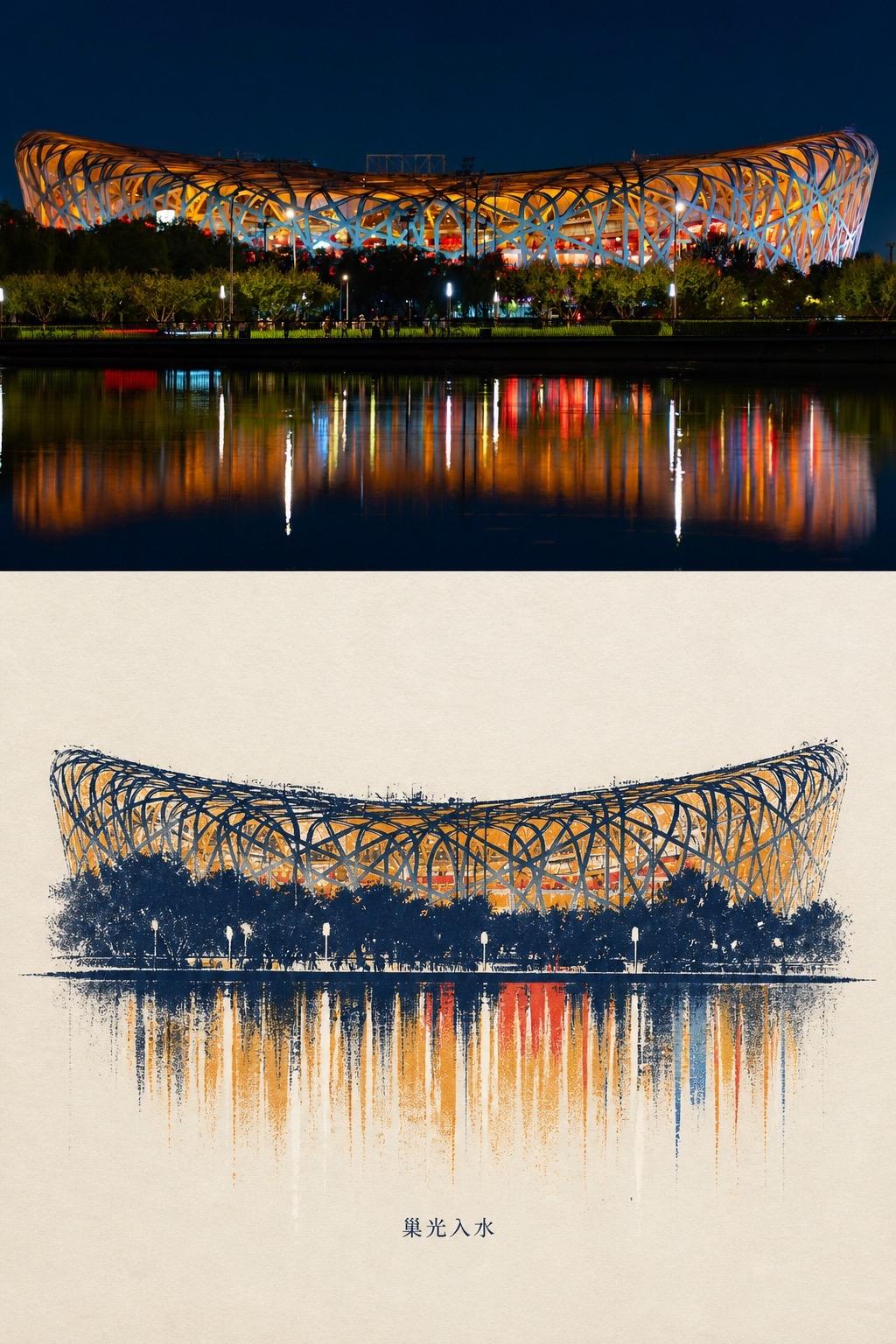
Learn how to convert a night photograph into a print/engraving-style illustration and compose it with the original photo into a vertical diptych using the GitHub repo photo-relic-editorial. This guide outlines what to prepare, the generic processing steps (stylize, color-tune, apply vertical reflection brush effects, composite and export), and what to check in the repository README.
Image Analysis
Observed facts (visible/readable in the image):
- Composition: the image is vertically split into two parts: the upper half is a night photograph, the lower half is an artistic/print-style illustration of the same subject (the building and its reflection).
- Readable text: four Chinese characters under the illustration are clearly “巢光入水”. No other clear text or UI elements are visible.
- Upper part (photo) details: a large mesh/steel-structure building illuminated at night with orange-yellow light inside; the shape is an arced ring (resembling the Bird's Nest). Trees, vegetation, street lamps and silhouettes of people appear in front. Lights and building reflections form multiple vertical reflections in the foreground water (colors include white, orange, red, blue), elongated vertically on the water surface. The sky is deep blue/night; the building is emphasized by artificial lighting.
- Lower part (illustration) details: the illustration uses blue and orange-yellow as primary colors, depicting the same mesh shell, foreground trees and street lamps, and vertical colored reflections in the water. The reflection area shows vertical brush-stroke/brushmark and granular texture effects—an artistic rendition.
Interface steps: none (no interface or step indicators visible in the image)
Chart/data: none (no charts, numbers, or axes in the image)
Unreadable/uncertain items:
- Small signs, English labels or single letters in the photo cannot be read due to distance/resolution. Small text on pedestrians, lamp posts, or trees is unreadable.
Inferences (not directly from pixels; reasonable guesses):
- The building is likely Beijing National Stadium (the "Bird's Nest") based on the distinctive mesh steel structure (this is an inference, not explicitly labeled).
- The bottom text “巢光入水” is likely the artwork title (inference).
- Night lighting and presence of people may indicate a tourist/visited or event period (inference).
SkillPI Creation Analysis
Purpose and overall description:
- The piece pairs a photographic capture (top) with a stylized print/engraving-like illustration (bottom) of the same scene to show contrast between reality and artistic re-interpretation; suitable for posters, prints, or visual presentations. The Chinese text “巢光入水” likely serves as the piece title.
Key evidence points (for quick verification):
- The evidence shows the same architecture and reflection rendered in two ways: the photograph documents original light/color/reflection geometry; the illustration reproduces the reflection with vertical brush strokes and granular texture.
- The only legible text is “巢光入水”; other small labels are unreadable—verify with the original high-resolution source or author notes if complete metadata is required.
Associated skill/tool and possible usage steps (to be verified):
- Referenced repository: github.com/wnby/photo-relic-editorial. Based on common image-stylization workflows, a plausible reproduction process would be:
1) Obtain a high-resolution source night photo including the water reflection.
2) Review the repository README and examples to confirm which features are provided (style transfer, print/engraving filters, brush/texture presets), and install required dependencies.
3) Use the repository’s provided scripts/tools to stylize the source image into a print/engraving-like illustration, tuning colors to emphasize the blue/orange contrast and applying vertical-stroke/grain effects to the reflection area.
4) Compose the original photograph (top) and the stylized illustration (bottom) into a single vertical diptych image and add the title text “巢光入水” in the chosen font/placement.
5) Export at the needed resolution and perform final color/sharpness adjustments.
Reproduction prerequisites and checks (must verify in the repository):
- Confirm the repository’s runtime environment and dependencies (e.g., Python, Node, frameworks), whether it requires GPU, and whether it provides a CLI or GUI and example commands.
- Check license and permissions for derivative works and any included models/assets.
- Verify whether the repo includes presets or parameters for producing vertical brush-stroke and granular reflection effects, or whether those need manual post-processing (e.g., in image-editing software).
- To match the bottom text style precisely, confirm the font or whether the title is hand-rendered.
Items to verify (do not invent):
- Exact feature list of photo-relic-editorial (which filters/styles are supported) and the exact usage syntax (commands or API).
- Presence of example input/output images or automation scripts for the photo+illustration composition.
- Detailed environment requirements and recommended input image resolution.
- Author credit, copyright and commercial usage permissions.
Summary: The image clearly presents a “photo + print-style illustration” vertical pairing titled “巢光入水”. To attempt reproduction using github.com/wnby/photo-relic-editorial, first inspect the repository to confirm available features, runtime, and usage examples, then follow a general pipeline of stylization → compositing → export while validating licensing and resource requirements.