
Make a postcard using a skill
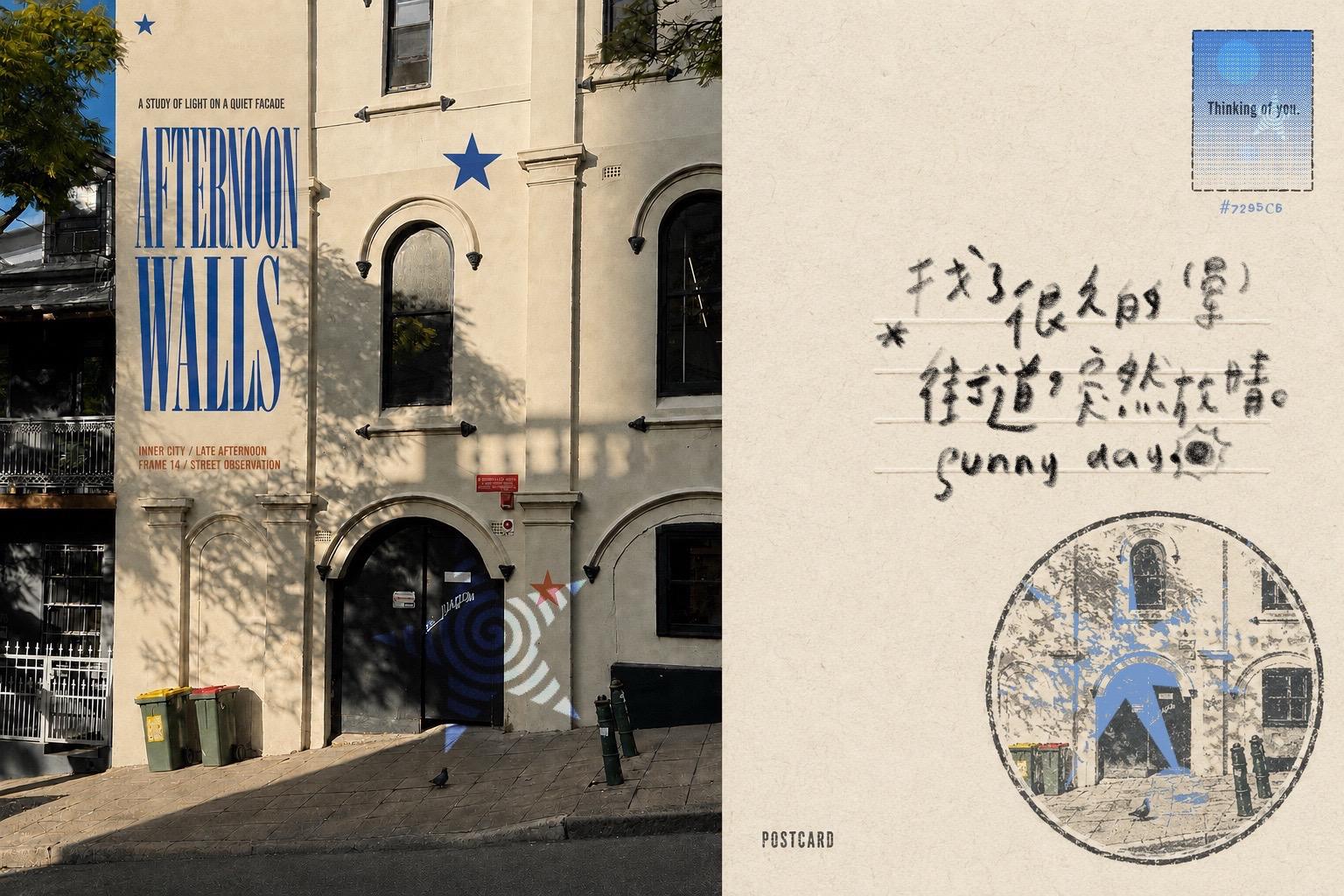
Learn a practical workflow to turn a photo into a two-column postcard layout with a postage-style rectangle (text “Thinking of you.” and color #7295C6), a circular stamp overlay featuring the photo in blue duotone, and handwritten notes. The guide covers assets preparation, layout setup, creating stamp and postal elements, adding handwriting, and export/print checks. Note: the original skill name is not provided and should be verified for exact replication.
Image Analysis
Image 1 — Evidence整理 (grouped as “Facts / Unreadable / Speculation”)
Facts (directly readable or clearly visible)
- Readable text (preserve original case):
SkillPI Creation Analysis
Use cases and deliverables:
- Use case: Use the stamp and postcard layout elements visible in the source (postage rectangle, horizontal writing area, circular stamp, handwritten notes, color code) as a reference for a postcard redesign or a printable postcard mockup.
- Possible deliverables (based on visible elements; require independent reproduction): a printable two-column postcard file (left: photo, right: postcard area), a postage-style rectangle layer with text “Thinking of you.” and color note #7295C6, a circular stamp layer containing a reduced/etched version of the building photo in blue overlay, and a handwritten note layer containing “* 街道突然放晴。” and “sunny day” with a sun doodle.
Key image evidence to reproduce or verify design elements:
- Layout: two-column composition — photo left, postcard-type right area with stamp rectangle, writing lines, circular stamp location.
- Text & color cues: “Thinking of you.” in the postage rectangle, color code “#7295C6” shown, “POSTCARD” at lower right, handwritten Chinese line with an asterisk and English “sunny day.”
- Stamp/overlay: circular stamp is a stylized, blue-toned reduction/etch of the left photo.
Suggested generic workflow to replicate the effect (no specific skill name provided):
1. Prepare source assets: select a clear architectural/street photograph for the left column and reserve the right column for postcard elements.
2. Set up the layout: create a two-column canvas sized for postcard proportions; mark areas for a postage rectangle, writing zone, and a circular stamp.
3. Create the postage rectangle: add a rectangular stamp graphic in the upper-right area, add text “Thinking of you.” and annotate color #7295C6 as the stamp color.
4. Produce the circular stamp: crop/scale the left photo, convert it to a single-color or duotone rendition (blue), mask it into a circle, and adjust overlay/opacity to mimic a stamped look.
5. Add handwriting: overlay handwritten text (Chinese and English) or use a handwriting font; include small doodles (sun) to match the visual style.
6. Harmonize visuals: adjust color balance and contrast so blue elements (stars, stamp) echo across the composition; ensure legibility for print.
7. Export for print: export high-resolution files with bleed and color-profile considerations; check actual print output.
Prerequisites and items to verify before attempting reproduction:
- Missing/uncertain skill/tool name: the source references a “skill” but does not provide its name or how it was used. Until then, the above is a generic method.
- Fonts and handwriting origin: the exact fonts or handwritten source are not specified; to match exactly, verify the handwriting source or obtain the font/handwritten sample.
- Stamp creation method: unclear whether the circular stamp was created physically (actual stamp or projection) or digitally (image editing). Confirm the original method to decide between physical stamping, projection, or digital filters.
- Print specs: confirm final printing size, paper stock, bleed, and color management choices before printing.
Notes and limitations:
- This interpretation is based solely on visible image evidence. No operational instructions embedded in the image were executed. Because the original material does not supply a named skill or procedural details, the recommended workflow is general and should be adapted when the specific tool or method is provided. If you can share the skill name or a link showing the tool’s steps, I can produce a more detailed, tool-specific procedure and checklist.