
Daily practical AI tutorial: Codex for making animations
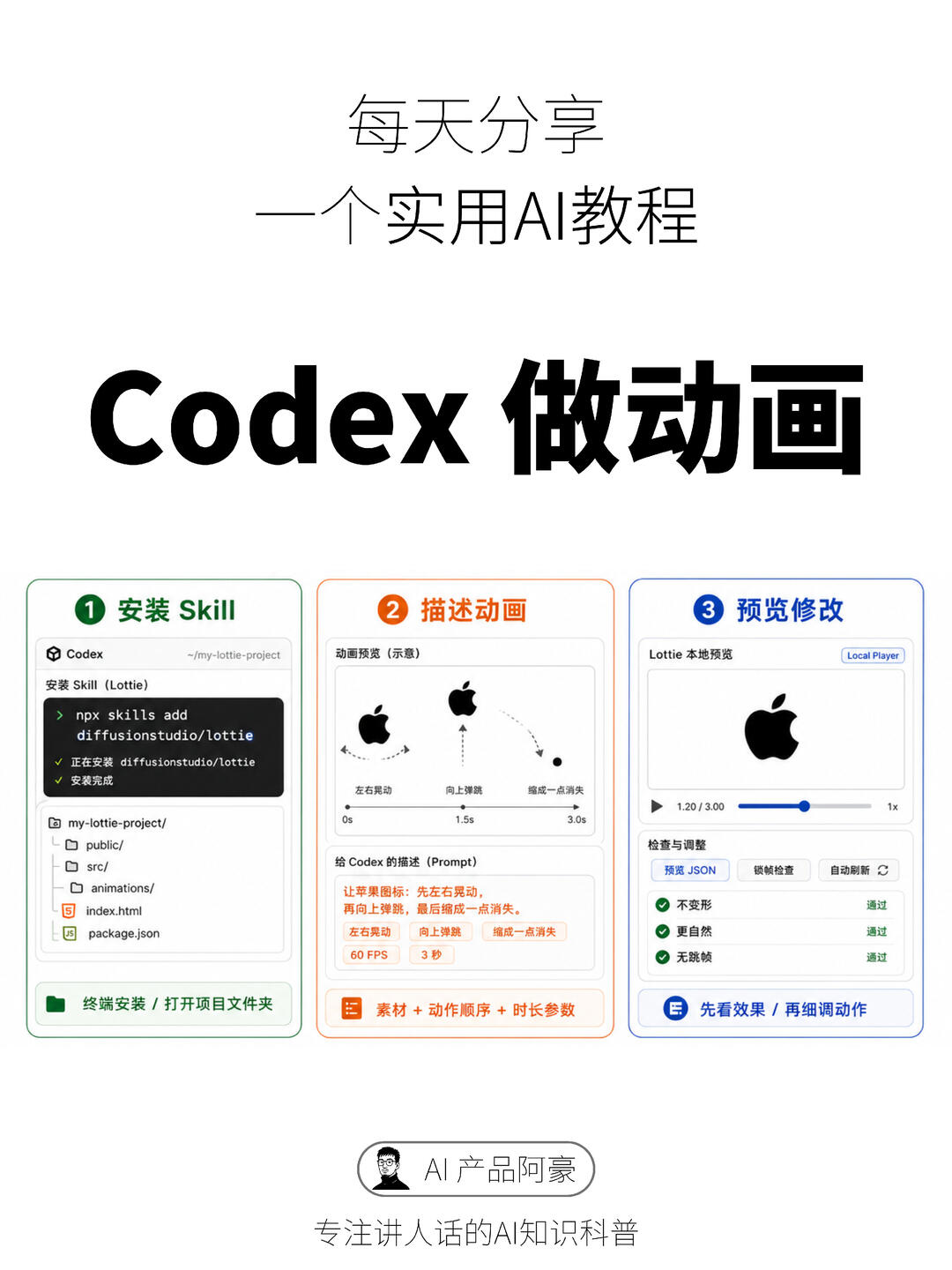
Follow a practical workflow to produce Lottie JSON from assets and a prompt: install a skill/plugin in your project, write a motion prompt, set FPS and duration, preview locally and inspect/export the JSON. The image shows an example flow (install → describe → preview/adjust) suited for quick UI micro-animations like loaders, likes, logos and empty states. Confirm package and integration details before use.
Image Analysis
Visible evidence from the image (translated and organized):
1) Directly visible facts
- Top large text: "每天分享" (Daily share) and "一个实用AI教程" (a practical AI tutorial).
SkillPI Creation Analysis
Intended use of the work:
- The image demonstrates a workflow for quickly generating Lottie animations with AI assistance, aiming to reduce reliance on After Effects for small UI motion tasks (loading spinners, like animations, logos, empty states).
Key image evidence to verify:
- The image shows the command string "npx skills add diffusionstudio/lottie" and terminal messages "installing diffusionstudio/lottie" and "installation complete," implying a skill installation via npx (this is visible in the screenshot but must be verified as a real package and safe to run).
- The animation is driven by a natural-language prompt shown in the image: "Make the apple icon: sway left and right, then bounce up, finally shrink to a point and disappear." The UI also shows parameters "60 FPS" and "3 seconds," timeline ticks, and a local preview player with playback time (e.g., 1.20 / 3.00).
- The preview UI includes a "Preview JSON" button and three quality checks marked as passed (no distortion, more natural, no frame drops), indicating the workflow includes a way to inspect/export the Lottie JSON and basic QA checks.
Steps to use the associated Skill (as implied by the image; each step needs confirmation in the real tool):
1. Install or add the Skill in a project environment (image shows an example command: "npx skills add diffusionstudio/lottie" — verify package/repo and install instructions before running).
2. Prepare project files/assets (project structure in image: my-lottie-project with public/, src/, animations/, index.html, package.json).
3. Write a clear prompt describing the asset actions and sequence (example prompt provided in the image) and set parameters like FPS and duration (example: 60 FPS, 3s).
4. Use the Local Player to preview the generated animation, check playback time and speed (e.g., 1.20 / 3.00, 1x).
5. Use the "Preview JSON" option to inspect or export the generated Lottie JSON, and iterate using available editing options while verifying quality checks.
Prerequisites to attempt reproduction:
- Local Node/npm environment and a project folder consistent with the shown structure (package.json, index.html, animations/).
- Access to an AI model/assistant labeled as "Codex" or equivalent and a Skill/plugin that integrates with it (image implies such an integration).
- Source assets for the animation (SVG/PNG icons) and a prompt describing motion.
- A local Lottie player or previewer that can load and play the generated JSON.
Items to verify before proceeding:
- Whether the package name shown (diffusionstudio/lottie) exists publicly and is safe to install; confirm repository, installation instructions, and license.
- How Codex integrates with the Skill in practice (API, SDK, CLI, authentication, rate limits), since the image is a UI snapshot and integration details are not provided.
- Whether the generated JSON fully adheres to Lottie/Bodymovin standards and whether it is compatible with the target runtime used by your product.
- The functions of partly unreadable UI buttons in the "Check & Adjust" area (their exact names and behaviors must be checked in the real interface).
Notes and cautions:
- The above describes what is visible in the image and reasonable steps implied by it. It does not guarantee the existence or functionality of any shown package or command. Verify sources, package provenance, and credentials before executing commands or installing packages.