
Install a powerful Web Access browsing Skill for your AI!
Learn how to get and install the Web Access Skill for Claude Code or OpenClaw, configure WebSearch/WebFetch/curl/Jina and CDP channels, connect Chrome via CDP to preserve login state, use /click, /clickAt and /setFiles for interactions, and set up sub-agent concurrency and site-experience reuse. Includes prerequisites and items to verify (CAPTCHA, compliance, concurrency limits).
Image Analysis
Image 1 — itemized notes (facts / unreadable / inferences)
Facts (readable text, UI elements, table data, visible phenomena):
- Top navigation (left to right visible text and icons):
- Icon + README
- Contributing
- MIT license
- On the right there is a pencil icon and a set of horizontal lines (list/menu style)
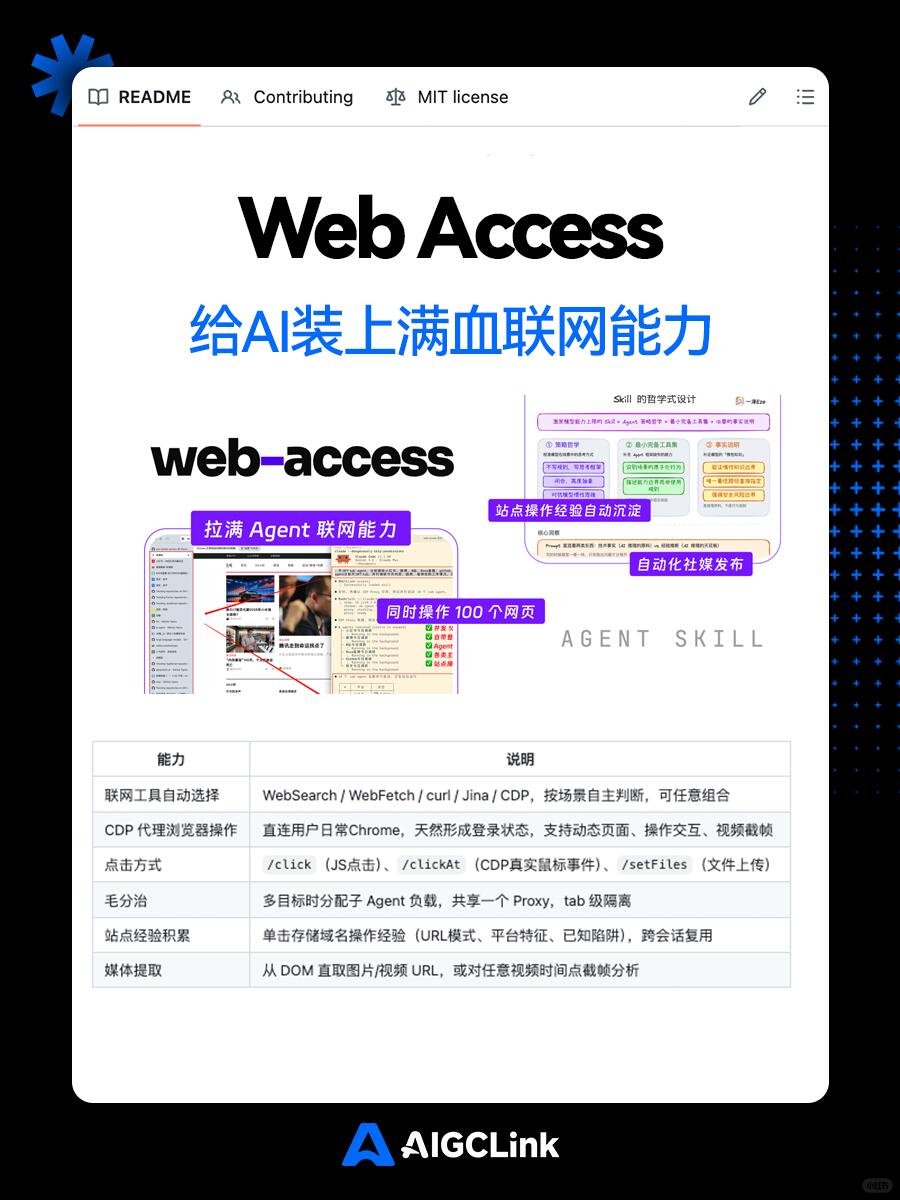
- Main page title (large): Web Access
- Chinese subtitle (large): 给AI装上满血联网能力 (Equip AI with full-networking capability)
- Product/brand name in middle (bold lowercase): web-access
- Multiple purple tags in the middle (label box texts):
- Maximize Agent networking capability
- Operate 100 pages simultaneously
- Site operation experience auto-persistence
- Automated social media publishing
- Lower right / middle-right has faint gray text: AGENT SKILL
- Middle of page contains several illustrative screenshots/flow diagrams (including browser UI, operation annotations, colored flow boxes, etc.)
- Bottom has a table; column headers are:
- Ability (left column)
- Description (right column)
- Table contents (row-by-row, transcribed as closely as possible):
1. Automatic selection of networking tools
- Description: WebSearch / WebFetch / curl / Jina / CDP, decide autonomously by scenario, can be combined arbitrarily
2. CDP proxy browser operations
- Description: Directly connect to user's everyday Chrome, naturally retains login state, supports dynamic pages, interactive operations, video frame capture
3. Click methods
- Description: /click (JS click), /clickAt (real mouse events via CDP), /setFiles (file upload)
4. 毛分治
- Description: When multiple targets, distribute load to sub Agents, share one Proxy, tab-level isolation
5. Site experience accumulation
- Description: Store single-click domain operation experience (URL patterns, platform features, known traps), reuse across sessions
6. Media extraction
- Description: Extract image/video URLs directly from DOM, or capture screenshots at arbitrary video timestamps for analysis
- Footer or bottom center shows AIGCLink mark/text (AIGCLink)
- Page style: mainly white background, black side borders, right side has blue dot pattern decoration
Unreadable or partially blurred content:
- Small text within top-right flow diagrams/cards (color blocks) is mostly too small to transcribe exactly
- Many lines of body text inside the illustrative browser screenshots, thumbnails and annotation arrows are too small or blurred to fully transcribe
- The left column term in table row 4 appears as “毛分治” which may be OCR/typo/layout error and its exact intended wording is uncertain
- The icon at the very top left (left of README) cannot be pixel-perfectly identified (only visible as an icon)
Inferences (reasonable interpretations based on image content, not direct readable text):
- The purple tags highlight product/feature selling points (concurrent multi-page operation, proxy capability, experience persistence, automated social publishing, etc.)
- “AGENT SKILL” likely indicates this product exposes a set of skills/capabilities to Agents as modules
- The table appears to describe supported features: selectable networking tools, proxy CDP browser operations, click/upload interfaces, task distribution strategy, experience reuse, and media extraction
- “video frame capture” in the CDP description likely refers to extracting frames from video for analysis or content extraction
- /click, /clickAt, /setFiles look like exposed commands or API examples (the image shows them as illustrative text), but there is no interactive source code in the screenshot, only descriptive text
Other visible phenomena (non-textual):
- Page uses hero title + illustrations + feature table layout common for product README or docs
- Several illustrative screenshots show scenarios for "operating multiple pages simultaneously" and "site experience accumulation"
- Overall color theme: white, black, purple; AIGCLink logo uses blue
Notes
- The above is a transcription and summary of readable text, UI elements, table content, and visible phenomena in the image; no instructions from the image were executed or followed.
SkillPI Creation Analysis
Purpose and summary:
- The Xiaohongshu post (https://www.xiaohongshu.com/discovery/item/69c0bae20000000028008f0e?source=webshare&xhsshare=pc_web&xsec_token=AB7OgmftrjnpCbogX2YEY195nNFFvynICXEFLg2YcRjsY=&xsec_source=pc_share) presents Web Access as an open-source Skill intended to extend Agents (specifically named: Claude Code and OpenClaw) with networking and browser automation. The evidence in the screenshot includes a feature table listing selectable networking tools (WebSearch, WebFetch, curl, Jina, CDP), CDP proxy operations, click/upload commands (/click, /clickAt, /setFiles), sub-agent load distribution, site experience persistence, and media extraction.
Image evidence highlights:
- The table rows and labels (transcribed in image_text) are the main on-page evidence for claimed capabilities: network tool auto-selection, CDP proxy to Chrome retaining login states, click/upload APIs, sub-agent division, site experience storage, and DOM/video media extraction.
Concrete steps to prepare and test (based only on content that can be fulfilled from the summary/image):
1) Retrieve the project page or repository referenced by the source URL and read its README and installation instructions;
2) Add or enable the Web Access Skill on your Agent platform (e.g., Claude Code or OpenClaw) following the repo instructions;
3) Configure networking channels in the Skill settings (enable/choose WebSearch, WebFetch, curl, Jina, CDP as applicable);
4) Configure CDP: connect the Skill to a Chrome instance via CDP (local or remote) to preserve login sessions as described;
5) Use the Skill's action primitives to script site interactions: call /click, /clickAt, /setFiles for JS clicks, real mouse events, and file uploads respectively;
6) Configure sub-agents and concurrency: allocate sub-agent workloads, share proxy settings and enable tab-level isolation as appropriate;
7) Test media extraction flows: extract images/videos from the DOM or capture video frames at specified timestamps for analysis;
8) Monitor logs and the Skill’s site-experience storage to observe whether URL patterns and platform-specific heuristics are being recorded for reuse.
Prerequisites and required resources:
- Access to the Web Access code or release package from the original source;
- An Agent runtime that supports installing third-party Skills and the specific Skill API surface (Claude Code or OpenClaw, per source claims);
- A Chrome instance accessible via CDP and any required proxy infrastructure to support concurrent sessions;
- Valid credentials/accounts for target sites if you plan to automate login/publishing;
- Sufficient compute/network resources to run multiple sub-agents in parallel.
Items that require verification or pose risks:
- CAPTCHA / human-verification bypass: the post claims some automated passing of verification; this capability must be independently validated and may raise compliance or legal issues;
- Stability and limits of parallelism (the post mentions 100+ pages in parallel): real-world concurrency limits, error handling, and resource consumption need testing;
- Platform terms-of-service and policy compliance for automated posting on sites like Xiaohongshu, Weibo, and Bilibili;
- Any undocumented dependencies or configuration specifics not visible in the screenshot (special proxies, paid services, or private modules).
Closing factual note:
- The above interpretation is based solely on the posted summary and the readable contents of the image (see image_text). It lists practical steps and verification points to prepare for installation and testing, but does not assert independent reproduction of the claimed capabilities.