
Episode 3: Big Update to the 'goutoujunshi' Prompt Pack!
Search GitHub for the repository name “goutoujunshi”, open the repo, review README and SKILL.md, download the entry file “00-项目说明与需求.md” or clone the repo. This guide explains where to look, what files to check (SKILL.md, README, test/interface docs) and the basic steps to obtain the prompt pack for inspection or local use.
Image Analysis
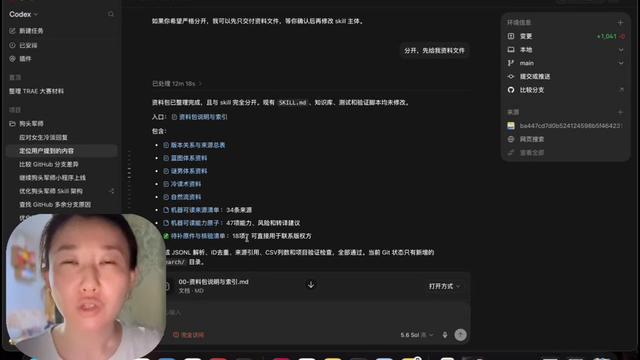
Image evidence (items read from the first screenshot; divided into Facts, Unreadable/Uncertain, and Speculation):
Facts (directly readable / confirmed)
SkillPI Creation Analysis
Interpretation (purpose, image evidence, related Skill usage steps, reproduction prerequisites, and items to verify):
Purpose
- The referenced material appears to be an open-source prompt/skill package named “goutoujunshi”. Its purpose is to provide a set of prompts, skill documentation, a project spec, test instructions, and interface docs for developers or users to read and integrate.
- The screenshot shows the resource package presented in a document/repository UI labeled “Codex”.
Key image evidence
- Visible evidence supports: the package is organized into separate files (SKILL.md, README, test instructions, interface docs); a file named “00-项目说明与需求.md” is present and downloadable (5.6 kb); right-side UI shows repository/commit metadata (branch: main, commit hash prefix); and a presenter video overlay is present.
Steps to use the associated Skill/files (practical actions that can be performed based on visible files and common repository workflows):
1. Search for repository name “goutoujunshi” on GitHub (recommended) to locate the code and documentation.
2. Open the repository and inspect the root files: README, SKILL.md, 00-项目说明与需求.md, test instructions, and any interface documentation.
3. Download the entry file “00-项目说明与需求.md” via the web UI or clone the repository with git clone <repo-url> to obtain all files locally.
4. Read SKILL.md to understand the definition and usage of any skill components; follow README for installation, usage, and testing instructions.
5. If interface docs or test scripts are provided, follow those documents to run examples or tests as described (commands and tools depend on README/SKILL.md content).
Reproduction prerequisites (minimum required)
- Internet access and the ability to reach GitHub (or the specific hosting platform).
- If cloning: git installed locally or access to GitHub’s download ZIP feature; basic command-line or Git client knowledge.
- A Markdown viewer or text editor to read README and MD files.
- For verifying UI details shown in the screenshot (Codex), access to the original high-resolution screenshot or the application used to render the documentation.
Items to verify (not determinable from the provided summary and screenshot)
- Whether the repository exists on GitHub, redskill, and/or skilhub (the video suggests multiple possible hosts; each must be checked).
- The exact contents and runnable examples inside SKILL.md, README, test instructions, and interface docs (open files to confirm).
- Whether “00-项目说明与需求.md” is the definitive entry doc and its full content and purpose.
- License and usage terms of the repository (check LICENSE or README statements).
- The nature of the “Codex” interface (whether it’s a custom viewer, third-party tool, or part of the project demo).
Notes and limitations
- This interpretation is based solely on the provided summary and screenshot text; no repository was accessed or executed. To perform downloads, installation, or execution, locate “goutoujunshi” on GitHub (or the indicated host) and follow the actual repository README and SKILL.md instructions.