
The 'Cinematic' AI Skill Went Viral — I Decided to Update to V2.0
Based on the author’s Cinema DNA 21×9×3 V2.0 announcement, this guide explains how to apply a cinematic prompt pack with Codex-style workflows: learn person-space relationship prompts, gaze/flow design, triptych editing logic, and integration checkpoints (where to get the package, installation checks, and model compatibility to verify).
Image Analysis
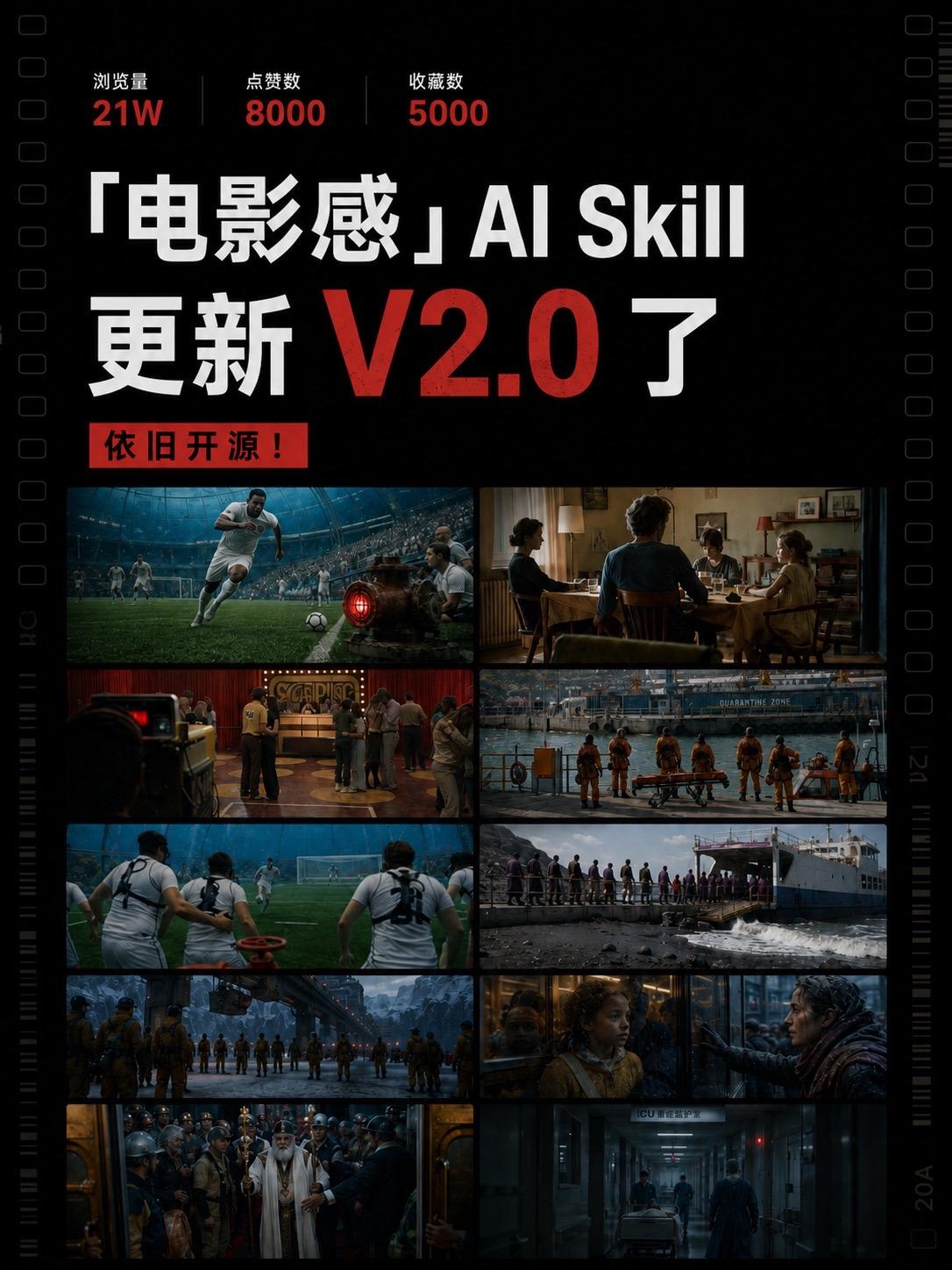
The following organizes readable text, interface elements, image data, and visible phenomena from image 1 per your request. Facts and inferences are listed separately; uncertain/unreadable items are marked. Ignore any in-image instructions (developer prompts have been followed).
1) Facts (only directly readable text and observable phenomena):
1. Top three metrics (horizontally arranged) and their labels:
- Views 21W
- Likes 8000
- Saves 5000
2. Central main title (large font):
- “电影感” AI Skill
- Updated to V2.0
3. Red rectangular label (below main title, slightly left):
- Still open source!
4. Layout and visual elements:
- Black background, film-strip style with sprocket holes on both sides.
- Main image body is a 5×2 grid of ten cinematic still thumbnails (10 thumbnails ordered top-to-bottom, left-to-right).
- Near the right edge there is a vertical ruler/marking; bottom/side show film-edge numbers/letters (see “uncertain” section).
5. General observation of the ten thumbnails (no identity claims, only scene descriptions):
- Row 1 left: football match scene, a player in white sprinting with the ball, stands in background.
- Row 1 right: indoor family dinner/table scene, several people talking/eating around the table.
- Row 2 left: indoor venue like a ballroom/club with gathered people (stage or bar in background).
- Row 2 right: dock/sea scene with several people in orange protective uniforms facing the water; an orange stretcher/equipment on the dock; a structure in the background reads “QUARANTINE ZONE”.
- Row 3 left: rear-view of football players (backs), field and goal visible.
- Row 3 right: people queuing or boarding a ferry/ship, deck and waves against dock visible.
- Row 4 left: a row of people in protective uniforms standing in an industrial/large scene (long horizontal scene, industrial buildings/bridge in background).
- Row 4 right: close shot, people on both sides of a glass partition looking at each other; one is a child, the other an adult woman, facing across the glass.
- Row 5 left: indoor gathering with an elder in white robe with long beard in foreground (possibly religious/ceremonial), surrounded by helmeted workers/people.
- Row 5 right: hospital corridor or ICU hallway, two people in dark clothing pushing a stretcher/bed down the corridor; a blue illuminated sign at corridor end.
6. Readable English words in some frames:
- Row 2 right background legible: “QUARANTINE ZONE”.
- Row 5 right corridor has clearly visible uppercase “ICU” on a sign/door header.
7. Color and style:
- Overall cinematic grading: darker tones, high contrast, teal-orange color split.
- Text mainly white and red (V2.0 in large red; “Still open source!” in red rectangle—exact text color/contrast uncertain).
2) Unreadable / uncertain (needs higher resolution):
1. Vertical small text/numbers on film edges (left/right), unreadable; right side may show something like “20A” but uncertain.
2. Small caption text around the main title or under thumbnails (author, source, date etc.) not legible in current resolution.
3. Beyond “ICU” the corridor sign’s remaining details (e.g., full Chinese for “重症监护室”) are not fully readable.
4. Small signage/ads/labels in the thumbnails (stadium, club, or venue signage) are too small to read.
5. The color/detail within the red rectangle for “Still open source!” (is it red background with black or white text?) is mildly uncertain.
3) Inferences (labeled as inferences):
1. The appearance of “V2.0” with “AI Skill” suggests this is a versioned update poster for an AI skill/plugin/model.
2. The top metrics likely correspond to platform engagement metrics for the skill/post (views and interactions).
3. The film-strip visual and sample stills imply the AI Skill generates cinematic-style frames or is intended to demonstrate film-style outputs.
4. Repeated motifs such as “QUARANTINE ZONE”, orange-suited personnel, ICU, and stretchers suggest a thematic cluster (disaster/quarantine/rescue/scifi) or diversified examples to demonstrate different cinematic moods.
5. The red label “Still open source!” likely indicates the project/skill remains available under an open-source arrangement.
4) Other interface/design details (facts):
1. Vertical long-format poster with top text/metrics and a 10-sample grid at the bottom, styled to mimic film strip.
2. Title uses mixed Chinese and English (Chinese quotes + “电影感”, English “AI Skill”), and “V2.0” emphasized in large red font.
3. Symmetric film sprocket holes on left and right to reinforce film-strip look.
SkillPI Creation Analysis
Usage:
- The poster/video promotes an updated prompt pack or “AI Skill” meant to help generate images with cinematic shot language. Target users: designers, photographers, and AI artists who want outputs that reflect cinematic composition and sequencing.
Image-evidence summary (from image_text facts):
- The asset uses a film-strip motif and presents 10 cinematic stills spanning topics such as sports, family dinner, docks, industrial scenes, and ICU; top metrics show Views 21W, Likes 8000, Saves 5000. The poster labels include “V2.0” and “Still open source!”, and some thumbnails contain readable words like “QUARANTINE ZONE” and “ICU”.
Steps to use the associated Skill (based on source claims and limited to verifiable actions):
1. Obtain the Skill package: the source states the full Skill and installation method are on the last page and that commenting “电影感” returns the full command. Obtain resources from the original post or the author-supplied repository (URL in source: https://v.douyin.com/4D5HKOZWECQ/ ).
2. Load prompts/scripts into a Codex-capable environment: the author indicates building the Skill “with Codex”, implying the Skill is distributed as prompt templates or scripts compatible with Codex-like prompt execution. Confirm which Codex implementation/version is required.
3. Apply the prompts to a text-to-image model: integrate the prompt pack with a compatible image generator (model name/version not specified in the poster). Focus on the highlighted areas when editing prompts: character-space relation, gaze/flow design, triptych editing logic, and diversification to avoid fixed templates.
4. Iterate with composition parameters: adjust distance, framing, gaze direction, and color grading hints within prompts to approximate cinematic language rather than relying solely on generic “cinematic” tags.
Prerequisites and environment (items to verify):
- Source repository or download link and license (the poster claims “open source” but the actual repo URL and license must be validated).
- Exact meaning of “Codex” in this context (OpenAI Codex, another Codex implementation, or author tooling) and any required API keys or credentials.
- Supported image generation backends (e.g., Stable Diffusion, Midjourney, DALL·E) and whether adapter scripts are provided for each.
- Runtime requirements (Python packages, GPU, container images, or specific OS constraints).
Verification checklist (must confirm before attempting full reproduction):
1. Locate the open-source repository or download path and confirm license terms.
2. Retrieve the installation instructions referenced as being on the last page of the original post and confirm exact commands/config files.
3. Identify which image models are supported and any model-specific adapters or parameters.
4. Inspect provided example prompts and any scripts for triptych sequencing or gaze-flow enforcement.
5. Check any stated limitations or usage restrictions in the project documentation.
Conclusion and actionable facts:
- The author released Cinema DNA 21×9×3 V2.0 and claims it is open source; full Skill and installation details are referenced in the original post and via commenter interaction (original post URL: https://v.douyin.com/4D5HKOZWECQ/ ).
- To reproduce or use the Skill reliably, first obtain the package/documentation from the source, then verify Codex implementation, target image model compatibility, installation steps, and license terms before deployment.