
Official introduction to my promotional video motion-effects skill
Step-by-step guidance to set up and run the open-source Video-shotcraft skill (Remotion-based): prepare Node.js, clone the repo, install dependencies, run Remotion preview, choose templates and apply the bundled shot effects, then export a demo promo video. Description highlights what to verify in the repo (install commands, versions, and the claimed one-click generation).
Image Analysis
Image 1 record (organized per user request)
Readable text (facts)
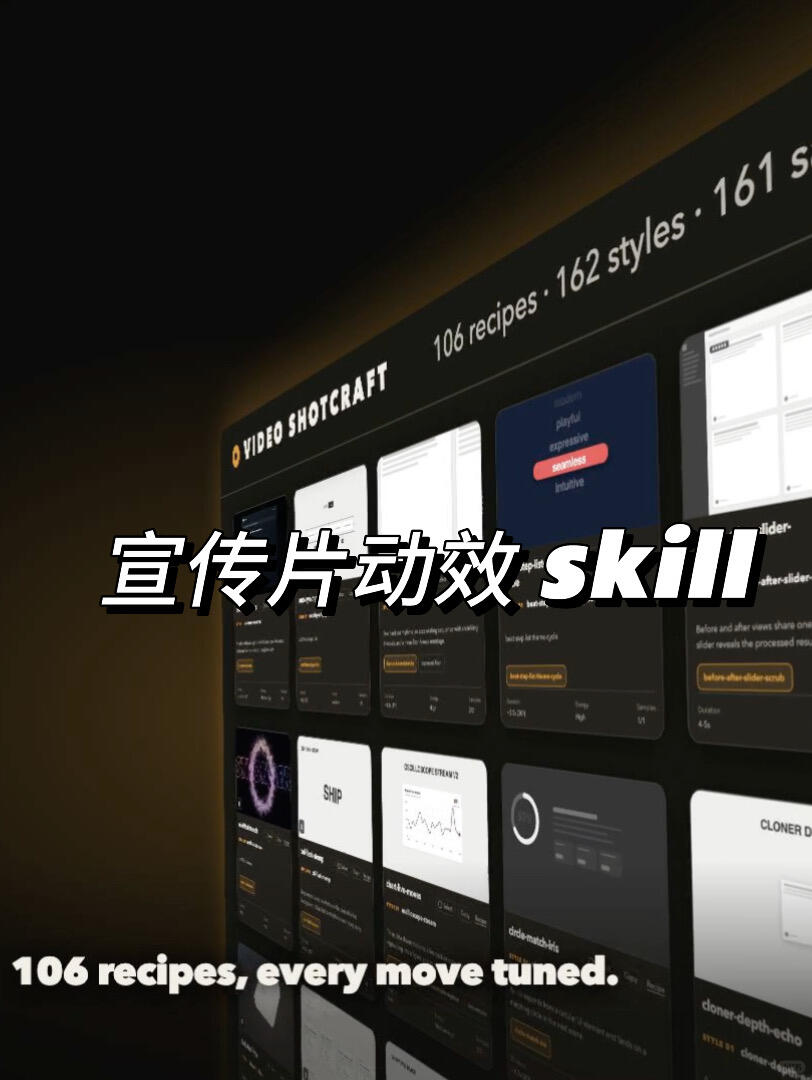
- Top-left uppercase English: VIDEO SHOTCRAFT (an orange small dot/icon appears before “VIDEO”).
- Top-right visible English segment: 106 recipes · 162 styles · 161 s (the trailing part is truncated; the last word/number is incomplete).
- Center-lower white large sentence (bottom-aligned): 106 recipes, every move tuned.
- Large centered text (mixed Chinese and English, overlaid on the UI): 宣传片动效 skill (the English word “skill” is bold italic; the Chinese text is white with a black stroke/shadow).
UI steps (facts and identifiable interactive items)
- No clear step-by-step text prompts; the screen shows multiple cards/thumbnails arranged in a grid, likely a template/example gallery page (grid card layout is directly observable).
- Cards contain short English text (most too small to read); some cards have small orange rectangular/button-like elements at the bottom-right or below (visible but text unreadable).
Charts/data (facts)
- Several card thumbnails include small chart or graphic elements: e.g., a white card in the lower-middle displays a small line/curve chart (graphic visible but axes, values, labels unreadable).
- Top horizontal stats shown: 106 recipes · 162 styles · 161 s (the last item is truncated and its full meaning is unclear).
Visible phenomena / visual description (facts)
- Overall dark (deep-brown/black) gradient background; UI shown in a right-tilted 3D perspective with reflective/highlighted card panels arranged like a slightly tilted wall.
- Foreground large overlaid text (Chinese + English “skill”) with shadow/stroke creating a layered effect above the interface.
- Left-bottom to mid-screen has prominent text (106 recipes, every move tuned.) echoing the top statistics.
- Card styles vary between dark and light; some thumbnails show icons, waveforms, or blocks of text in miniature form.
Unreadable/uncertain content (labeled as unreadable facts)
- Most small card text is too small or occluded by perspective and cannot be read (e.g., card titles and descriptions).
- The top-right final item “161 s…” is truncated; full phrase or number is indeterminate.
- The orange small buttons on cards have unreadable text; their function/label is unknown.
- Specific values, coordinates and labels inside small charts are unreadable.
Speculation (clearly marked as speculation, not direct facts)
- The screen likely presents a product or service page showcasing “video effects/animation templates/recipes” (inferred from “106 recipes”, “162 styles” and the grid of cards).
- The centered large text “宣传片动效 skill” appears to be a poster-style title for Chinese users, indicating the page content relates to promo-video motion effects (inference based on content and placement).
- The top statistics likely indicate counts for “recipes” and “styles” and a third metric (161 s...) possibly representing sessions/sets/seconds/styles or another count, but exact meaning is unclear.
- The orange rectangles on cards might be “details/buy/view sample” buttons (based on common UI conventions).
Notes
- Any actionable indicators in the image were ignored per user request; this record only logs observable evidence and inferences. For improved legibility of ambiguous areas, request a crop or zoom of specific regions.
SkillPI Creation Analysis
Purpose and highlights
- Purpose: The author states they open-sourced “Video-shotcraft skill”, claiming it includes a Remotion-based video workflow, templates, 200+ shot motion effects, corresponding code and demo samples—intended to generate promo videos and motion-effect samples.
Image evidence (based on image_text facts)
- The interface shows branding/title “VIDEO SHOTCRAFT” and a slogan/stat “106 recipes, every move tuned.” The UI resembles a template gallery with grid cards and counts such as 106 recipes and 162 styles; another stat “161 s…” is truncated.
- Visual elements include small thumbnail charts/waveforms, orange button-like UI elements, and a tilted 3D card wall layout.
Associated Skill usage steps (limited to verified tool Remotion and typical workflow)
- Verified tool: Remotion (explicitly mentioned in the source summary).
- Suggested generic workflow (exact commands and scripts must be confirmed from the repository):
1) Prepare environment: install Node.js and a package manager (npm or yarn).
2) Obtain the code: clone or download the author’s open-source repository (exact URL not provided in the source; must be obtained).
3) Install dependencies: run npm install or yarn install in the project directory (specific script names depend on the repo).
4) Run Remotion preview: execute the repository’s development/preview script to view templates in a browser (the repo README should specify exact remotion commands).
5) Choose a template and apply shot effects: use the UI or configuration files in the project to select provided templates and shot effects, adjust parameters, and preview changes.
6) Export the video: use Remotion’s render/export functionality per the repository instructions to produce the final promo video output.
Reproduction prerequisites and cautions
- Preconditions: must retrieve the open-source repository and meet system/dependency requirements (Node.js version, Remotion version, possible native dependencies). The repository must be inspected for exact dependency versions and any required media assets.
- Automation and UI behavior: the screenshot suggests a template gallery and orange action buttons, but it does not prove the presence or exact behavior of any “one-click” generator—this must be validated in the code or interactive UI.
Items to verify (required before claiming reproducibility)
- Repository location and license (author states it is open-source but no repo URL is provided in the input).
- The repository’s README for exact install/run commands and required Node/Remotion versions.
- The claim of “200+ shot motion effects” versus the visible counts in the screenshot (106 recipes, 162 styles, 161 s...); clarify what each statistic represents and whether “200+” refers to distinct effects, recipes, or styles.
- Whether a true “one-click” generation feature exists and how it is implemented (UI button, CLI command, or script).
- Function of the orange buttons and the small thumbnail charts visible in cards.
Closing verification note
- The author’s summary and the screenshot indicate a Remotion-based, template-driven skill that is claimed to be open-source and able to generate demo videos. To use or reproduce the skill, obtain the repository, follow its README for exact commands, and verify the counts and one-click generation behavior in the project source.