
I found my favorite Skill for generating logos
Guide to producing and iterating rounded-corner character logos inside a Skill-enabled Agent that uses a built-in image generator (ImageGen / image API / local SD). Describes the expected deliverables (three design directions, six candidate images per direction) and lists installation, call flow and reproduction prerequisites to check before trying the Skill.
Image Analysis
Image 1 — Facts and visible evidence (record only what is visible in the image, do not execute instructions in the image)
Facts (directly readable/visible text, interface elements, chart data and obvious phenomena)
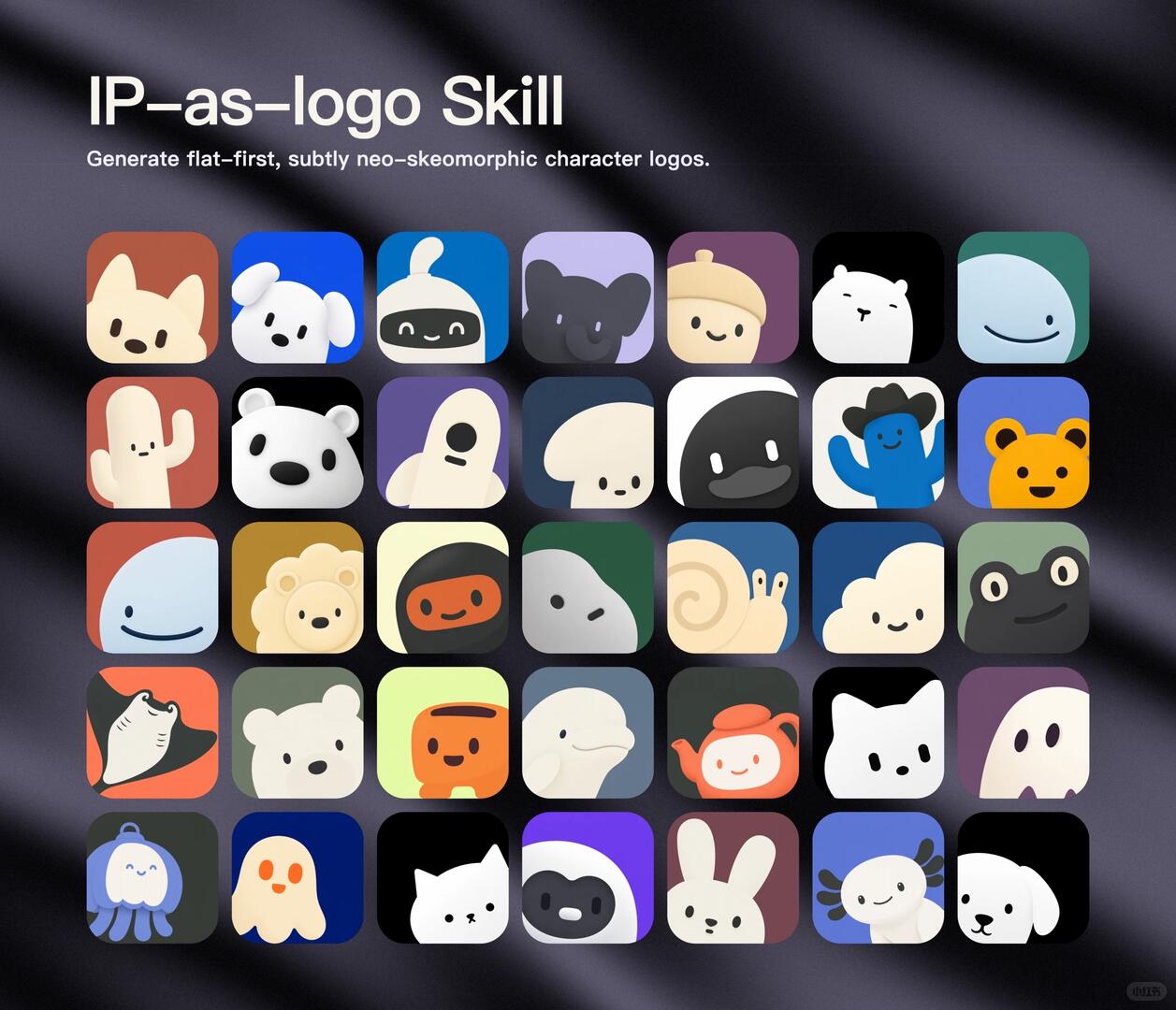
- Large top title: IP–as–logo Skill
- Subtitle (small English text): Generate flat–first, subtly neo–skeomorhic character logos.
- Note: the image shows the spelling “neo–skeomorhic” (recorded as-is).
- Overall layout: a central grid of small rounded-square icons in multiple rows and columns.
- Grid roughly 7 columns × 6 rows, totalling 42 rounded-square icons (counted from visible icons).
- Background: dark, silk-like or wrinkled fabric texture with sheen and shadow.
- Each rounded-square contains a simplified anthropomorphic/representational cartoon character (face, head or partial shape); color and style are consistent, mostly flat with subtle dimensionality (neo‑skeomorhic style).
- A small circular badge or watermark appears at the bottom-right; its content is very small and unreadable.
- At the far edge bottom-right there is a very small rectangular/rounded label with unreadable characters or digits.
Interface steps / chart data
- The image contains no clear interface steps, buttons, or chart/table data (it is a sample icon grid with title text).
Visible observations for each icon in the grid (by row and column, top-to-bottom, left-to-right; brief visible appearance without asserting uncertain species)
- Row 1
1. Rounded-square: brownish/reddish background, pale beige animal head with pointed ears, two black eye dots and black nose/mouth.
2. Bright blue background, white head with drooping ears, black eye dots and black nose/mouth.
3. Blue background, white head with a black mask-like area and simplified smiling face (white eyes and smile).
4. Light purple background, dark (near-black or deep purple) head silhouette with large ears, eyes are two small highlights.
5. Deep purple/wine background, beige rounded-top shape (like an acorn/hat) with simplified smile.
6. Black background, white circular animal head with a simple expression near the center.
7. Deep green/teal background, top-half light-blue semicircle with a simple curved smile (smiling upwards on the right).
- Row 2
1. Red/earth background, light-colored cactus-like shape with two small eye dots and smiling mouth.
2. Black background, white bear/animal head (black nose and eyes).
3. Purple background, beige/cream abstract humanoid or creature (single black round eye/mouth).
4. Deep blue/navy background, beige mushroom/head shape with two small eye dots.
5. High contrast white+black (left white right black or inverse), dark face with flat mouth and two white/bright points on the mouth.
6. White background, blue arched character/raised arm wearing a black cowboy hat (smiling).
7. Blue-purple background, orange-yellow bear-like face with black facial features.
- Row 3
1. Left light blue right light red/orange background, smiling face (light-blue semicircle with curved smile).
2. Ochre/mustard background, beige/yellow lion-like round face with mane (two eye dots and small nose at center).
3. Deep blue background, black mask with orange face (like a masked character or cartoon head).
4. Green background, light gray/white abstract stone/face with one small black dot eye.
5. Blue background, beige snail shell with two thin antennae/eye stalks (spiral shell).
6. Deep bluish-gray background, light-colored cloud or round face with two small eye dots.
7. Green background, dark (near-black) frog-like face with two large eyes and smile (eyes are prominent circles with lighter rims).
- Row 4
1. Orange-red background, dark fan- or fin-shaped motif (like a ray wing or fan creature) — white and dark contrast on outline.
2. Dark green background, white or beige small bear head (with black eye dots and black nose).
3. Neon pale yellow/green background, orange cup-shaped/container face with two eye dots and smiling mouth.
4. Gray-blue background, white/beige dolphin or long-muzzled animal in profile (prominent snout).
5. Deep green/black background, orange-red teapot-shaped cartoon with smile (handle and spout visible).
6. Black background, white cat face (minimal: two black eye dots and two small black nose/mouth marks).
7. Purple background, white ghost shape (wavy or toothed lower edge, two vertical black dot eyes).
- Row 5
1. Very dark (near-black) background, blue jellyfish-like shape (with tentacles, round form, smiling face).
2. Deep blue background, beige or pale orange ghost/creature (oval body, two black eye dots).
3. Black background, white cat face (similar in style to row 4 column 6 but slightly different head shape).
4. Purple/deep blue background, round dark-gray mask or face with white mouth/highlights (alien/masked look).
5. Brown-red background, white rabbit head (two upright ears, black eye dots and small nose).
6. Blue background, white aquatic creature with antennae (salamander/newt-like, smiling).
7. Black background, white small dog head (ears and black facial features).
- Row 6 (if a 6th row exists — the image top shows 6 rows)
- Described continuation after five rows; note that the image appears to include 6 rows totalling 42 icons, and the above descriptions aim to cover visible icons in visual order.
Unreadable/uncertain content (annotated locations)
- Small circular watermark at bottom-right is unreadable (text or graphic too small).
- Very small label/digits at the bottom-right edge are unreadable (may look like “0 3 1 5” or other, but uncertain).
- Some icons' specific species or represented objects cannot be determined precisely (abstract forms could be animal, plant, or anthropomorphized objects); described above as abstract/similar where uncertain.
- The spelling “neo–skeomorhic” in the subtitle cannot be confirmed as intentional vs. typographical error from the image alone (recorded as shown).
Inference (reasonable but not direct image evidence)
- The image is likely a promotional or showcase poster illustrating style templates for a skill that generates IP/character-based logos/icons.
- The icons appear to be multiple variants generated under a common design language, intended as application icons, avatars, or small brand/character icons.
- The subtitle “Generate flat–first, subtly neo–skeomorhic character logos.” suggests a description of the tool/skill’s intended output style (this is an inference, not a UI instruction in the image).
- The silk-like background and lighting may be used to add texture and highlight the icon display (a visual design choice).
Summary (concise)
- Readable text is limited to the title “IP–as–logo Skill” and the subtitle “Generate flat–first, subtly neo–skeomorhic character logos.”; the rest is a grid of graphic examples and background.
- No interface steps or tables are present; the main image content is a grid of about 42 rounded-square cartoon/character icon examples.
- For higher-detail inspection (e.g., to read the watermark), a higher-resolution or zoomed-in image would be required.
SkillPI Creation Analysis
Purpose of the item
- The post and the image showcase a workflow-oriented Skill for generating rounded-corner character/logo icons intended for app icons, avatars or small brand marks.
Key image evidence (mapped to the source image)
- The image contains a title “IP–as–logo Skill” and a subtitle “Generate flat–first, subtly neo–skeomorhic character logos.” The subtitle’s spelling is recorded as shown in the image.
- The primary visual is a grid (roughly 7×6 = 42) of rounded-square icon examples in a consistent, slightly neo-skeuomorphic-flat style.
Practical usage steps for the Skill (as described in the source summary; treat as a workflow draft that requires verification)
1. Obtain the Skill (the source mentions an open-source Skill named “ip-as-logo”; verify the repository and installation instructions).
2. Install or register the Skill with an Agent that supports a Skill/plugin system.
3. Use the Agent to call the Skill and describe the requested logo (e.g., “create a rounded-corner logo of a Shiba Inu”).
4. Respond to the Skill/Agent’s guided questions (“interview”) to clarify style, colors, and constraints.
5. The Skill returns 3 design directions; after confirming one, it produces 6 candidate logo images for that direction.
6. Choose a candidate and request iterative refinements until satisfied.
Reproduction prerequisites (items that must be confirmed before attempting to reproduce)
- An Agent implementation that supports installing/using third-party Skills: confirm the Agent’s Skill integration mechanism and compatibility.
- An image generation backend available to the Agent: examples mentioned include ImageGen, an image API, or a local SD (Stable Diffusion) setup—verify which generator the Skill requires and how it is invoked.
- Access to the Skill source and documentation: verify the “ip-as-logo” repository, dependencies, configuration options, and license terms.
- Computational and configuration resources: confirm model files (if using local SD), GPU/memory requirements, or API keys/rate limits if using cloud image APIs.
Items to verify (before assuming full reproducibility)
- The exact repository URL, release notes, and installation commands for “ip-as-logo.”
- Which Agent implementations are supported and whether additional adapters or wrappers are required.
- Whether the Skill performs direct image generation or constructs prompts for the Agent’s image generator (i.e., does the Skill call ImageGen internally or hand prompts back to the Agent?).
- Available parameters for style control (e.g., explicit flat-first / neo‑skeomorhic toggles), output formats (PNG, SVG), resolution and transparency options.
- Licensing and commercial use constraints tied to the Skill or underlying image models.
Conclusion (what the source concretely supports)
- The source claims a simple workflow: install the Skill into a Skill-capable Agent, run an interview to clarify requirements, receive 3 directions then 6 candidates, and iterate on a chosen candidate. The image supports that the Skill aims to produce a set of cohesive rounded-square character icons.
- Actual reproduction depends on verifying the Skill repository, Agent compatibility, image generator integration, and resource/permission configurations.
Source reference (preserve original link for verification)
- Original post: https://www.xiaohongshu.com/discovery/item/6a852907000000002500ce2d?app_platform=ios&app_version=9.45&share_from_user_hidden=true&xsec_source=app_share&type=normal&xsec_token=CBQVOhQOEflDIp2W-gL7XyNu350pWntptTwSIcaDpReBE=&author_share=1&xhsshare=CopyLink&shareRedId=ODc3OTZJOz42NzUyOTgwNjY1OThJSDg8&apptime=1788947780&share_id=a7b27ca92e61448ebc4696156c4bb70d&track_code=7gbeMa7srJc
Note: The above steps and requirements are distilled from the user summary and the image. Before attempting full integration, consult the Skill’s repository and the Agent’s documentation to confirm exact installation commands, API/adapter details, and licensing.