
Make AI videos without editing | 7 free skill tools ready to use
Step-by-step guide to turn ideas into finished AI videos with free open-source tools: generate 3 proposals + previews, apply a 43-style visual atlas, produce 15×10s MG animations, use 7 Chinese voiceover templates, animate 35 art-history styles, run script-to-video pipelines, and create 2.5D product promos. Includes deliverables you can produce (scripts, storyboards, editable source code, voiced clips). Specific tool names and installation steps need verification.
Image Analysis
I only record visible evidence from the image and do not execute or follow any instructions shown. Below is an itemized record for image 1, divided into “Facts”, “Cannot identify/Uncertain”, and “Speculation”.
Image 1 — Facts
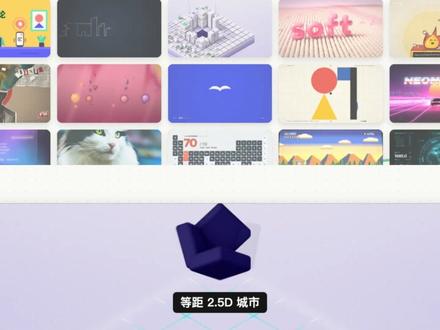
- Overall layout: multiple thumbnails arranged in a grid at the top (at least two rows); slightly below center there is a horizontal divider, below which a purple/dark-blue 3D icon (an abstract geometric shape) is centered with a black label box containing text.
- Readable text (verbatim):
- Chinese in the black label box: 等距 2.5D 城市
- English word visible in a thumbnail: soft (located on a pink thumbnail near the top-right)
- Readable number/character in a thumbnail: 70 (appears on a thumbnail that includes a keyboard or table)
- Other short readable chars: UI (appears in a corner of a left thumbnail)
- Another thumbnail shows partially readable English: NEON (on a top-right or right-side thumbnail with a neon style)
- Visible images/elements (visual description only, no functional claims):
- Top thumbnails include: cartoon/flat icon sets, a dark chalkboard or UI screen, an isometric city model, pink 3D “soft” lettering, emoji/icons, dotted abstract pink background, blue background with a white bird silhouette, geometric shapes (circle+triangle+rectangle), neon-styled image, a photo of a cat, a UI thumbnail showing a keyboard/table, multi-color mountain-pattern background, etc. (each thumbnail is distinct).
- Lower center: a purple/dark-blue 3D geometric icon on a light purple/gray gradient background, with a black label below showing “等距 2.5D 城市”.
- Colors and styles: overall light gray-purple background; thumbnails vary in style (cartoon, photography, isometric 3D, abstract, neon, etc.).
Cannot identify / Uncertain
- Small text inside most thumbnails is not legible (blurry or too small), so full text content cannot be listed.
- The exact number of thumbnails and each thumbnail’s full title/description cannot be determined.
- Details inside some thumbnails (e.g., text around the keyboard thumbnail, meaning of icons) are not discernible from this image.
Speculation (reasonable guesses, not direct image facts)
- The interface might be a template/asset/style selection view (e.g., a list of design templates, themes, or presets), but this is speculation — the image itself does not explicitly label the function.
- The purple 3D icon and its label in the lower-center may indicate the currently selected item or preview, inferred from position and emphasis, but no explicit selection UI is visible, so this is speculative.
Workflow and data in the interface
- No explicit step-by-step workflow labels or navigation text (such as “Next/Previous”) are readable in the image.
- Apart from “70”, no numeric chart data is legible; if thumbnails contain charts, those data are too small to read in this image.
SkillPI Creation Analysis
Purpose of the source and main claim:
- The source is a short promotional/demo message claiming a workflow to produce AI videos without manual editing. It states the author has 8 open-source AI video “skills” (all free) arranged by style/scene, and that the showcased video was generated by code written by Claude. The source ends with an invitation to join a group to obtain usage addresses.
Image evidence summary:
- Directly observable: a grid of style/asset thumbnails and a highlighted center area showing a purple/dark-blue 3D icon with the black label “等距 2.5D 城市”. Some thumbnails contain readable tokens such as “soft”, “70”, “UI”, and “NEON”; styles visible include cartoon, isometric 3D, neon, photography, and abstract graphics.
- Not observable from the single image: full thumbnail titles, exact item counts, controls for exporting/generating videos, or clickable UI affordances.
Associated skills and generic usage steps (abstracted from the described categories; no specific tool names are provided in the source):
- General pipeline: provide an idea or reference clip → system generates 3 proposal variants and previews → select one and produce the final video.
- Style atlas workflow: pick a target style (source claims 43 styles) → run the style rendering pipeline to transform visuals → export video or frame sequence.
- Motion graphics (MG) workflow: choose an MG style (source claims 15 styles, ~10s each) → use provided source code and soundtrack to render short animated segments → export final clip with music.
- Chinese voiceover workflow: pick a visual style + voice template (source claims 7 styles) → synthesize Chinese narration and burned-in subtitles → export clip ready for editing tools.
- Art-history styles: choose an art-historical aesthetic (source claims 35 variants) → system applies style transfer/animation to visuals.
- Script-to-video: input concept → generate script and storyboard, editable source code, and a voiced final clip → export script, storyboard, and video assets.
- Product promo: input webpage/front-end snapshot → one-click generation of a 2.5D camera-motion promo (as described).
Note: these steps summarize the source’s feature claims. The source does not provide concrete repository names, command-line instructions, or exact configuration steps, so precise execution steps cannot be given here.
Prerequisites for attempting reproduction (items to verify):
- Obtain the actual repositories or download addresses for the 8 open-source skills (the source mentions these but does not list names—source suggests “join group to get usage addresses”).
- Review each project’s README for required runtime (e.g., Python/Node versions, libraries), model weights or API keys, and hardware considerations.
- Prepare multimedia tooling (e.g., FFmpeg or equivalent) if local rendering/encoding is required; confirm codecs and export settings from the projects.
- Check license and third-party dependencies to confirm true “free” status (some projects may require downloading model weights hosted elsewhere or using third-party TTS services).
- Collect input assets (ideas, reference videos, images, or webpage snapshots) and sample music if needed.
Items that must be verified before claiming operational parity with the source:
- Exact identities and availability of the 8 open-source AI video skills and their source code repositories.
- Whether all claimed features (43 styles, 15 MG animation styles ×10s, 7 Chinese voiceover presets, 35 art-history styles, 2.5D promo capture) are implemented as described and usable out-of-the-box.
- Any external or paid services required (cloud APIs, proprietary model weights, or commercial music) despite the “all free” claim.
- The nature of the author’s “Claude wrote code” claim: whether it relies on a private Claude deployment, a local automation script, or public APIs.
Preserved reference details for verification:
- Original link: https://www.douyin.com/video/7696547892042960182
- Numbers and enumerations from the source: 8 open-source skills, 43 style variants, 15 MG animation styles × 10s, 7 Chinese voiceover styles, 35 art-history styles, and mention of 2.5D camera-motion product promos.
Conclusion:
- The source presents a categorized set of open-source AI video capabilities and an accompanying UI screenshot; it is a demonstrative summary rather than a step-by-step installation guide. To reproduce or use the claimed pipelines, obtain the actual repositories/addresses referenced by the author and validate dependencies, licensing, and whether any external APIs or paid components are required.