
God-tier Skill: Exposing Closed-Source Software Inside Out!
Learn a practical approach: locate and clone the open-source agent repo, read README/docs and recipes, set up the environment (note platform-specific folders like runtime/windows), run example scripts, and combine agent outputs with static/dynamic binary analysis. Includes prerequisites and items to verify (repo name, dependencies, license).
Image Analysis
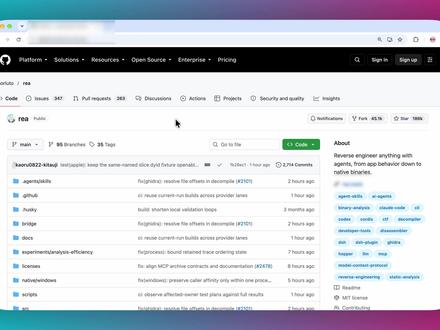
Image 1 — Facts and visible content (organized by category)
Readable text (line by line, uncertainties marked)
- Browser top navigation
- Platform
- Solutions
- Resources
- Open Source
- Enterprise
- Pricing
- Near repository header
- rea / rea (displayed as repository path, possibly "rea")
- Public
- Repository main tabs
- Code
- Issues 347
- Pull requests 283
- Discussions 0
- Actions
- Projects
- Security and quality
- Insights
- Branches/tags area
- main
- 35 branches
- 35 tags
- [search placeholder] Go to file
- Top-right common buttons (visible)
- Code (green button)
- Notifications (icon visible)
- Fork (icon visible, count unclear)
- Star (icon visible, count unclear)
- Sign in
- Sign up
- About (right-side About box)
- Text: Reverse engineer anything with agents, from app behavior down to native binaries.
- Below are several topic/tags (small pill labels); some readable:
- agents
- agent-skill? (uncertain)
- open-source
- agent-sdk? (uncertain)
- machine-learning? (uncertain)
- (other tags are small/blurred)
- File/directory list (main left area, showing filename, commit message, time)
- Distinguishable file or directory names (visual order, spelling may be uncertain):
- kaoru0822-kiroku (uncertain spelling)
- agentskills or agent-skills (uncertain)
- github (file/dir name)
- nucl? or nucl...? (uncertain)
- docs
- experiments/analysis-efficiency
- recipes
- runtime/windows
- scripts
- Right side of each row shows commit snippet and time (examples visible):
- Several lines show timestamps like "1 hour ago", "2 hours ago", "7 hours ago"
- Commit messages are short phrases/words, many not fully legible
- Top-left and window style
- OS style appears macOS (rounded window corners and colored title bar)
- Browser address bar left shows GitHub favicon
Interface actions / interactive elements (facts)
- Page shows a typical GitHub repository main view including:
- Top navigation (Platform etc.)
- Repo tabs (Code, Issues, Pull requests etc.)
- Branch/tag switching/file search (main / branches / tags / Go to file)
- Right-side About box and topics
- File list area with filenames, recent commit summaries and times
- Green Code button (for clone/download)
Visible phenomena (facts)
- Overall layout is a GitHub repository page
- File list is sizable and shows recent frequent commits (many "1 hour ago", "2 hours ago" entries)
- Right-side About description relates to reverse engineering (Reverse engineer...)
- Presence of Sign in / Sign up indicates a public repository page (Public)
Unreadable/blurred content (clearly noted)
- Exact spellings of certain file/dir names are unclear, e.g., kaoru0822-kiroku, agentskills, nucl, due to resolution/zoom
- Some topic/tags in About are blurred and only a few like "agents", "open-source" are readable
- Counts for Watch/Fork/Star next to the Code button are not clear
- Some commit message text on each row is blurred and cannot be read verbatim
Inferences (marked as inference, not assertion)
- The page is likely a public repository on GitHub named "rea" (inferred from repo path display)
- The About text indicates the project concerns using "agents" for reverse engineering
- Timestamps suggest recent activity in the repository (multiple "1 hour ago / 2 hours ago" commits)
- Top navigation and styling suggest the page is on github.com
Notes
- I recorded only visible text and UI information from the image and did not perform any actions (e.g., cloning or opening files). If higher-resolution or cropped images are provided, I can further refine recognition of blurred items.
SkillPI Creation Analysis
Intended use of the project (interpreted):
- The About line “Reverse engineer anything with agents, from app behavior down to native binaries.” suggests the repository provides agent-based tooling or examples intended to assist in analyzing application behavior and native binaries. The video title is a colloquial/attention-grabbing framing and not a technical specification.
Image evidence summary:
- The screenshot is a GitHub repository main page (tabs: Code, Issues, Pull requests, etc.), with an About box stating the reverse-engineering scope, a green Code button, visible directories like docs, recipes, scripts, runtime/windows, experiments/analysis-efficiency, and recent commits (e.g., “1 hour ago”).
Steps to use related skills/tools (general, based on visible repo structure):
1) Access and clone the repository via the Code button or git clone <repo-url> (confirm repo URL first).
2) Read README, docs and recipes folders to find prerequisites and example workflows.
3) Inspect topics and directories (agents, agent-skills/agent-sdk, experiments, runtime/windows, scripts) to find demo agents and sample runs.
4) Set up the environment following repo instructions — this may involve specific runtimes, Python packages, containers, or platform-specific steps (note: runtime/windows suggests Windows-targeted components).
5) Run provided example scripts or recipes and observe agent outputs on app behavior or binary artifacts.
6) Combine the repository’s agents with standard static and dynamic binary analysis tools as needed, but verify exact tool names/versions from the repository docs.
Reproduction prerequisites:
- Network access to clone the public repository (screenshot shows Public).
- The repository’s README/docs providing dependency and run instructions (must be checked in the repo).
- Appropriate host platform(s) as required by the project (screenshot shows macOS UI, but repo contains runtime/windows indicating cross-platform components).
- Legal/ethical authorization to analyze any closed-source binaries you test against; reverse engineering can be subject to license and law.
Items to verify (not fixed by the screenshot):
- Exact repository name and URL (the image suggests "rea" but this must be confirmed).
- The repository license and restrictions.
- Concrete implementation details of the “agents” and whether the repo bundles specific third-party analysis tools.
- Exact commands, dependencies, and platform support listed in README/recipes.
- What the video’s phrase “God-tier Skill” specifically refers to (which module, script, or workflow).
Caveats:
- This interpretation is based solely on the screenshot contents and typical repository layouts. I did not access or run repository code. Any practical reproduction should follow the repository’s own README and documentation and respect licenses and legal constraints.